Excel Import Csv Set Decimal Separator How To Change Decimal Separator In Excel 7 Quick Methods Excel Text Import Wizard Delimeter Unionhopde Set Excel As Default Program Mac Nasvelinks Tex LaTex Plotting From CSV File Using Comma As Decimal Separator How To Set Decimal Separator In Libre Office Calc 2 Solutions Web Jun 19 2021 nbsp 0183 32 2 I am trying to read in a CSV file in Excel which contains decimals with several decimal places My procedure Click Data upper Tab Click From Text CSV Choose my file that I want to read in Click Load If I open the csv with a
Web Mar 31 2012 nbsp 0183 32 1 Just use as delimeter and opening file with double click will separte it in columns in MS Excel Hrvoje T Jan 17 2019 at 19 31 Web Feb 24 2022 nbsp 0183 32 Set Decimal separator to comma and Thousands separator to period Clicking OK ensures that Excel uses semicolon as the delimiter This setting allows Excel to save CSV files with semicolons If you are using a computer with European version your settings may already be like above
How To Set Decimal Separator In Libre Office Calc 2 Solutions Decimal And Thousand Separator System CSV File Studio UiPath Notepad UDL Dot As Operator And Decimal Separator At The Same Time How To Change Excel CSV Delimiter To Comma Or Semicolon Ms Excel For Mac Proper Csv File Ghmusli How To Properly Import CSV With Data Into Excel 2019 decimal Separator Need Different Decimal Separator For Dimension Elevation Tekla User Determine Decimal Separator In Excel Withoug VBA Stack Overflow How To Change The Decimal Separator In Excel 2013 Techbase
Excel Import Csv Set Decimal Separator
 Excel Import Csv Set Decimal Separator
https://www.exceldemy.com/wp-content/uploads/2022/10/how-to-change-decimal-separator-in-excel-5-1.png
Web Apr 23 2014 nbsp 0183 32 1 2 rename the CSV file to txt and use File gt Open in Excel to get the import wizard There is a phase where you can see what s wrong with data sample present Does it give you a hint what is the difference between some good numbers and some bad numbers If not then add the troublesome piece of CSV to your question xmojmr Apr
Pre-crafted templates use a time-saving solution for developing a diverse variety of documents and files. These pre-designed formats and layouts can be made use of for different individual and expert jobs, consisting of resumes, invitations, flyers, newsletters, reports, presentations, and more, enhancing the material creation procedure.
Excel Import Csv Set Decimal Separator
Fix Comma Point Decimal And Csv Separator YouTube

Decimal And Thousand Separator System CSV File Studio UiPath

Notepad UDL Dot As Operator And Decimal Separator At The Same Time
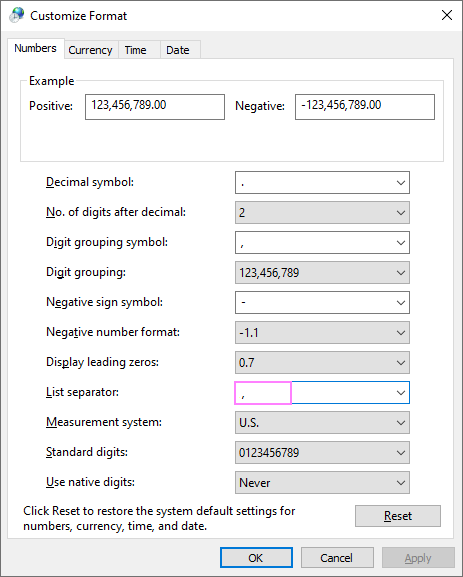
How To Change Excel CSV Delimiter To Comma Or Semicolon

How To Properly Import CSV With Data Into Excel 2019 decimal Separator
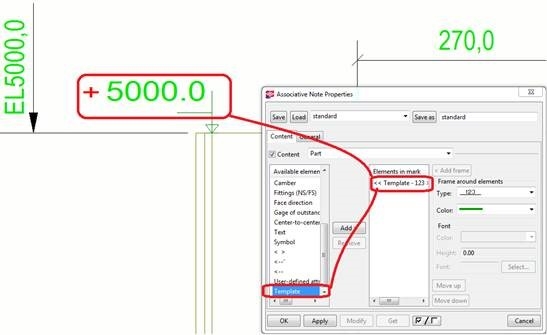
Need Different Decimal Separator For Dimension Elevation Tekla User

Web Aug 22 2017 nbsp 0183 32 I have several csv files that I want to import to Excel 365 but with the new Data gt From text CSV import wizard the decimal separator is discarded during the import process My csv files contain strings of data like this No 0 00001 0 00002 0 00003 0 00004 0 00005 0 00006 0 00007 0 00008
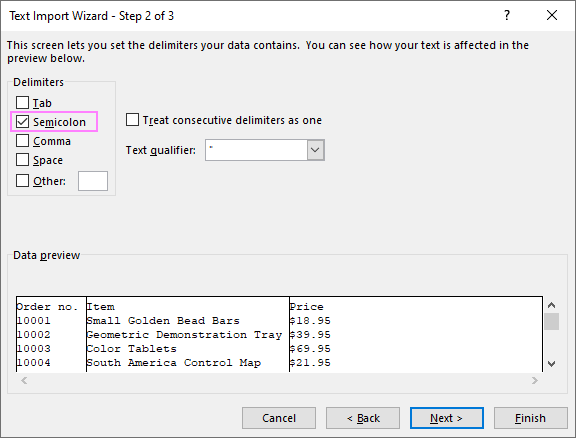
Web Dec 6 2017 nbsp 0183 32 I m trying to import a csv file The problem is that numbers are written with comma decimal separator but my PC is working with dots as decimal separator In the previous Excel versions there was the possibility to convert them during the import wizard
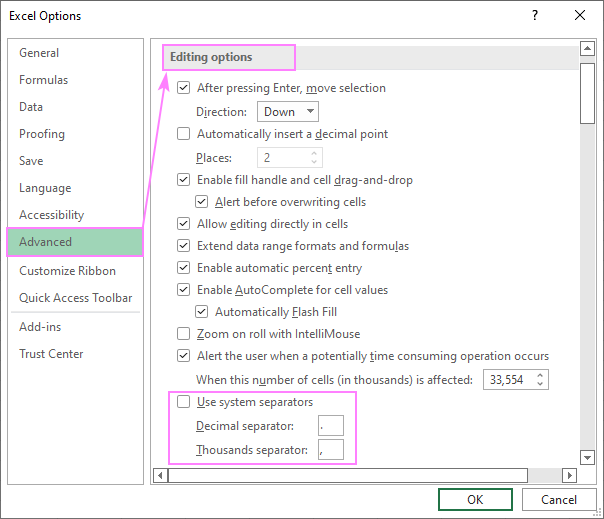
Web Mar 9 2023 nbsp 0183 32 Change default CSV separator globally On Windows go to Control Panel gt Region settings For this just type Region in the Windows search box and then click Region settings In the Region panel under Related settings click Additional date time and regional settings Under Region click Change

Web If you want to use a semi colon as the default list separator when you Save As csv but need to limit the change to Excel consider changing the default decimal separator to a comma this forces Excel to use a semi colon for the list separator

Web 1 Answer Sorted by 3 On the Data Ribbon under Get External Data the From Text will import text from csv and let you choose the delimiter Once set as a datasource if you get a new version of the text file you can overwrite the old one refresh the data source and it s updated Share Improve this answer Follow answered Feb 3 2012 at 19 14 Jesse
Web Microsoft Excel will open csv files but depending on the system s regional settings it may expect a semicolon as a separator instead of a comma since in some languages the comma is used as the decimal separator from Wikipedia Web Jul 11 2019 nbsp 0183 32 Excel for MacOS drops decimal separators when importing csv file Ask Question Asked 4 years 1 month ago Modified 4 years 1 month ago Viewed 166 times 0 I regularly work with csv files that use semicolons as the separator when I import these into Excel the decimal points are lost
Web Oct 28 2014 nbsp 0183 32 I found the problem My decimal symbol in the Regional settings was also a comma European so even when my List separator was a comma the CSV was saved with semicolons Now I changed my decimal symbol to a point and now the CSV file is created correctly with commas as separators