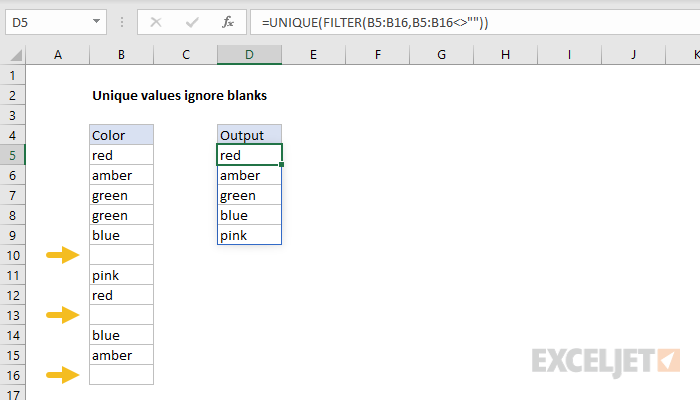
Excel Get All Unique Values From A Column Formula How To Find Unique Values Excel Riset How To Get Unique Distinct Values From A Column In Excel Sebastian Expert Why Is This Formula Not Converting To A Column Formula Smartsheet Unique Values With Criteria Excel Formula Exceljet Unique Values Ignore Blanks Excel Formula Exceljet Web To extract a list of distinct values from a set of data i e values that appear just once you can use the UNIQUE function In the example shown the formula in D5 is UNIQUE B5 B16 FALSE TRUE which outputs the 2 distinct values in
Web To return unique values from in the range A1 A10 you can use a formula like this UNIQUE A1 A10 By column By default UNIQUE will extract unique values in rows UNIQUE 1 1 2 2 3 returns 1 2 3 UNIQUE will not handle the same values organized in columns UNIQUE 1 1 2 2 3 returns 1 1 2 2 3 Web For me the most simple way to sort is to use quot Filter quot option First step is to find the duplicate values with Conditional Formatting gt Highlight Cells Rules gt Duplicate Values Then click the arrow on the Column you have the duplicates in this case quot Platforms quot gt Filter by Color Cells color or font color Share
Unique Values Ignore Blanks Excel Formula Exceljet Get All Unique Values In A JavaScript Array remove Duplicates Solved Duplicate Column To Generate Unique IDs VBA Excel How To Extract Only Unique Values From A Column In Excel Printable Column Formula To Return 1st 2nd 3rd Etc Instance Of A Column Entry How To Extract Only Unique Values From A Column In Excel Printable Find Unique Values In Two Columns In Excel Free Excel Tutorial How To Dynamically Extract A List Of Unique Values From A Column Range How To Extract Only Unique Values From A Column In Excel Printable
Excel Get All Unique Values From A Column Formula
 Excel Get All Unique Values From A Column Formula
https://www.exceldemy.com/wp-content/uploads/2017/03/Duplicate-Data-Excel-5-768x741.png
Web To extract unique values from more than one range at the same time you can use the UNIQUE function with the VSTACK function In the example shown the formula in cell H5 is UNIQUE VSTACK range1 range2 range3 Where range1 C5 C16 range2 D5 D15 and range3 F5 F13 are named ranges Generic formula
Pre-crafted templates offer a time-saving option for producing a diverse variety of files and files. These pre-designed formats and layouts can be utilized for various personal and expert jobs, consisting of resumes, invites, flyers, newsletters, reports, discussions, and more, simplifying the material production process.
Excel Get All Unique Values From A Column Formula

Get An Array Of Unique Values From A List Excel Tips MrExcel Publishing
Get All Unique Values In A JavaScript Array remove Duplicates

Solved Duplicate Column To Generate Unique IDs VBA Excel

How To Extract Only Unique Values From A Column In Excel Printable

How To Extract Only Unique Values From A Column In Excel Printable
Find Unique Values In Two Columns In Excel Free Excel Tutorial

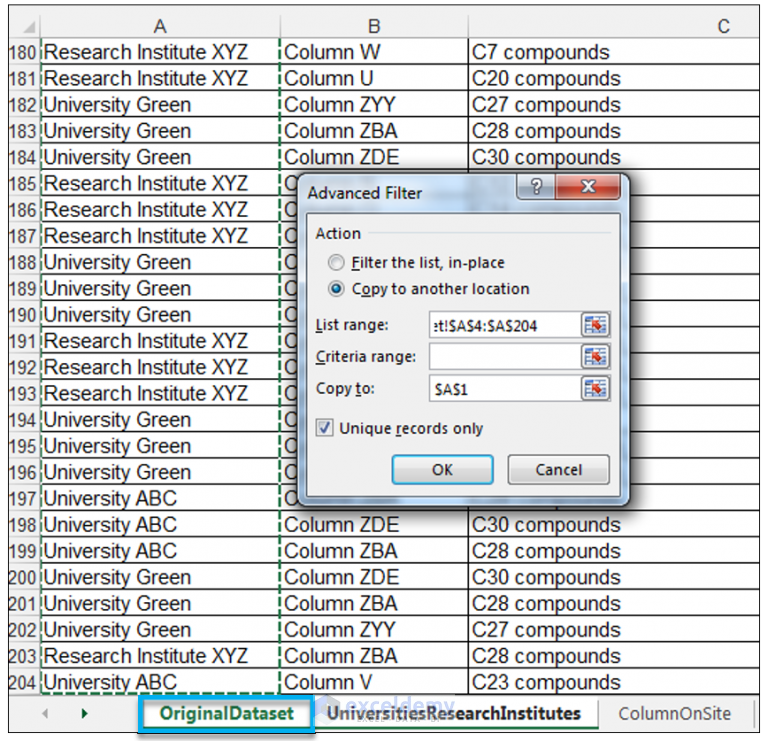
Web Using the Excel Remove Duplicates Tool to Get Unique Values from a Column Excel has an in built tool to instantly remove all the duplicate values and give you only the unique ones This is the simplest quickest and so far the most commonly used method to get unique values from a column

Web To extract only unique values from a list or column you can use an array formula based on INDEX MATCH and COUNTIF In the example shown the formula in D5 copied down is INDEX list MATCH 0 COUNTIF D 4 D4 list 0 where quot list quot is the

Web Apr 12 2023 nbsp 0183 32 The UNIQUE function in Excel returns a list of unique values from a range or array It works with any data type text numbers dates times etc The function is categorized under Dynamic Arrays functions The result is a dynamic array that automatically spills into the neighboring cells vertically or horizontally
Web Dec 20 2023 nbsp 0183 32 The Excel UNIQUE function returns a list of unique values in a range or a list It s a very easygoing function that you can use to extract both unique and unique distinct values It also helps to compare columns to columns or rows to rows Note The UNIQUE function is available in Excel 365 and 2021
Web Mar 21 2023 nbsp 0183 32 To extract a list of unique values in Excel use one of the following formulas Array unique values formula completed by pressing Ctrl Shift Enter IFERROR INDEX A 2 A 10 MATCH 0 COUNTIF B 1 B1 A 2 A 10 COUNTIF A 2 A 10 A 2 A 10 lt gt 1 0 quot quot Regular unique values formula
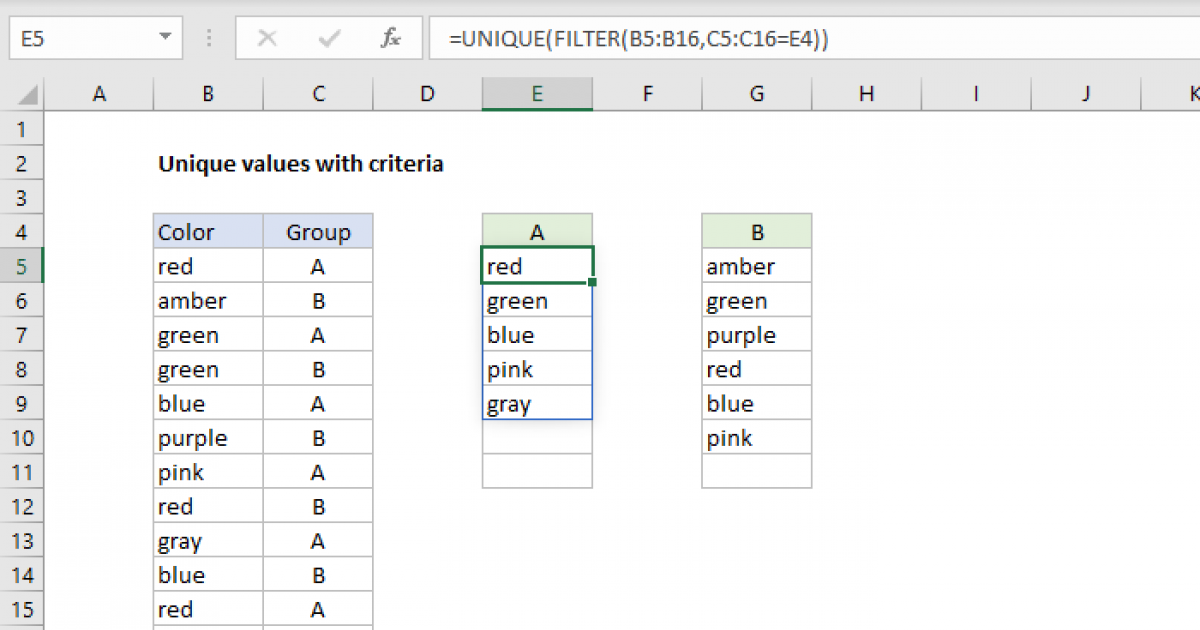
Web Mar 21 2023 nbsp 0183 32 Find unique distinct rows in Excel In a similar manner you can find unique rows in your Excel table based on values in 2 or more columns In this case you need to use the COUNTIFS function instead of COUNTIF to evaluate the values in several columns up to 127 range criteria pairs can be evaluated in a single formula For Web To extract a list of unique values from a set of data while applying one or more logical criteria you can use the UNIQUE function together with the FILTER function In the example shown the formula in D5 is UNIQUE FILTER B5 B16 C5 C16 E4 which returns the 5 unique values in group A as seen in E5 E9
Web Aug 22 2017 nbsp 0183 32 We can use an array formula to extract a list of unique values from a column The example below uses INDEX MATCH and COUNTIF to generate the list It s then wrapped in the IFERROR function so that when the end of the list is reached the formula simply returns a blank instead of an error