Excel Function To Extract Text From A Cell How To Extract Number Only From Text String In Excel How To Extract Numbers From A Cell In Excel Excel Tutorials Excel Extract How To Extract Text From A Cell In Google Sheets And Excel Docs Tutorial Extract Text After A Character In Excel 6 Ways ExcelDemy Discover Easy Excel Formulas To Extract Text From Cells Swiftly Web Jun 8 2022 nbsp 0183 32 LEFT B2 FIND quot quot B2 1 Your selected cell will display the result of the function which is the full text before your specified character in your cell You re all set Extract the String to the Right of Your Text To get all the text that s to the right of the specified character in your cell use Excel s RIGHT LEN and FIND functions
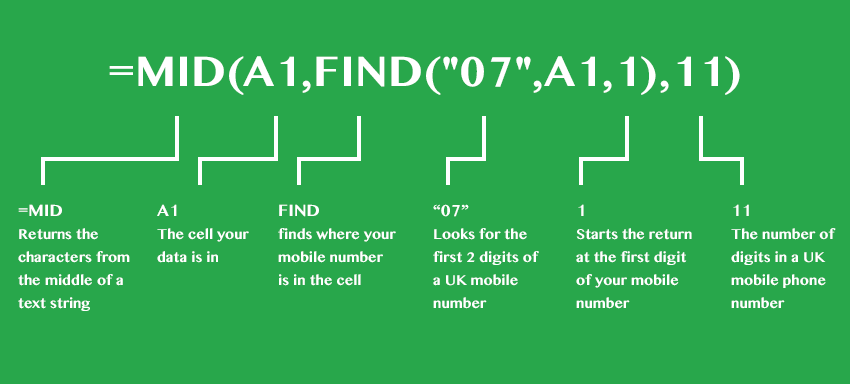
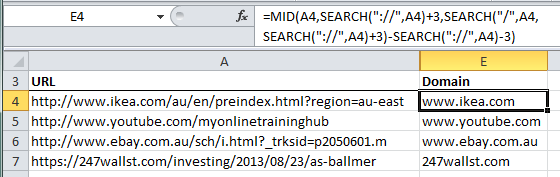
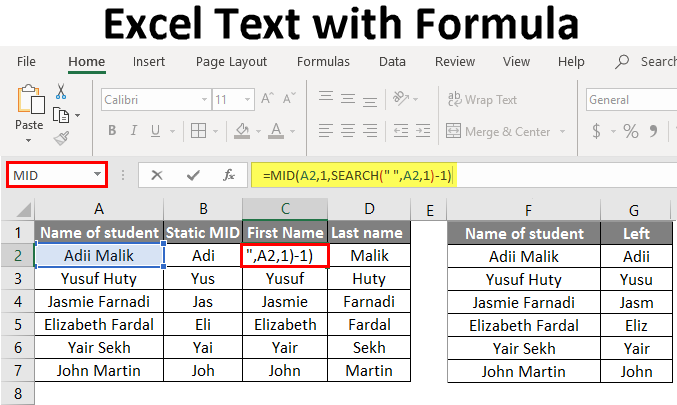
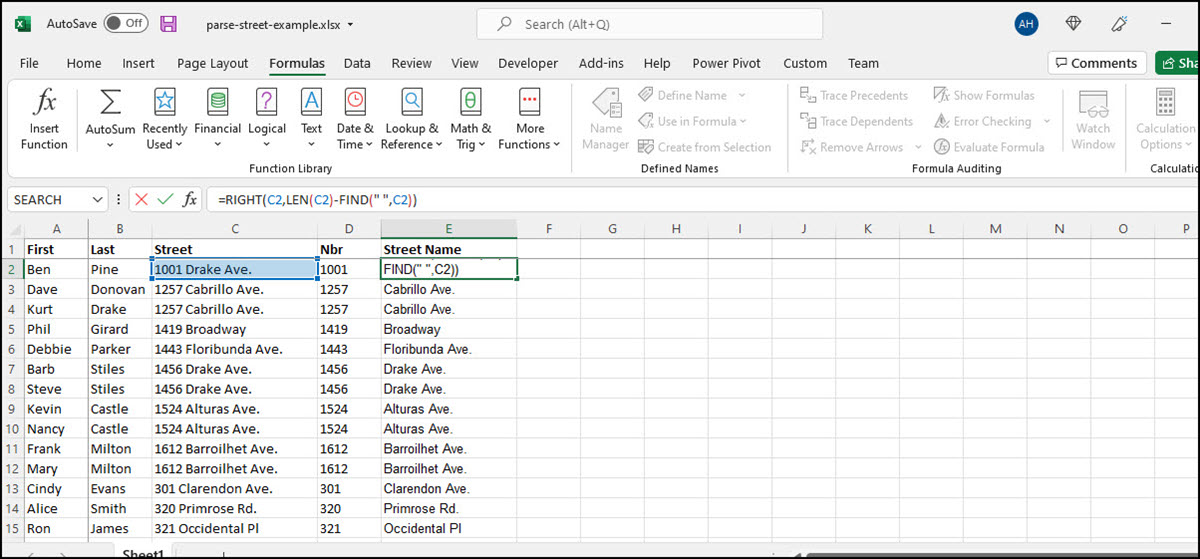
Web May 20 2023 nbsp 0183 32 The MID function is another Excel function that allows you to extract text from a string by specifying the starting character and the number of characters to extract The syntax for the MID function is MID text start num num chars Where text The cell we want to extract a portion of the text Web Jun 24 2023 nbsp 0183 32 How to Extract Street Numbers Using LEFT Function Import your data into Microsoft Excel or use the sample spreadsheet in the Resource section In cell D1 type Nbr In cell E1 type Street Name In cell D2 type the following formula LEFT C2 FIND quot quot C2 1 Press Enter The value 1001 should show in D2
Discover Easy Excel Formulas To Extract Text From Cells Swiftly Excel Function To Remove All Text Or All Numbers From A Cell Mobile Legends Excel Extract Text From Middle Of String From Right Texte Pr f r View How To Use Formula Text In Excel Image Formulas Mr Excel Excelisfun Trick 140 Extract Text From Cell Flash Fill Formula Or VBA YouTube Mastering TEXT Excel Formula Unlock Your Excel Potential Printable List Of Excel Shortcuts Solarseek s Blog How To Extract Text Before Or After A Specific Character In A String In Excel Office 365 YouTube How To Insert Space Between Number And Text In Cells In Excel Riset
Excel Function To Extract Text From A Cell
 Excel Function To Extract Text From A Cell
https://www.extendoffice.com/images/stories/doc-excel/extract-number-only/doc-extract-numbers-only-2.png
Web Nov 7 2023 nbsp 0183 32 MID Gets characters from the middle of the source string LEN Returns the number of characters in the source string FIND Returns the position of a specific character within the source
Templates are pre-designed documents or files that can be utilized for different functions. They can conserve effort and time by offering a ready-made format and design for developing different type of content. Templates can be utilized for personal or professional tasks, such as resumes, invites, leaflets, newsletters, reports, presentations, and more.
Excel Function To Extract Text From A Cell
How To Extract A Mobile Number From A Cell Containing Text In Excel Text Marketer
Excel Function To Remove All Text Or All Numbers From A Cell Mobile Legends
Excel Extract Text From Middle Of String From Right Texte Pr f r
View How To Use Formula Text In Excel Image Formulas
Mastering TEXT Excel Formula Unlock Your Excel Potential

Printable List Of Excel Shortcuts Solarseek s Blog
Web Sep 19 2022 nbsp 0183 32 Microsoft Excel offers a set of functions for working with text When you want to extract part of a text string or split a string into rows or columns there are three particular functions that get the job done With TEXTBEFORE and TEXTAFTER you can pull out text before or after a certain word or character

Web Sep 13 2023 nbsp 0183 32 Microsoft Excel provides three different functions to extract text of a specified length from a cell Depending on where you want to start extraction use one of these formulas LEFT function to extract a substring from the left RIGHT function to extract text from the right

Web In this example the first name is at the beginning of the string and the suffix is at the end so you can use formulas similar to Example 2 Use the LEFT function to extract the first name the MID function to extract the last name and the RIGHT function to extract the suffix Copy the cells in the table and paste into an Excel worksheet at

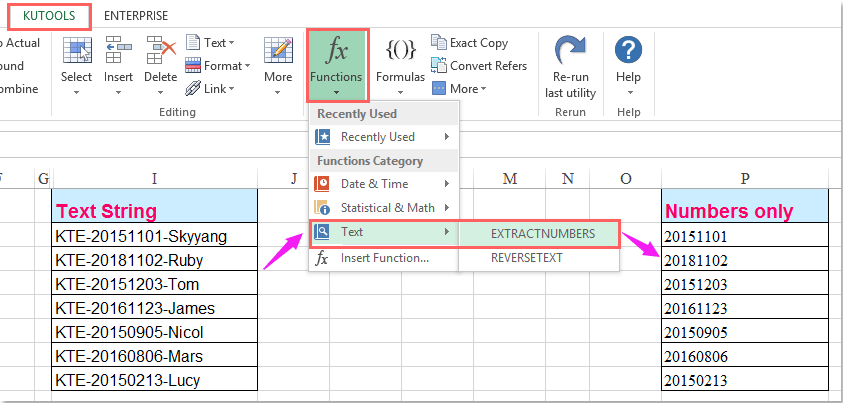
Web 1 Select the cells that you want to extract substrings from click Kutools gt Text gt Extract Text 2 In the popping Extract Text dialog under the Extract by location tab the first three options support you to extract substring from left mid or right The first N character extract substring from left For instance extract first 2
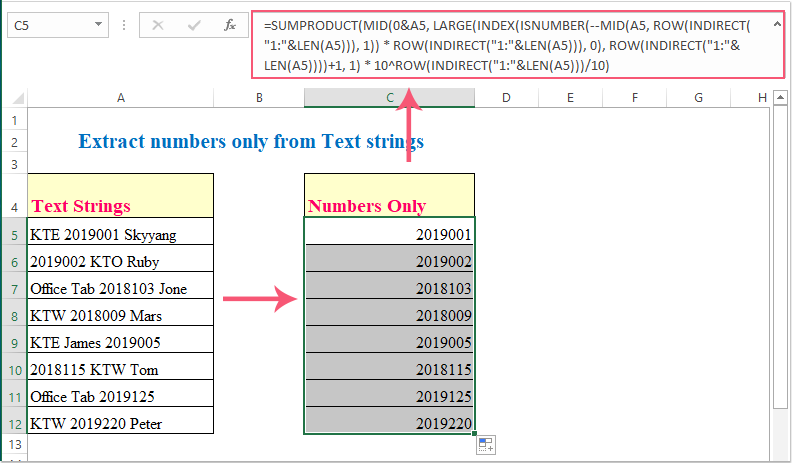
Web Report a problem with this page To separate text and numbers you can use a formula based on the FIND function the MIN function and the LEN function with the LEFT or RIGHT function depending on whether you want to extract the text or the number In the example shown the formula in C5 is MIN FIND 0 1 2 3 4 5 6 7 8 9 B5 amp quot 0123456789
Web Excel has a range of text functions that would make it really easy to extract a substring from the original text in Excel Here are the Excel Text functions that we will use in this tutorial RIGHT function Extracts the specified numbers of Web Feb 8 2023 nbsp 0183 32 You can extract text from the left side of a cell in Excel by using the LEFT Function Simply supply the text and enter the number of characters to return However this will only extract a fixed number of characters You can see above some cook temperatures are correct extracted ex 300 but some are not ex 95F
Web The MID function has the following syntax MID text start num num chars The MID function is similar to the LEFT function except you can specify which point in the text string from which to start extracting text Example of the MID function in action In the previous example you might enter this formula MID A5 7 3