Excel Formula Tab Name Into Cell How To Make Sheet Tab Name Equal To Cell Value In Excel SocialWeBrowsing Microsoft Excel Formulas Tab Riset MS Excel Formulas Tab In Hindi Microsoft Excel Formulas In Hindi Hindi Bros Advanced Excel Tutorial Pdf With Examples Import Tab Delimited Text File Into Excel 2019 YouTube Web Apr 14 2016 nbsp 0183 32 This starts addressing cell A1 on the sheets whose name is in A1 and will change one column when dragged across and one row for every row dragged down EDIT In B1 put INDIRECT MID FORMULATEXT A1 2 FIND quot quot FORMULATEXT A1 1 amp quot C5 quot This will find the Sheet name from the formula in A1
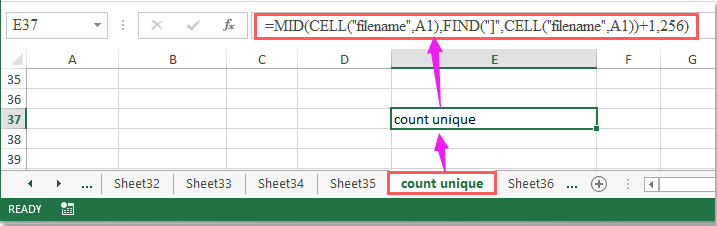
Web Sep 19 2013 nbsp 0183 32 The formula provided by Shane will give the Sheet Tab name in a cell You have to paste this formula in any cell of a sheet and you will get the sheet name But I believe your requirement is just reverse You want that Tab name should change based on a value in a cell Web Select a blank cell copy and paste the formula MID CELL quot filename quot A1 FIND quot quot CELL quot filename quot A1 1 255 into the Formula Bar and the press the Enter key See screenshot See screenshot Now the sheet tab name is referenced in the cell
Import Tab Delimited Text File Into Excel 2019 YouTube Excel Formula Tab Name Into Cell V rias Estruturas Excel Formula Tab Name Into Cell V rias Estruturas Excel Formula Tab Name List V rias Estruturas Formula Tab In Excel In Hindi MS Excel Formula Tab Function Library Use In Excel MS How To Set Cell Value Equal To Tab Name In Excel Excel Formula Worksheet Name In Cell How To Match The Cell Value With Sheet Tab Name Or Vice Versa In Excel Excel Formula Tab Function Library With Examples By Learning Center In Urdu hinid YouTube
Excel Formula Tab Name Into Cell
 Excel Formula Tab Name Into Cell
https://www.extendoffice.com/images/stories/doc-excel/doc-tab-name-equal-to-cell-value/doc-make-sheet-tab-equal-to-cell-value-6.png
Web By finding the sheet name using an Excel formula it ensures that if the sheet name is changed the formula returns the new sheet tab name This tutorial covers two Excel formula examples Firstly using the CELL MID and FIND functions
Pre-crafted templates use a time-saving solution for creating a diverse series of documents and files. These pre-designed formats and layouts can be made use of for different individual and expert tasks, including resumes, invites, leaflets, newsletters, reports, presentations, and more, improving the content development process.
Excel Formula Tab Name Into Cell

Excel Formula Tab Name Indirect V rias Estruturas
Excel Formula Tab Name Into Cell V rias Estruturas

Excel Formula Tab Name Into Cell V rias Estruturas

Excel Formula Tab Name List V rias Estruturas
How To Set Cell Value Equal To Tab Name In Excel
Excel Formula Worksheet Name In Cell
Web Feb 6 2021 nbsp 0183 32 Method 1 Insert the sheet name using built in Excel functions The easiest way is to copy the following function and paste it into your Excel cell RIGHT CELL quot filename quot A1 LEN CELL quot filename quot A1 SEARCH quot quot CELL quot filename quot A1 This formula obtains the filename

Web To get the name of the current worksheet i e current tab you can use a formula based on the CELL function together with the TEXTAFTER function In the example shown the formula in E5 is TEXTAFTER CELL quot filename quot A1 quot quot The result is quot September quot the name of the current worksheet in the workbook shown
Web Sep 11 2023 nbsp 0183 32 You can use the following formula in Excel to reference the current tab name i e sheet name in a formula TEXTAFTER CELL quot filename quot quot quot This formula will return the current tab name For example it may return Sheet1 The following example shows how to use this formula in practice

Web Dec 1 2020 nbsp 0183 32 Here is an easy way to insert the current worksheet s name into a cell Insert the following formula into any cell and press enter MID CELL filename A1 FIND CELL filename A1 1 255 In the below we have called the worksheet Sales Data The formula above is in cell A1

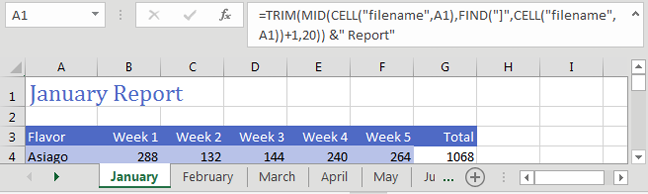
Web The formula returns the name of the worksheet in cell G1 Explanation of the formula MID CELL filename A1 FIND CELL filename A1 1 31 CELL filename A1 The first CELL function s info type argument is set to filename and reference argument to cell A1 to return the full path to the active worksheet as
Web Jun 10 2020 nbsp 0183 32 Using a TAB s name as an argument in an Excel Formula In this example I want the formulas on columns B and C to pick up the tab name from column A So for the next item down I want to calculate the same simple average and max formulas in the same position but in tab 378142 Any ideas Thanks This thread is locked Web 1 Select a blank cell to locate the sheet tab name enter the below formula into it and then press the Enter key MID CELL quot filename quot FIND quot quot CELL quot filename quot 1 255 Then you can see the sheet tab name is referenced into the blank cell Easily insert tab name in a specific cell header or footer in worksheet
Web SUMIF REFERENCE TO CELL CONTAINING TAB NAME B B B3 REFERENCE G G excel Share Follow asked Feb 21 2018 at 19 55 Tony White 197 5 18 Add a comment 2 Answers Sorted by 4 By using INDIRECT you can create a sheet reference using a cell value Instead of your example in the picture SUMIF