Excel Find Cell Reference Containing Text Learn Advanced Excel Online March 2012 How To Find And Replace Cell Reference In Excel Formula If Cell Contains Text From List 2023 How To Find And Replace Cell Reference In Excel Formula Excel Find Cell Contents You can use the following formula to find specific text in a range in Excel and return the cell reference CELL address INDEX A2 A11 MATCH Warriors A2 A11 0 This particular formula will look for the text Warriors in the range A2 A11 and return the cell reference where this text is located
COLUMNS function Returns the number of columns in a reference DROP function Excludes a specified number of rows or columns from the start or end of an array EXPAND function Expands or pads an array to specified row and column dimensions FILTER function Filters a range of data based on criteria you define MATCH lookup value lookup array match type The MATCH function syntax has the following arguments lookup value Required The value that you want to match in lookup array For example when you look up someone s number in a telephone book you are using the person s name as the lookup value but the telephone number is the value you want
Excel Find Cell Contents Cell Referencing In Excel Conditional Formatting Excel 2016 Based On Cell Text Glasspassl Excel Find Cell Navigate To Column To The Left Get Last Non empty Value Of That Column Relative Cell Reference Excel Definition Quizlet Asrpostrades EXCEL Find Replace Cell Colors YouTube Find Text In Excel Cell Printable Templates Free Enter Formula Using Relative Cell Reference Excel 2016 Passltracker Excel Find Text Within Cell Lasopamadness
Excel Find Cell Reference Containing Text
 Excel Find Cell Reference Containing Text
https://3.bp.blogspot.com/-dVAGaQMWpx4/T3L8mx23dbI/AAAAAAAADYs/xH4dpiZJZMo/s1600/PIC3.png
Find cells that contain text Follow these steps to locate cells containing specific text Select the range of cells that you want to search To search the entire worksheet click any cell On the Home tab in the Editing group click Find Select and then click Find In the Find what box enter the text or numbers that you need to find
Templates are pre-designed documents or files that can be utilized for numerous functions. They can conserve time and effort by offering a ready-made format and layout for developing different kinds of content. Templates can be utilized for individual or professional jobs, such as resumes, invitations, leaflets, newsletters, reports, discussions, and more.
Excel Find Cell Reference Containing Text
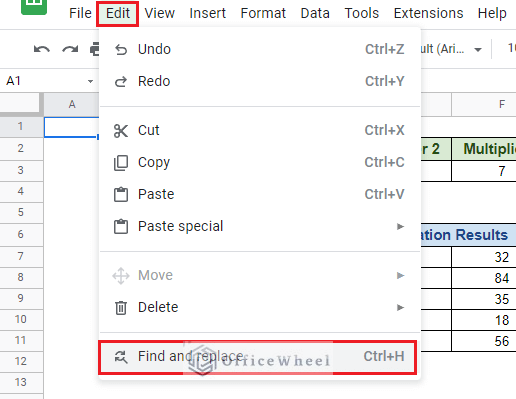
Find Cell Reference In Google Sheets 2 Ways OfficeWheel
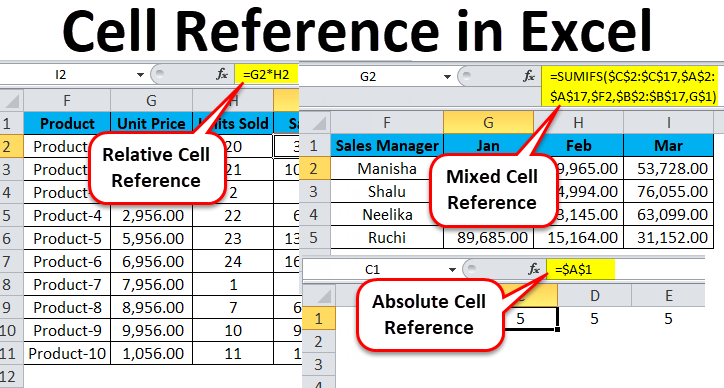
Cell Referencing In Excel
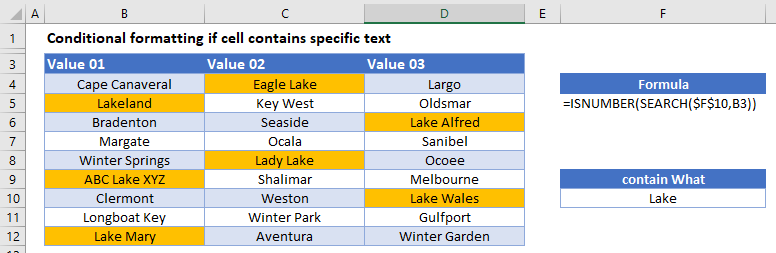
Conditional Formatting Excel 2016 Based On Cell Text Glasspassl

Excel Find Cell Navigate To Column To The Left Get Last Non empty Value Of That Column

EXCEL Find Replace Cell Colors YouTube

Find Text In Excel Cell Printable Templates Free
To check if a cell contains specific text i e a substring you can use the SEARCH function together with the ISNUMBER function In the example shown the formula in D5 is ISNUMBER SEARCH C5 B5 This formula returns TRUE if the substring is found and FALSE if not Note the SEARCH function is not case sensitive

The VLOOKUP and HLOOKUP functions together with INDEX and MATCH are some of the most useful functions in Excel Note The Lookup Wizard feature is no longer available in Excel Here s an example of how to use VLOOKUP VLOOKUP B2 C2 E7 3 TRUE In this example B2 is the first argument an element of data that the function needs to work
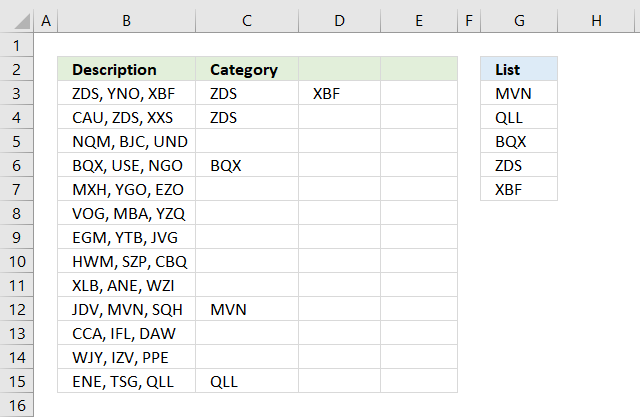
1 Answer Sorted by 3 Try this small macro Sub WhereIs Dim r As Range For Each r In ActiveSheet UsedRange If InStr 1 r Text hello 0 Then MsgBox r Address Exit Sub End If Next r End Sub EDIT 1 Here is the same approach in User Defined Function UDF format

In this example the goal is to test a value in a cell to see if it contains a specific substring Excel contains two functions designed to check the occurrence of one text string inside another the SEARCH function and the FIND function Both functions return the position of the substring if

I would like to search one column for a cell containing a given string Then if I find it I would like to use a value in the next door cell on the same row For example I could want to search Column A for any cell containing the word yellow If cell A17 contains the word yellow I want to output the contents of cell B17
The FIND function in Excel is used to return the position of a specific character or substring within a text string The syntax of the Excel Find function is as follows FIND find text within text start num The first 2 arguments are required the last one is optional Find text the character or substring you want to find The formula returns the reference given in a text So instead of directly linking to A1 you could say INDIRECT A1 In this article we are taking a look at how to use the INDIRECT formula and why it is very useful But there are also disadvantages
Summary To test for cells that contain specific text you can use a formula based on the IF function combined with the SEARCH and ISNUMBER functions In the example shown the formula in C5 is IF ISNUMBER SEARCH abc B5 B5 To test for if cell equals you can use a simpler formula