Excel Convert Matrix Table To List Convert Matrix Table To Simple List Table In Excel YouTube How To Convert PDF To An Excel File Quick And Easy How To Format Matrix Table In Power Bi Design Talk How To Convert Jpg To Excel With Able2extract Professional Riset Solved Convert Matrix Table To Clustered Column Chart Microsoft Web Dec 12 2013 nbsp 0183 32 Add a column label to your data source and turn it into an Excel Table via Insert gt Table or Ctrl T Select any cell in the table and on the Power Query ribbon click quot From Table quot This will open the table in the Power Query Editor window Click the column header of the first column to select it
Web Dec 28 2022 nbsp 0183 32 Essentially convert the table into a records structure in memory without having an intermediary matrix in the worksheet as follows transformation examples for G2 G3 and E7 List lt Record gt vals 36 22 48 1 69 31 48 2 169 99 40 6 Web Sep 19 2022 nbsp 0183 32 1 In the top menu select File Then click Options in the left pane 2 In the left pane select Customize Ribbon on the right panel under Choose commands from select Commands Not in the Ribbon and find PivotTable and PivotChart Wizard in the list below 3 Expand the Data category and click New Group
Solved Convert Matrix Table To Clustered Column Chart Microsoft Solved Convert Excel Matrix Table To Flattened Table Microsoft Convert Tabular Data From PDF To Sheets And Excel Screenshots Sap Sod Matrix Template Excel Kayra Excel Pdf Spreadsheet Converter Sapjeregister How To Convert A Table In Excel To A Graph Printable Templates Solved Convert Matrix Table To Clustered Column Chart Microsoft How To Convert Excel To PDF with Pictures WikiHow How To Convert An Excel File Into PDF YouTube
Excel Convert Matrix Table To List
 Excel Convert Matrix Table To List
https://i.ytimg.com/vi/7fV9F1T88_s/maxresdefault.jpg
Web 00 00 Convert an occupancy matrix year and month into a list00 10 Load the matrix into Power Query00 15 Remove unnecessary columns00 30 Transpose or unpivo
Pre-crafted templates offer a time-saving service for developing a diverse range of files and files. These pre-designed formats and designs can be utilized for various personal and expert jobs, including resumes, invitations, flyers, newsletters, reports, discussions, and more, streamlining the content creation procedure.
Excel Convert Matrix Table To List

How To Convert Table To List In Excel 3 Quick Ways ExcelDemy

Solved Convert Excel Matrix Table To Flattened Table Microsoft
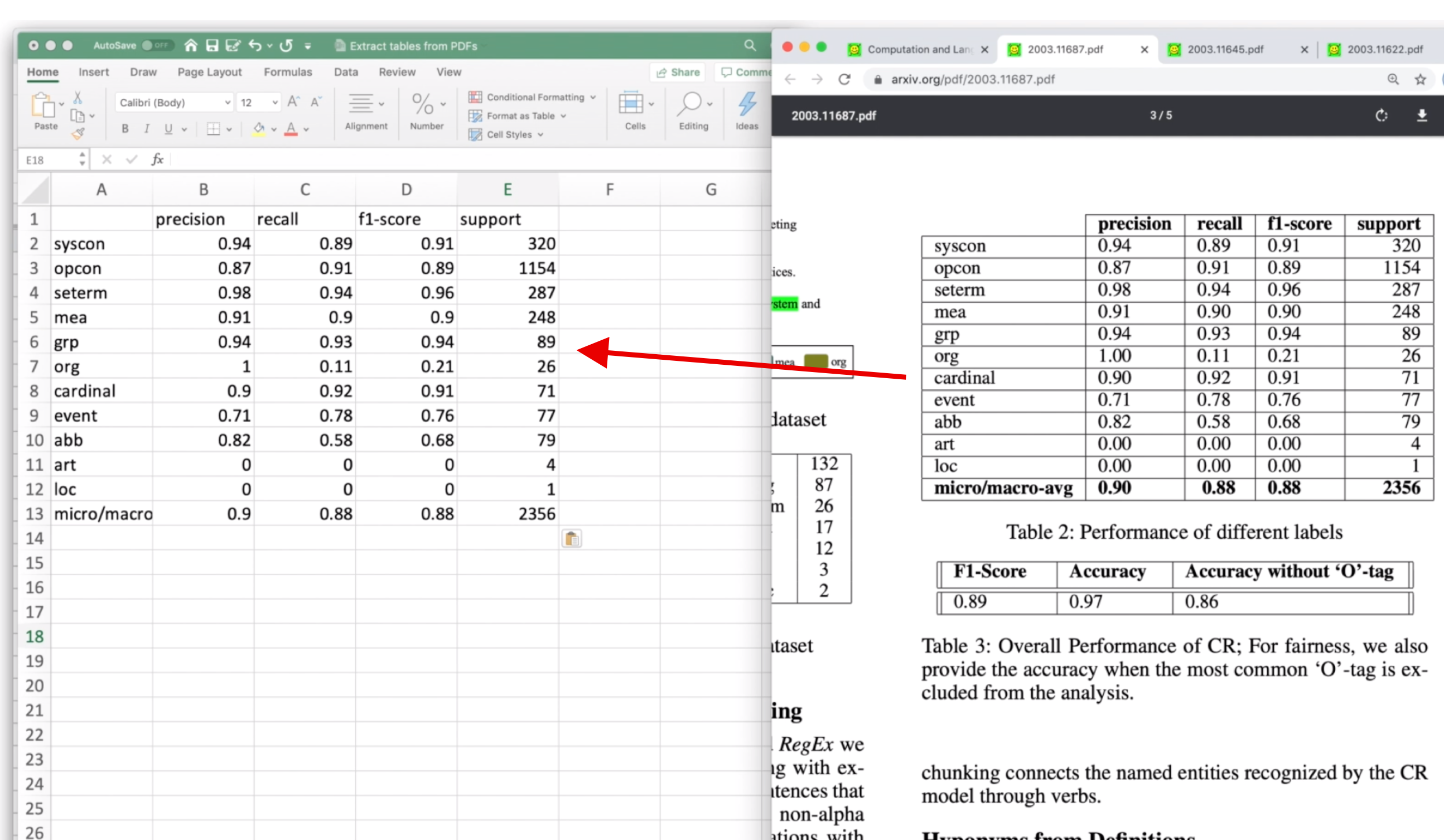
Convert Tabular Data From PDF To Sheets And Excel Screenshots

Sap Sod Matrix Template Excel Kayra Excel
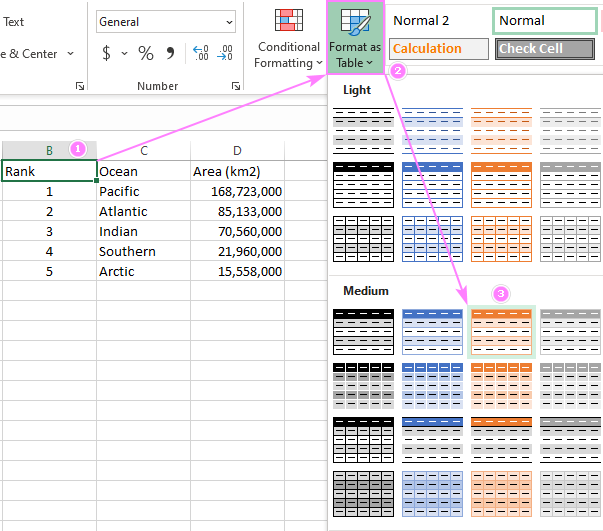
How To Convert A Table In Excel To A Graph Printable Templates

Solved Convert Matrix Table To Clustered Column Chart Microsoft

Web Convert matrix style table to list with Kutools for Excel Both of the above methods are somewhat troublesome here I will introduce you an easy way Kutools for Excel with its Transpose Table Dimensions feature you can quickly convert betwwen a matrix of cells and a list table
Web 1 Select the array table you want to convert to list and click Kutools gt Range gt Transpose Table Dimensions See screenshot 2 Then in the Transpose Table Dimensions dialog check Cross table to list option and then select the range that output the list table See screenshot 3 Click Ok now the array table has been converted to a list table

Web Jun 8 2023 nbsp 0183 32 You can use the TRANSPOSE function with the HSTACK function in Excel to quickly convert a table of data into a vertical list For example you can use the following formula to convert a table with three rows into a vertical list The following example shows how to use this formula in practice

Web Jun 21 2019 nbsp 0183 32 2 Answers Sorted by 3 Another approach is with Power Query In Excel 2010 if not already installed this is a free add in from Microsoft Once you ve done that select some cell in your original table select to get Data from Table Range When the UI opens select the ID column select Transform gt Unpivot gt Other columns Close amp Load

Web I have a matrix style table in excel where B1 Z1 are column headings and A2 A99 are row headings I would like to convert this table to a 3 column table column heading row heading cell value It does not matter in what order the new table is
Web Jun 12 2020 nbsp 0183 32 HOW TO CONVERT CROSSTAB MATRIX TABLE INTO TABULAR FLAT LIST DATA TABLE Find the Sample Data below let convert this data in Tabular Data List Table format STEP 1 You need to insert a row and concatenate values Find the below stepFind an article to use a different type of concatenating formula Web Use a Pivot Table Put From in the Row Lables To in the Column Labels and Total in the Values Depending on how you want to treat duplicate routes you might want to use Sum Average or Max on the Values aggregation
Web May 30 2018 2 Hi Ellasheba You could try A10 IF ROWS A 10 A10 gt COUNTIF B 2 F 7 quot X quot quot quot LOOKUP ROWS A 10 A10 1 COUNTIF OFFSET B 1 F 1 ROW A 2 A 7 ROW A 1 quot X quot A 2 A 7