Excel Conditional Data Validation List Excel Formula Data Validation With Conditional List Exceljet Conditional Formatting Excel 2016 Bonolpor Conditional Data Validation List Help Microsoft Community Hub List All Conditional Formatting Formulas In Excel TeachExcel Google Sheets How Do I Conduct Conditional Data Validation Multiple This is called a conditional or dependent drop down list in Excel Creating a Dependent Drop Down List in Excel Here are the steps to create a dependent drop down list in Excel Select the cell where you want the first main drop down list Go to Data Data Validation This will open the data validation dialog box
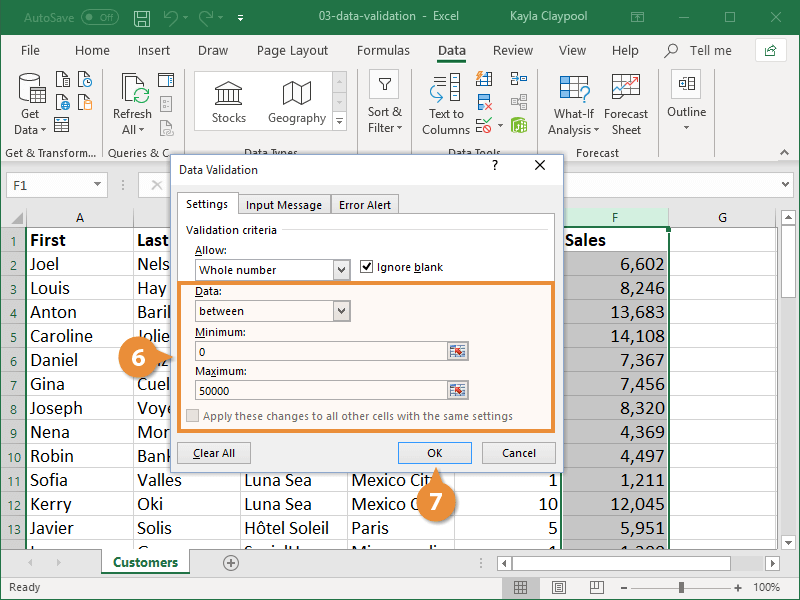
Download Excel data validation examples Data entry is quicker and more accurate when you restrict values in a cell to choices from a drop down list Start by making a list of valid entries on a sheet and sort or rearrange the entries so To create a drop down list start by going to the Data tab on the Ribbon and click the Data Validation button The Data Validation window will appear The keyboard shortcut to open the Data Validation window is Alt A V V You ll want to select List in the drop down menu under Allow
Google Sheets How Do I Conduct Conditional Data Validation Multiple How To Create A Conditional Data Validation List Using The Indirect Excel Conditional Data Validation Returning A List Of Entries Based Create A Data Validation List In Excel By Chris Menard Youtube Riset Data Validation Microsoft Excel 2003 TechSupp247 Excel Data Validation List Spreadsheets Riset Reference A Table In Excel Data Validation Elcho Table Excel Data Validation Conditional Formatting YouTube Solved Conditional Data Validation For MS Excel VBA Excel
Excel Conditional Data Validation List
 Excel Conditional Data Validation List
https://exceljet.net/sites/default/files/styles/original_with_watermark/public/images/formulas/inline/data validation with conditional lis default short list.png?itok=kVQSFGJW
The tutorial explains how to do Data Validation in Excel create a validation rule for numbers dates or text values make data validation lists copy data validation to other cells find invalid entries fix and remove data validation
Templates are pre-designed documents or files that can be used for numerous functions. They can save time and effort by supplying a ready-made format and layout for creating various type of material. Templates can be used for individual or professional projects, such as resumes, invitations, flyers, newsletters, reports, presentations, and more.
Excel Conditional Data Validation List
Conditional Data Validation List Help Microsoft Community Hub

How To Create A Conditional Data Validation List Using The Indirect

Excel Conditional Data Validation Returning A List Of Entries Based
Create A Data Validation List In Excel By Chris Menard Youtube Riset

Excel Data Validation List Spreadsheets Riset

Reference A Table In Excel Data Validation Elcho Table

Create Dependent Drop down Lists with Conditional Data Validation This post explores macro free methods for using Excel s data validation feature to create an in cell drop down that displays choices depending on the value selected in a

To make your primary drop down list configure an Excel Data Validation rule in this way Select a cell in which you want the dropdown to appear D3 in our case On the Data tab in the Data Tools group click Data Validation In the Data Validation dialog box do the following

Select Data Data Validation On the Settings tab under Allow select an option Whole Number to restrict the cell to accept only whole numbers Decimal to restrict the cell to accept only decimal numbers List to pick data from the drop down list Date to restrict the cell to accept only date

Create a data validation rule for the dependent dropdown list with a custom formula based on the INDIRECT function INDIRECT B5 In this formula INDIRECT simply evaluates values in column B as references which links them to the named ranges previously defined

Conditional data validation means restricting the choices in an Excel drop down list depending on the value in another cell or in another drop down for that matter Here we will find out how to create conditional Excel drop down using Data Validation
We can use Excel s data validation features to generate a conditional drop down list which allows us to select a data value from a specified list The Excel conditional drop down list is a handy feature for making data entry Method 1 Using OFFSET to create a dynamic drop down list Setup formula for the data validation Whenever a formula is to be used as a data validation criteria it is usually easier to first set the formula up on the spreadsheet then transfer it to the data validation window so that all the Excel helper tips show up as guides
The process to add a drop down list with color formatting is much the same in Google Sheets as it is in Excel In the Menu select Data Data validation Make sure the Cell range is where the drop down list should go and then select the Criteria range e g B3 B6 Tick Show dropdown list in cell if it not already ticked and then click Save