Esxi Show Running Vm Vmware On Mac Same Ip Deltapublic When I Power Off Esxi esxi Shows That The System Has Been Halted How To Enable VM Autostart On VMware ESXi 7 0 What Is The VMware ESXi Server And Its Role In The VMware Suite Esxi 4 Upgrade To Esxi 5 Using Update Manager Vrogue You can check which VMs are running on an ESXi server by using the esxcli command from the ESXi shell esxcli vm process list This will only show the running VMs You can get an overview of all registered VMs by using vim cmd vmsvc getallvm as I explained in an earlier post Running the command will output something like this for every VM running
An issue may occur when a task within vCenter Server times out And when attempting to run other tasks you see the error Another task is already in progress Purpose This article provides steps to collect information about tasks for ESXi ESX hosts Resolution The World ID of the Virtual Machine to kill This can be obtained from the vm process list command required help Show the help message vm process list List the virtual machines on this system This command currently will only list running VMs on the system help Show the help message
Esxi 4 Upgrade To Esxi 5 Using Update Manager Vrogue Customizing The ESXi DCUI To Show Number Of VMs ESXi Install 5 x 6 x VSAM Pro ESXi Shows Hosts With Connectivity Issues Performance Service Red But VM Skiskyting 2023 Slik Ser Du Skiskyting P TV Samt VM I Alpint Og VMware ESXi Installation And Setup VMware VSphere 6 7 67 IAG EN VMware ESXi 8 0c MacOS Unlocker OEM BIOS Sysin Moving VMs From ESX To Workstation SOSTechBlog Virtualguido VMware ESXi Locking And How To Kill A Frozen VM
Esxi Show Running Vm
 Esxi Show Running Vm
https://www.nakivo.com/blog/wp-content/uploads/2021/10/How-to-find-IP-address-of-virtual-machine-VMware.jpg
To get a list of all the tasks running on the ESXi host you can run the below command vim cmd vimsvc task list Further information on how to use the command can be found at here You may also use esxtop to see more details about all processess running in an ESX box along with CPU and memory usage and lot of other performance metrics
Templates are pre-designed documents or files that can be utilized for various functions. They can conserve time and effort by offering a ready-made format and design for creating various kinds of material. Templates can be used for individual or professional tasks, such as resumes, invites, leaflets, newsletters, reports, presentations, and more.
Esxi Show Running Vm

Instalando O VMware ESXi 7 0

Customizing The ESXi DCUI To Show Number Of VMs

ESXi Install 5 x 6 x VSAM Pro

ESXi Shows Hosts With Connectivity Issues Performance Service Red But
VMware ESXi Installation And Setup VMware VSphere 6 7 67 IAG EN

VMware ESXi 8 0c MacOS Unlocker OEM BIOS Sysin
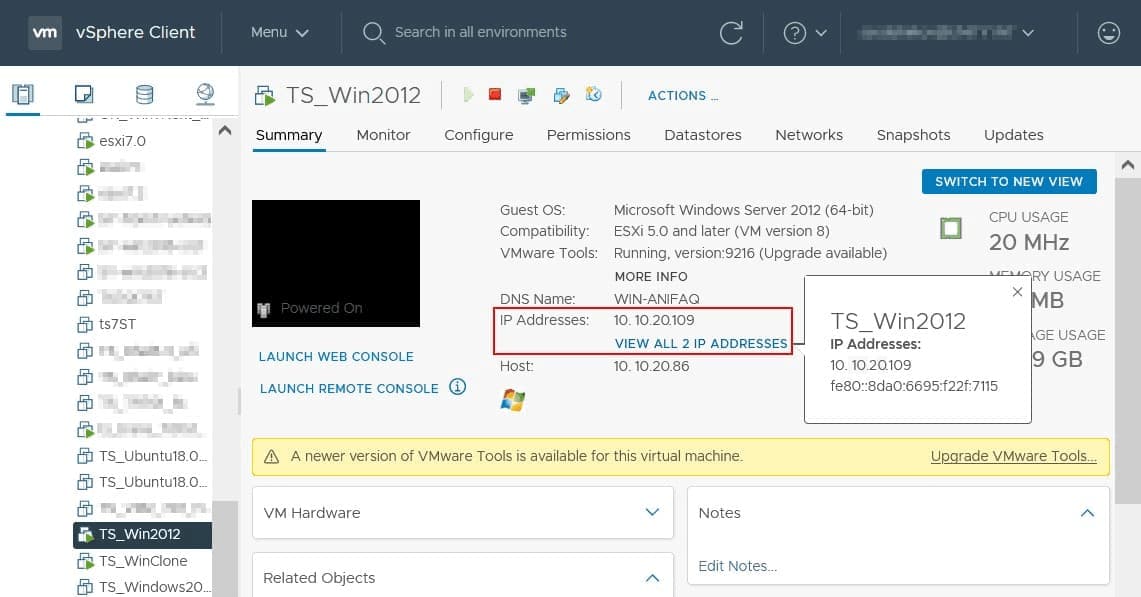
In VMware vSphere Client navigate to Hosts and Clusters and select your ESXi host then click Service Configure SSH Click Start to launch the SSH server once Tips On Windows you can use PuTTY as an SSH client for running ESXi shell commands remotely VMware list VMs command line

Run this command to verify the power state of the virtual machine In ESX vmware cmd cfg getstate Where cfg is the path to the configuration file as determined by the vmware cmd l command For more information on the vmware cmd command see the VMware Scripting API

DISCOVER SOLUTION How to Open the ESXi Shell Console By default ESXi shell is disabled for local and remote access This means that you cannot run ESXi shell commands until you enable ESXi shell or SSH access VMware imposes this restriction for security reasons Let s look at the three main methods for enabling the command line interface in ESXi

1 esxcli system version get Description Returns the ESXi build and version numbers 2 esxcli system hostname get Description Returns the hostname domain and FQDN for the host 3 esxcli system stats installtime get Description Returns the date and time of when ESXi was installed 4 esxcli system account list

Run the vm support x command to show which virtual machines are currently running on the ESX host Compare results from these commands to determine the ESX host on which the virtual machine is registered but not running
Syntax of the command is as follows esxcli vm cmd cmd options esxcli vm is the command which you can run directly into ESXi without any option But to get into deeper you will have to use the Namespaces with the command 1 Answer Sorted by 2 ESXCLI can be used for this example esxcli system process list Alternatively there s also this https kb vmware s article 1010993 Share Improve this answer Follow answered Jul 25 2019 at 17 40 Kyle Ruddy 1 931 1 7 5 Add a comment Your Answer
27 Can VMWare ESX or ESXi be installed and used inside a virtual machine It can be installed inside VMWare Workstation or Server but then it doesn t work the main symptoms are It runs REALLY slowly It lets you create VMs but when powering up them it gives an error stating You may not power on a virtual machine in a virtual machine