Error Bin Sh Pod Command Not Found How To Fix ip Command Not Found In Linux Programmer Hat Fix sshpass Command Not Found In Linux Programmer Hat Bourne Again Shell Vim Command Not Found Programmer Hat v2 bin sh Autoreconf Command Not Found Issue 3137 Facebook Do release upgrade Command Not Found Sh 1 command not found pod If I run pod install manually in the shell it works option 2 plink ssh v 192 168 101 129 l user1 pw pw1 pod install How can I run pod install remotely using the first option ssh plink Share Improve this question Follow asked Jul 9 2022 at 18 25 ChrisC 223 1 5 11 1
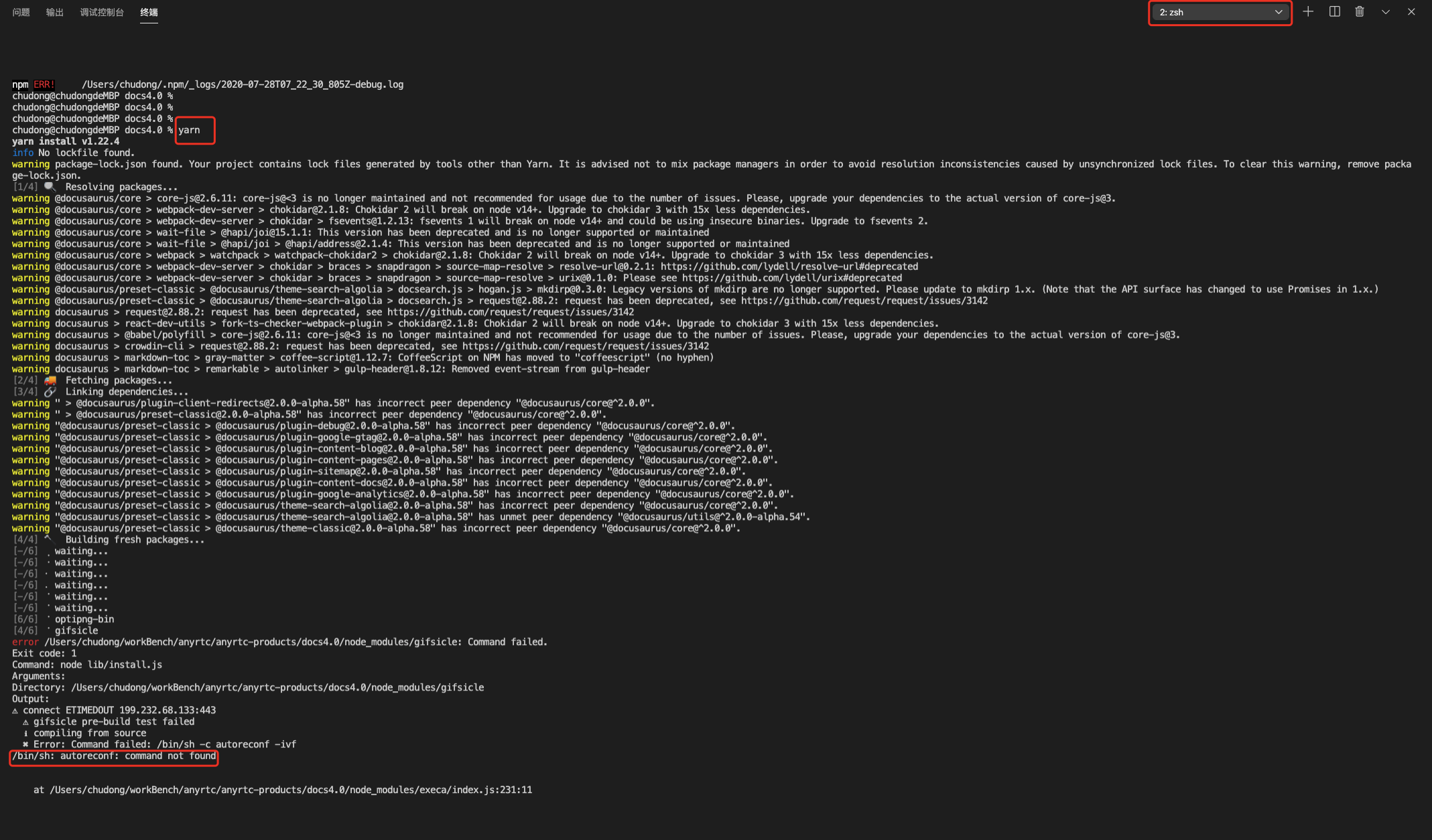
1 Answer Sorted by 1 When you run podman run mount type bind src path to input files dst HYDRA imageName You are replacing the contents of HYDRA with the contents of path to input files Anything else that was included in that directory in the image is no longer accessible When you re trying to run a command with or without sudo and get an error message that reads Command not found this means the script or file you re trying to execute doesn t exist in the location specified by your PATH variable What is this variable and how can you run commands that it can t find
Do release upgrade Command Not Found PM2 Failed Create Project AaPanel Hosting Control Panel One click Ngrok Command Not Found In Linux Programmer Hat pg ctl Command Not Found In Linux Programmer Hat Fix emacs Command Not Found In Linux Programmer Hat Do release upgrade Command Not Found bash Script sh bin sh M Bad Interpreter No Such File Or Directory Seqtk Command Not Found Issue 121 Lh3 seqtk GitHub Solved Bash Script Gives command Not Found Error On 9to5Answer
Error Bin Sh Pod Command Not Found
 Error Bin Sh Pod Command Not Found
https://www.programmerhat.com/wp-content/uploads/2023/01/ip-command-not-found-1080x675.png
Jump to solution Hi podman experts After a container is created using podman run d name container name I encountered a problem as described in the subject title p odman exec it container name bin bash shows bin bash not found Detailed message as the following
Pre-crafted templates use a time-saving option for producing a diverse variety of documents and files. These pre-designed formats and designs can be utilized for numerous personal and professional jobs, including resumes, invitations, flyers, newsletters, reports, discussions, and more, enhancing the content creation procedure.
Error Bin Sh Pod Command Not Found
Fixing protoc Command Not Found In Linux Programmer Hat
PM2 Failed Create Project AaPanel Hosting Control Panel One click
Ngrok Command Not Found In Linux Programmer Hat
pg ctl Command Not Found In Linux Programmer Hat

Do release upgrade Command Not Found

bash Script sh bin sh M Bad Interpreter No Such File Or Directory

Are you not on macOS If you are a react native developer and you are on iOS then pod is required to be in your PATH If you are not on macOS just developing on windows or linux perhaps then perhaps react native clean project shouldn t try it Contributor Author whck6 on Mar 27 2022

2 Answers Sorted by 3 You can use this manifest The command bin sh c says run a shell and execute the following instructions The args are then passed as commands to the shell Multiline args make it simple and easy to read Your pod will display its environment variables and also start the NGINX process without stopping

For a radical reset you could remove or less drastically move to a subdirectory all your shell startup files cd mkdir away mv profile bash away but then to take it from there you probably want to recreate them with useful settings you scavenge out of the files you moved away tripleee Dec 4 at 8 41
How can it be not available in the image then docker run dit name MY CONTAINER NAME v opt ros melodic MY IMAGE latest docker exec it MY CONTAINER NAME bin bash Fyi v opt ros melodic mounts the volume v else opt ros melodic would be empty
1 Answer Sorted by 0 I tried this and it s working for me 1 sudo mkdir p Home Software ruby 2 export GEM HOME HOME Software ruby 3 gem install cocoapods
Using the full command or any other parameters in my ssh command is not an option in my scenario My command is executed by a script I cannot touch and worked on every host yet except this one The host that s giving me the problem is a Synology NAS and the etc passwd setting for that myuser is Describe the problem error question Followed the documentation on Google Cloud n8n Docs I ve managed to deploy it into my GKE cluster but both the N8N pod and the Database pod are not working When checking the logs I get Error command bin sh not found My guess is that this is related to this args in the n8n deployment yaml file in the repo GitHub n8n io n8n kubernetes hosting spec
Of course we can use the chmod command to set executable permission chmod x filename chmod x path to filename sysadmin level permission needed for other users sudo chmod x path to file sh