Enhanced Vs Extended Message Trace A Man Looking Through A Magnifying Glass With The Text Performing An How To Use Message Trace In Office 365 Exchange Online Time Zone Exchange Message Trace Center About The Delivered How To Perform An Extended Message Trace In Office 365 The EXPTA blog Exchange Online Historical Message Trace Report O365info Extended message traces in the CSV format are particularly useful for diagnostic purposes To learn how to generate them in Microsoft 365 Office 365 follow the guidelines below Log in to the Exchange admin center
To begin we can find the message sent by the user by including their primary SMTP address in the Sender parameter Get MessageTrace SenderAddress Terry Hegarty office365itpros StartDate Get Date AddHours 1 EndDate Get Date Received Sender Address Recipient Address Subject Exchange Message Trace Extended and Enhanced Summary report result details If you ran a message trace where the time range was more than 10 days selected Enhanced Summary or Extended report details you can find below some of the available information in these reports and what they mean
Exchange Online Historical Message Trace Report O365info Making Good Nodes TraderTraxx For OEMs Equipment Media Kit How To Create An Extended Message Trace Report In Office 365 How To Create An Extended Message Trace Report In Office 365 Microsoft 365 Exchange Microsoft Learn How To Create An Extended Message Trace Report In Office 365 How To Track Email Messages With Message Trace In Exchange Online Data And Insights RV Trader Media Kit
Enhanced Vs Extended Message Trace
 Enhanced Vs Extended Message Trace
https://i.pinimg.com/736x/ce/15/e8/ce15e8812932c9b60ffcd42a0f83825e.jpg
Alternatively you can add the sender or recipient and select the message direction inbound outbound In Report type select Extended report For example Click Next In Report title enter the title for the report Then in the space provided enter the email address where the notification message is to be sent when the trace is complete
Templates are pre-designed files or files that can be utilized for various functions. They can save effort and time by supplying a ready-made format and design for developing various sort of content. Templates can be utilized for individual or professional tasks, such as resumes, invites, leaflets, newsletters, reports, presentations, and more.
Enhanced Vs Extended Message Trace
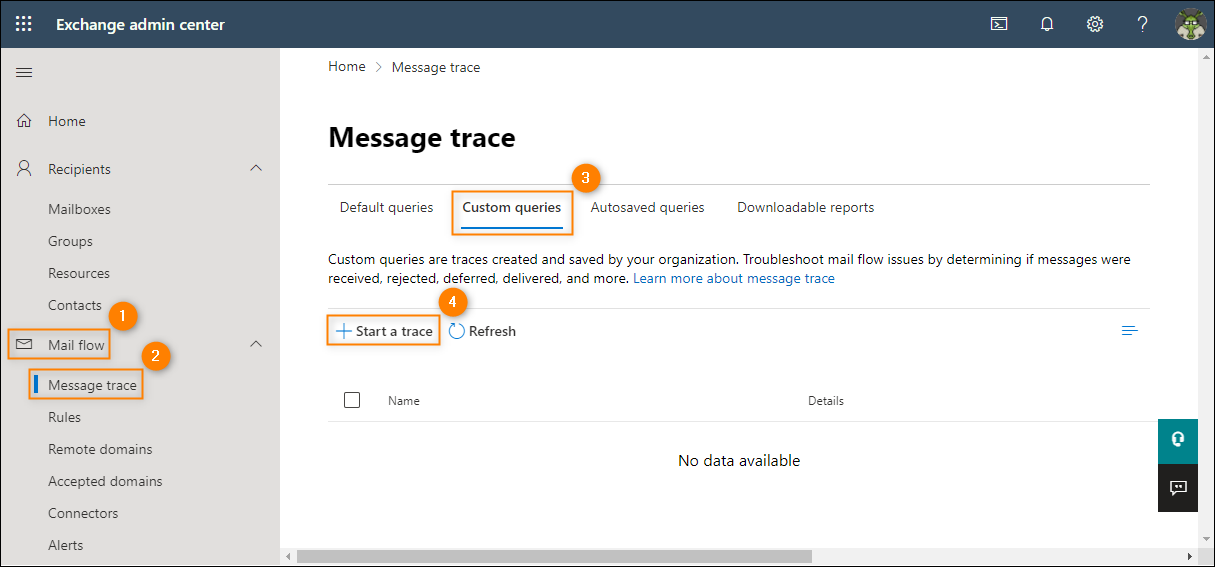
How To Create An Extended Message Trace Report In Office 365

Making Good Nodes

TraderTraxx For OEMs Equipment Media Kit
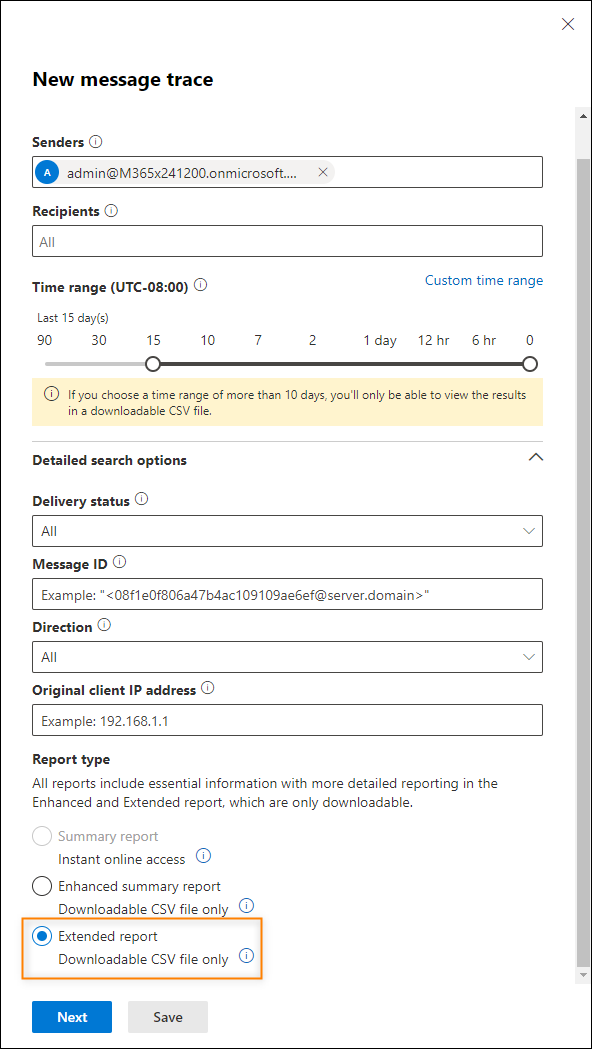
How To Create An Extended Message Trace Report In Office 365

Microsoft 365 Exchange Microsoft Learn
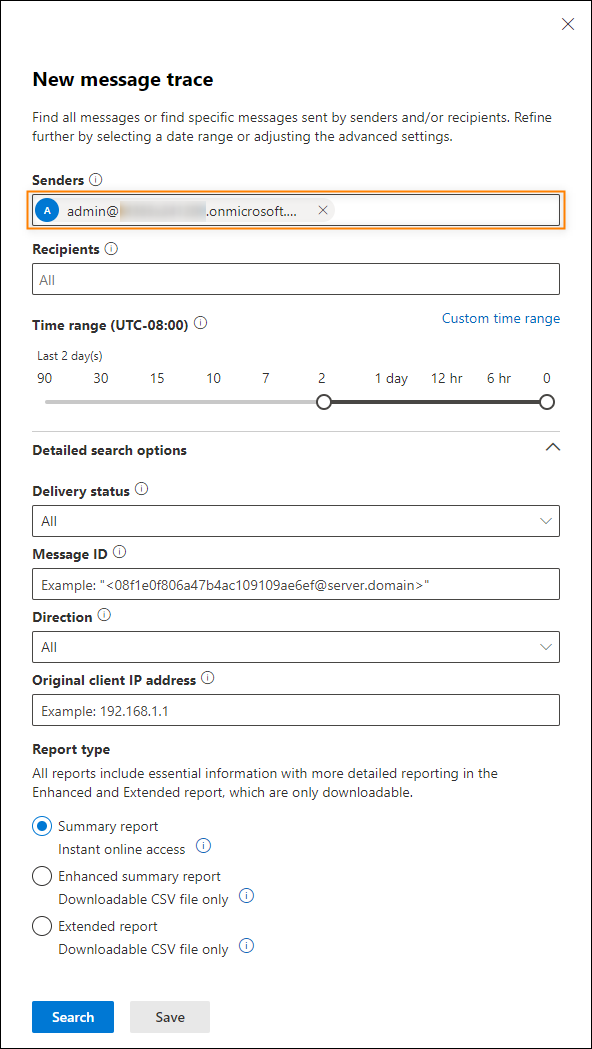
How To Create An Extended Message Trace Report In Office 365

What are the cmdlets to use You can use the following cmdlets in Exchange Online PowerShell or Exchange Online Protection PowerShell to run a message trace Get MessageTrace Trace messages that are less than 10 days old Get MessageTraceDetail View the message trace event details for a specific message
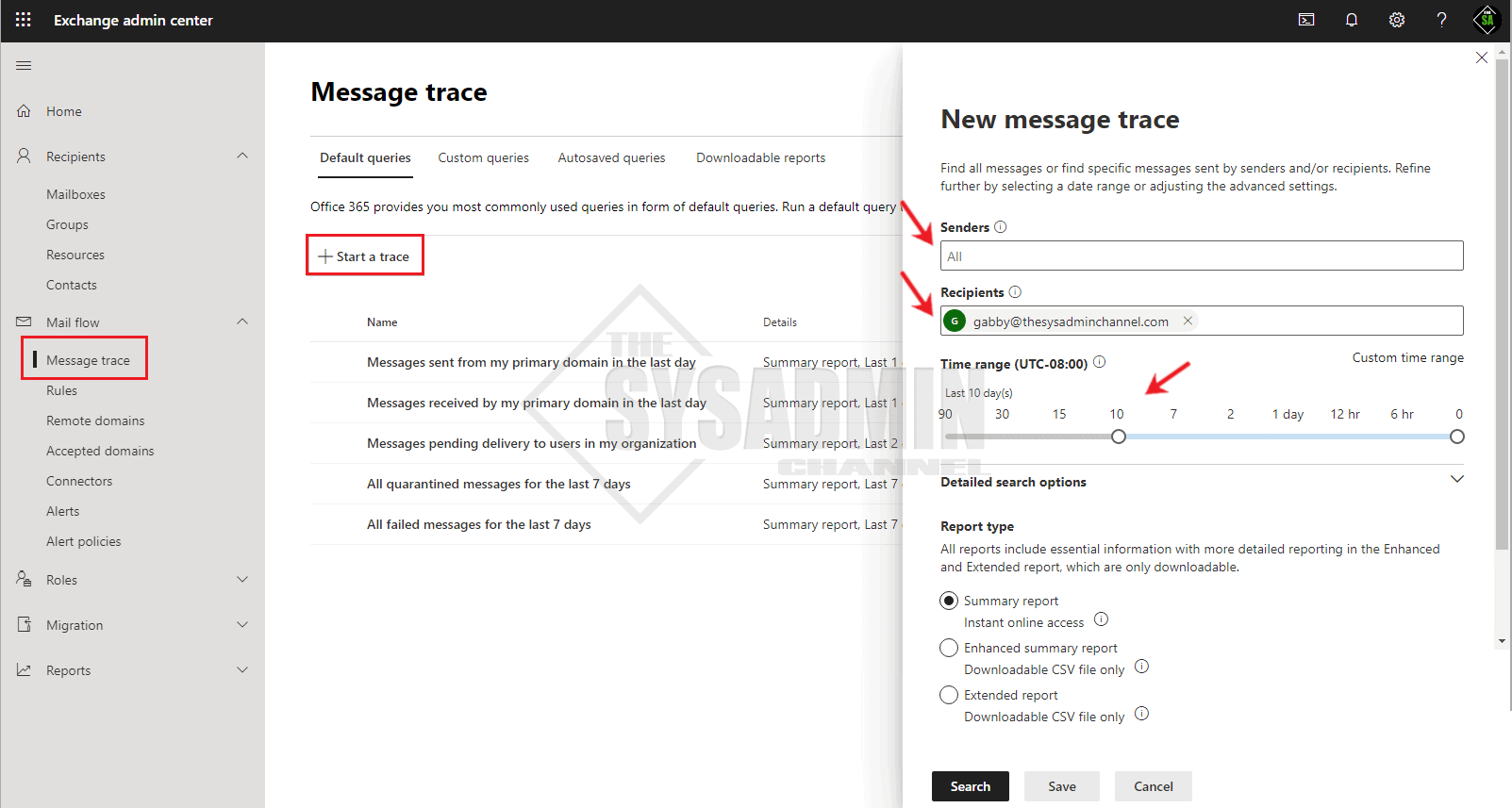
Let s take a quick look at the classic message tracking features in the Exchange Admin Center for Office 365 The interface for message trace in EAC is not complicated Select a date range and some information about the message you are looking for and click on Search Below I searched for all the messages from Paul for the last seven days

Launch the URL https admin exchange microsoft and select Mail flow Message trace Launch the URL https admin exchange microsoft messagetrace Message trace page From the Message trace page you can start a new default trace by clicking Start a trace

In the Microsoft Defender portal at https security microsoft go to Email collaboration Exchange message trace

Message Trace is a key tool for email admins to troubleshoot and track the health of their organization s mail flow Message Trace in the Exchange Admin Center EAC is a useful tool for tracing messages but it s visually cluttered and confusing and it lacks a number of more sophisticated capabilities
The Exchange message trace link in the Microsoft Defender portal opens message trace in the modern EAC As an administrator you can find out what happened to an email message by running a message trace in the Exchange admin center EAC Download message trace report There are two ways to download the extended message trace CSV file report Click the hyperlink in the mail you get when the report is ready Download the report in the Exchange admin center Once the report is completed you can open the mail and click here It will open a new pane to download the report
Extended Message Trace Interpretation Message ID MESSAGE ID HERE CENSOREDDOMAIN recipient status Email address is removed for privacy Receive Email address is removed for privacy Receive Resolve MESSAGE ID HERE CENSOREDDOMAIN THIS IS THE ONE IN QUESTION