Enable Symbolic Links Git WNXY S BLOG Git Windows C Git Windows C Join The Human Cyber Physical Intelligence Integration Lab Set Up Prerequisites Web Mar 17 2013 nbsp 0183 32 What is the correct way to handle symlinks in git I have the following structure Vendors Module A Module B Module C App Code Modules Core Module 1 Core Module 2 Module A symlinked to vendors Module B symlinked to vendors Module C symlinked to vendors
Web Jun 3 2015 nbsp 0183 32 2 The error is clear the git client doesn t know how to handle Windows symlinks the symlink is just some metadata in the NTFS node Don t good old shortcuts work in both VStudio and git CristiFati Jun 3 2015 at 10 44 3 Thanks I understand error I must have one file in two directory project Th symlink good idea for this but bad Web Sep 12 2017 nbsp 0183 32 Symbolic links in Git Tue Sep 12 2017 Espresso Git Note all this has been tried and tested on macOS only but it should work seamlessly on Linux as well Symbolic links are a great way to simplify mundane tasks such as having the same configuration file in different folders
Set Up Prerequisites Windows git Infrarot Empf nger F r Fernbedienungen Mit RS232 Schnittstelle Which Command Is Used To Create A Symbolic Link Build Mitsuba2 In Windows Centos6 8 Git Windows git O Debug Terminal Help DropdownComponenttsx Untitled Workspace Vis Windows git
Enable Symbolic Links Git
 Enable Symbolic Links Git
http://p9.qhimg.com/bdr/__85/t01f7ef5834e581023c.jpg
Web Jan 11 2018 nbsp 0183 32 You can set this in the config file for git for windows By default this is located at C ProgramData Git config Find the core section and add symlinks true to turn it on
Pre-crafted templates use a time-saving service for developing a varied series of files and files. These pre-designed formats and designs can be made use of for various individual and professional projects, including resumes, invites, flyers, newsletters, reports, presentations, and more, enhancing the content development procedure.
Enable Symbolic Links Git

Organizations Gitopia
Windows git

Infrarot Empf nger F r Fernbedienungen Mit RS232 Schnittstelle

Which Command Is Used To Create A Symbolic Link

Centos6 8 Git
Windows git
Web Oct 27 2018 nbsp 0183 32 How can I get Git to follow symlinks Ask Question Asked 14 years 11 months ago Modified 1 month ago Viewed 121k times 268 Is my best be going to be a shell script which replaces symlinks with copies or is there another way of telling Git to follow symlinks PS I know it s not very secure but I only want to do it in a few specific cases git

Web Oct 27 2018 nbsp 0183 32 A symbolic link is a special type of file whose contents are a string that is the pathname of another file the file to which the link refers The contents of a symbolic link can be read using readlink 2 So a symbolic link is one more file just as a
Web Jul 26 2012 nbsp 0183 32 Symbolic links are only available on Windows Vista and later Symbolic links will only work on NTFS not on FAT You need to be an admin and or have the SeCreateSymbolicLinkPrivilege privilege Symbolic links on remote filesystems are disabled by default Windows symbolic links are typed

Web Mar 27 2022 nbsp 0183 32 git config get core symlinks should return true If it is not true then you have to remove and clone you repo one more time with command git clone c core symlinks true lt repository url gt Note maybe it possible just to enable it with git config set but it was not working for me by some reason

Web May 1 2023 nbsp 0183 32 huenisys Enable symbolic links for Git on Windows 10 md during installation set config to enabled edit policy add your user on Local Comp Policy gt Computer Configuration gt Windows Settings gt Security Settings gt Local enable Windows Developer mode to bypass UAC requirement Search gt For
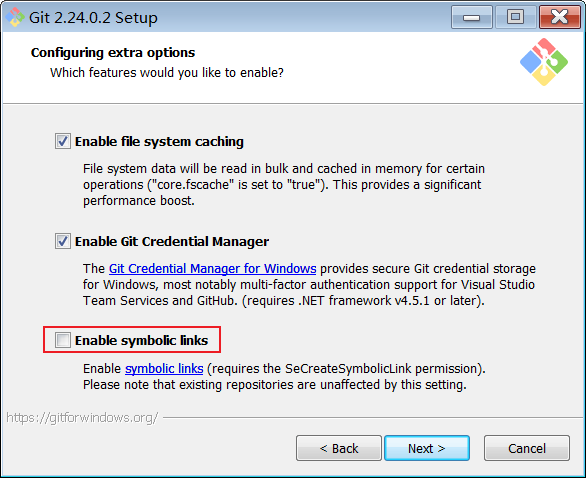
Web You have to Enable Symbolik Link on Git during the application Setup see picture By default the ln s command in Git Bash does not create symbolic links Instead it creates copies To create symbolic links provided your account has permission to do so use the built in mklink command like so Web But symbolic links are not entirely portable so they are now deprecated and symbolic refs as described above are used by default git symbolic ref will exit with status 0 if the contents of the symbolic ref were printed correctly with status 1 if the requested name is not a symbolic ref or 128 if another error occurs
Web Oct 3 2022 nbsp 0183 32 When installing git bash for windows there is an option called quot Enable symbolic links quot When you installed git bash with that option I had the same issue as OP So install the same setup git bash again with that