Enable Bitlocker Gpo Step By Step SOLVED GPO Chrome Clear Browsing Data Category BitLocker A Windows System Admin s Blog Bitlocker GPO PIN Enable MOBS Bangladesh Configure BitLocker Group Policy Settings RootUsers Bitlocker Windows Server 2019 Web Choose how BitLocker protected fixed drives can be recovered Set to enabled save BitLocker recovery information to AD DS for fixed data drives store recovery passwords and key packages do not enable BitLocker until recovery information is stored to AD DS for fixed data drives and omit recovery options from the BitLocker setup wizard
Web Sep 8 2022 nbsp 0183 32 How to configure the GPO Right click and select Properties Enable the policy and keep checked the Allow BitLocker without a compatible TPM if you don t have a TPM in each Leave the other options as it Web Requirements As with client systems BitLocker requires a Trusted Platform Module TPM version 1 2 or later TPM version 2 0 adds some additional features such as Connected Standby but most servers aren t going to use that feature Without the TPM a USB startup key or startup password is necessary for the server at every boot
Bitlocker Windows Server 2019 Restrict Internet Access Using Group Policy GPO Step By Step Guide YouTube How To Enable A Pre Boot BitLocker PIN On Windows We Take You Through The Smart Card Bitlocker Setup Process Step by step REAL Security How Can I Configure BitLocker Settings On Windows 10 Devices Managed By Intune Just Another Enable BitLocker Authentication Using GPO How To Enable BitLocker On Windows Server 2012 R2 Solved How To Fix BitLocker Failed To Encrypt C Drive Issue History Of Telecommunications Kuriositas
Enable Bitlocker Gpo Step By Step
 Enable Bitlocker Gpo Step By Step
https://content.spiceworksstatic.com/service.community/p/post_images/attached_image/632d00a9-5f5a-4f9f-9756-124ef2870948-1.PNG
Web Jun 5 2023 nbsp 0183 32 To install the BitLocker feature the BitLocker and BitLocker Utilities features are the only required items To install BitLocker using the dism exe module use the following command Enable WindowsOptionalFeature Online FeatureName BitLocker All This command prompts the user for a reboot
Pre-crafted templates offer a time-saving solution for developing a diverse variety of files and files. These pre-designed formats and layouts can be made use of for different individual and expert projects, consisting of resumes, invites, flyers, newsletters, reports, discussions, and more, improving the material creation procedure.
Enable Bitlocker Gpo Step By Step

Enable Bitlocker Windows Server And Clients AD And GPO Wiki ICT

Restrict Internet Access Using Group Policy GPO Step By Step Guide YouTube

How To Enable A Pre Boot BitLocker PIN On Windows
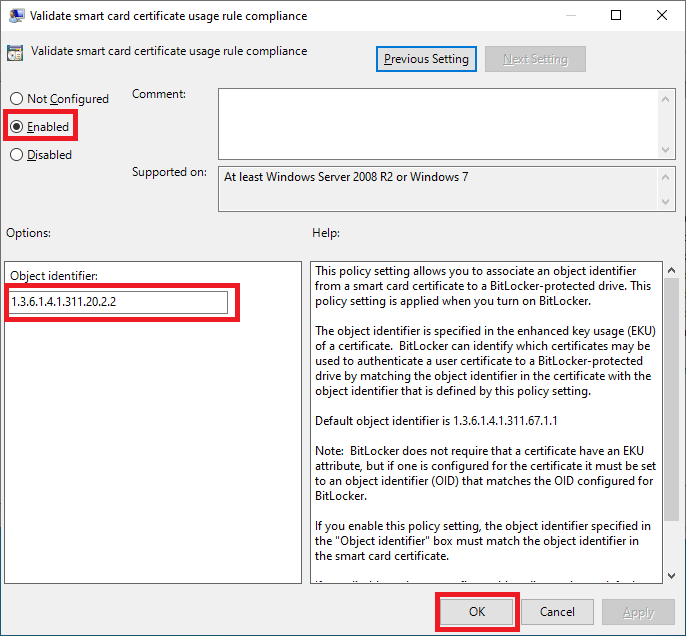
We Take You Through The Smart Card Bitlocker Setup Process Step by step REAL Security

Enable BitLocker Authentication Using GPO

How To Enable BitLocker On Windows Server 2012 R2

Web Nov 15 2020 nbsp 0183 32 by Tom van Veen 15 November 2020 In this post I will explain how to configure enable and deploy Bitlocker via GPO s Group Policy Objects If you or your organisation are able to use or use MBAM Microsoft Bitlocker Administration and Monitoring SCCM Microsoft System Center Configuration Manager or Intune please

Web Sep 2 2021 nbsp 0183 32 1 Go to Group Policy Editor in quot gpedit msc quot 2 Go to Computer Configuration gt Administrative Templates gt Windows Components gt BitLocker Drive Encryption gt Operating System Drives 3 n the right pane double click quot Require additional authentication at startup quot 4 Make sure the quot Enabled quot option is chosen so that all other options below will
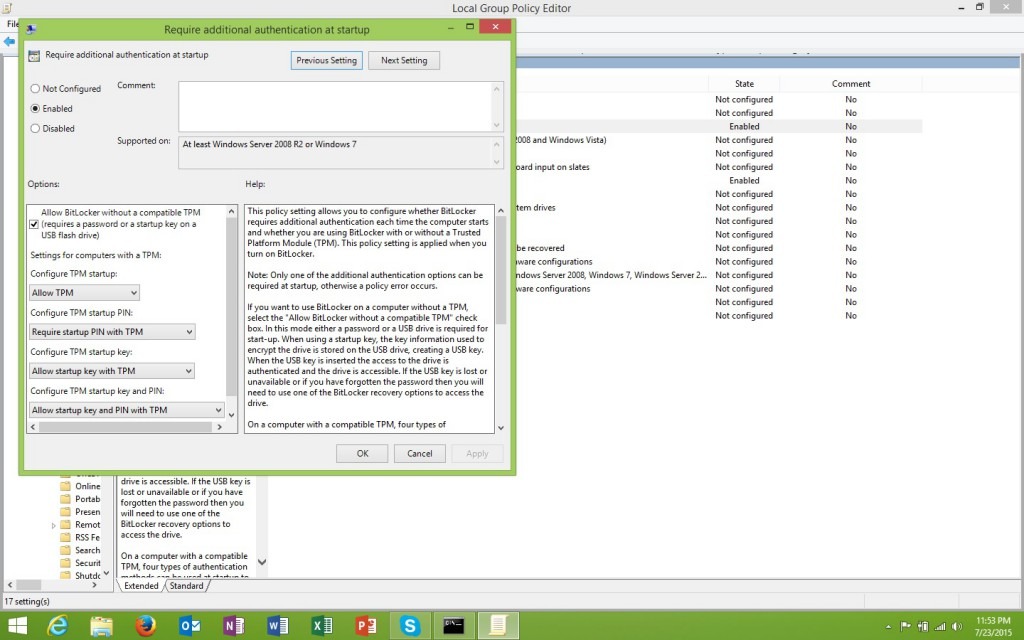
Web Aug 29 2019 nbsp 0183 32 First thing is to create a new GPO i e Configure BitLocker Edit it and navigate to Policies gt Administrative Templates gt Windows Components gt BitLocker Drive Encryption Enable the following Options Choose drive encryption method and cipher strength Windows 10 Version 1511 and later
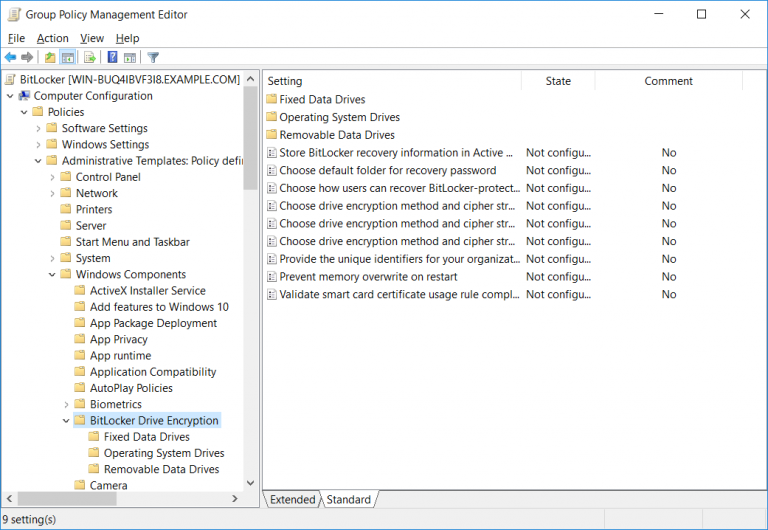
Web Apr 10 2021 nbsp 0183 32 Open the Group Policy Editor by using the quot Run quot executable typing in quot gpedit msc quot and clicking the quot OK quot button Navigate to Computer Configuration gt Administrative Templates gt Windows Components gt BitLocker Drive Encryption gt Operating System Drives

Web Jun 5 2023 nbsp 0183 32 Audit the environment To plan a BitLocker deployment understand the current environment Perform an informal audit to define the current policies procedures and hardware environment Review the existing
[desc-11] [desc-12]
[desc-13]