Edit Image Size Pixels Weekly Pixels Medium Pixel Dimensions And File Sizes For Printing Fine Art Printing Los Screenit Pixels Ishqust Amazing Moments In Pixels Vintage Pixels UI Kit Design Web Vintage Web Design Graphic Design Resize the image by percentage or resize it to be exactly the size you specified for example 1366x768 pixels x px Keep Aspect Ratio Fill in the background with a solid
Get Started How Does Image Resizer Work It is the fastest way to edit your photos for all types of projects Easily resize images by pixel dimensions scale by percentages and maintain the aspect ratio of 1 Select image in BMP GIF JPEG PNG TIFF format 2 Set width and height in pixels Width Height Type of resizing Keep aspect ratio Stretching or narrowing Cropping of
Vintage Pixels UI Kit Design Web Vintage Web Design Graphic Design How To Change Photo Size For Upload Smith Camem1997 A Paper Sizes In Pixels Paper Size Pixel Paper Hot Sex Picture PIXELS GEM LAB GEM TESTING LAB AND CERTIFICATION About Paper To Pixels Medium The Pixels Instagram Photo Size Guide To Aspect Ratios And Dimensions Download Pixel Wallpaper Image Size Background By bweber Pixel A4 Size In Pixels Convenient Calculator With Different DPIs
Edit Image Size Pixels
 Edit Image Size Pixels
https://cdn-images-1.medium.com/max/1200/1*ysxiLtFFy1J9cd8_4FKYWA.png
Image Resizer online for free Change the size of your image online You can customize the width and height with automatic scaling or enter your choice s exact values Drop
Templates are pre-designed files or files that can be utilized for numerous purposes. They can save time and effort by providing a ready-made format and layout for producing various sort of content. Templates can be utilized for personal or expert projects, such as resumes, invites, leaflets, newsletters, reports, presentations, and more.
Edit Image Size Pixels

Codes And Pixels Medium
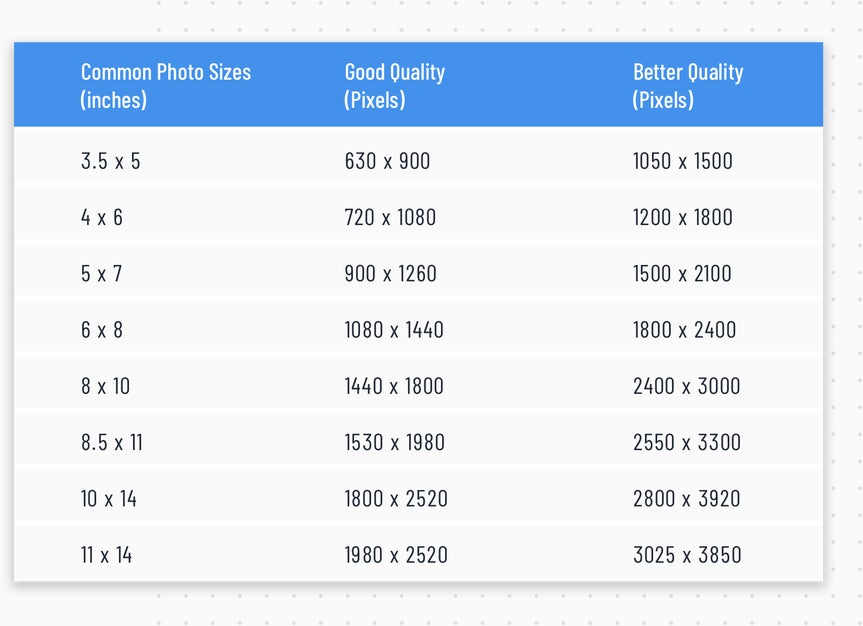
How To Change Photo Size For Upload Smith Camem1997
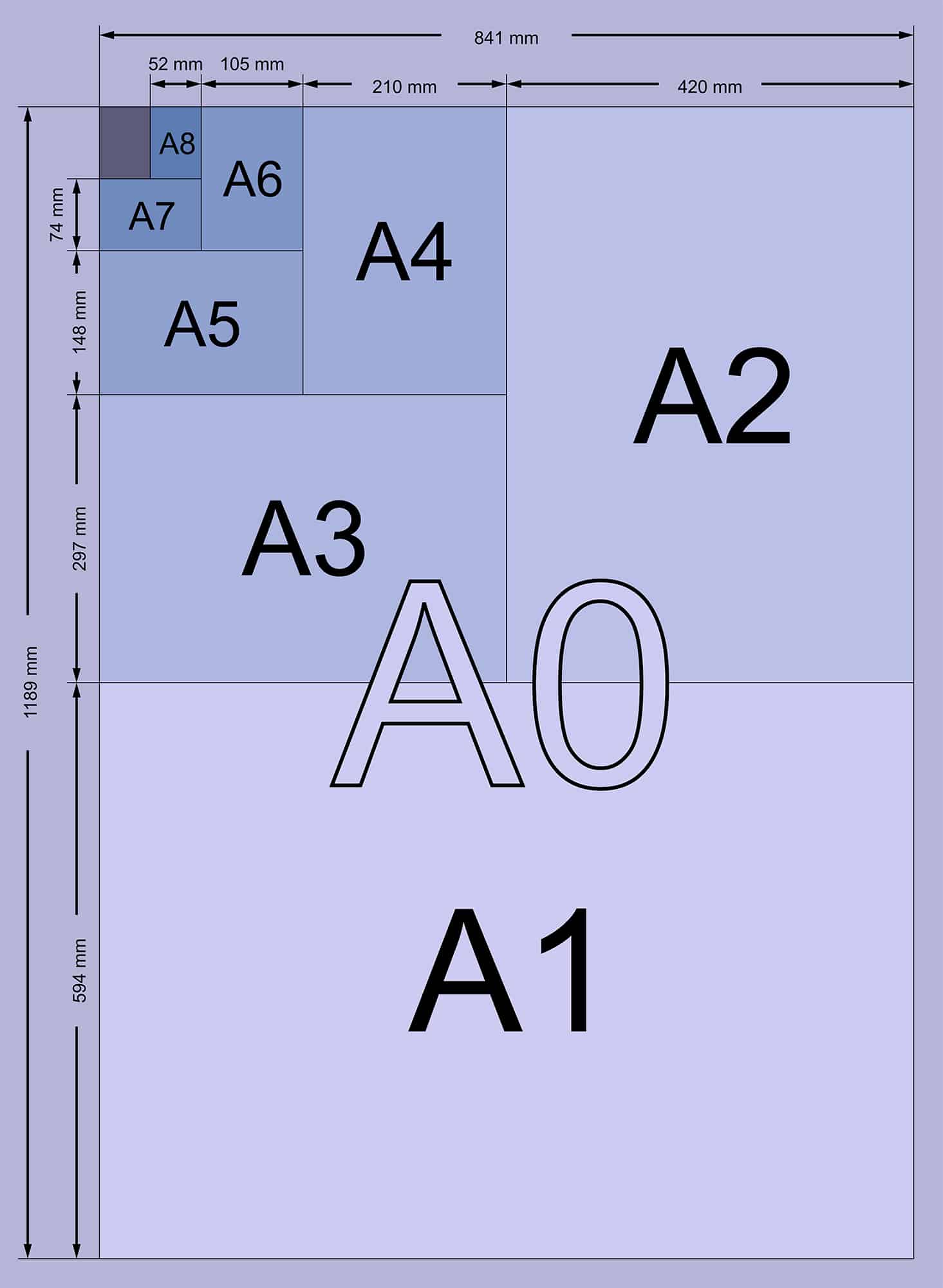
A Paper Sizes In Pixels Paper Size Pixel Paper Hot Sex Picture

PIXELS GEM LAB GEM TESTING LAB AND CERTIFICATION
The Pixels
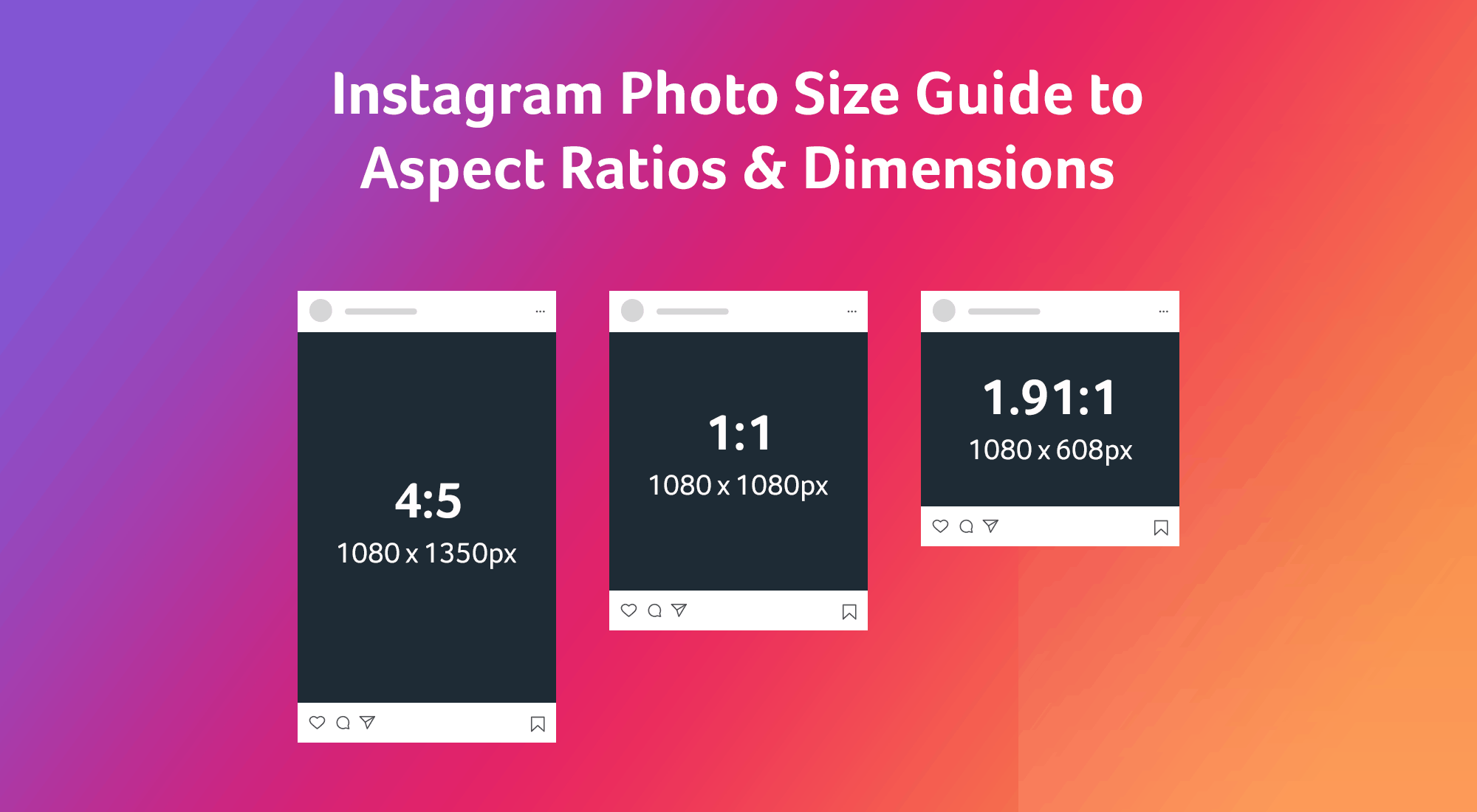
Instagram Photo Size Guide To Aspect Ratios And Dimensions
Upload the photo you want to resize In the drop down menu choose the format you want your images to be converted to You can also use the DPI to change the image size
STEP 1 Upload Your Image To resize image in px first upload your photo We support various image formats such as JPG JPEG PNG and PDF Whether you re using your
Get web ready image files by converting your photos or graphics into BMP GIF JPG or PNG format to preserve image resolution The original FREE picture resize and crop

1 Click on the Select Image button to select an image 2 Enter a new target size for your image 3 Click the Resize Image button to resize the image Image Converters PDF

To resize an image with AI use Kapwing s Image Resizer Choose the social media platform and post type to apply the right aspect ratios Then add padding to your image
Free form Resize to aspect ratio instead of cropping Rotate or Flip Show grid Coordinates Left Top Crop Dimensions Width Height Resize Image Resize 1 Upload Upload your JPG photo to our image resizer 2 Resize Choose a size template or enter in your own dimensions 3 Continue editing Instantly download your resized
Create new AI Image Generator Worlds First and Most Popular Advanced Online Photo Editor Welcome to the free advanced photo editor by Pixlr