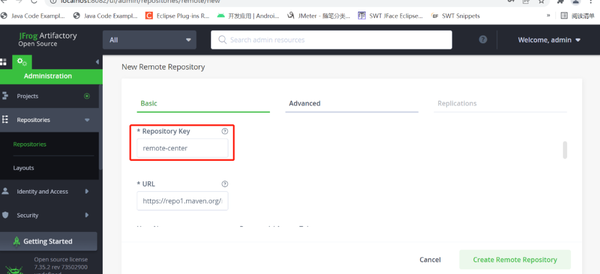
Eclipse Git Create Remote Repository Solved Git Create Remote Repository On Push 9to5Answer Git Command Reverse Lookup 9to5Tutorial Creating A Repository Curriculeon Visual Studio 2019 No Option For GitLab When Creating A New Git Repository Stack Overflow Jfrog Artifactory Choosing a URL for your remote repository There are several ways to clone repositories available on GitHub When you view a repository while signed in to your account the URLs you can use to clone the project onto your computer are available below the repository details
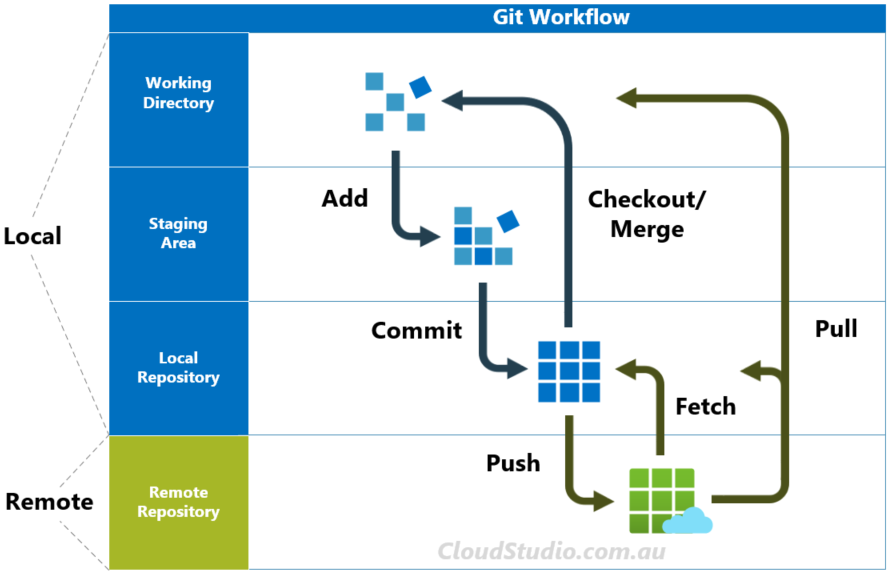
Remote repositories are versions of your project that are hosted on the Internet or network somewhere You can have several of them each of which generally is either read only or read write for you Collaborating with others involves managing these remote repositories and pushing and pulling data to and from them when you need to share work 1 1 git init myGitRepo which creates the repository with that name after the init Next I create a readme txt in that folder created I m using nano below you can use any text editor 2
Jfrog Artifactory Git Commands Cloud Studio How To Create And Add GIT Remote Repository FoxuTech How To Use Git In Eclipse Add Eclipse Project To Local And Remote Git Repository Ananth Chellathurai s Walk On Software How To Create A New Git Local Branch And Push To Create And Push A Branch To The Remote Repository Git Atlassian Documentation Multiple Remote Git Repositories And Branches In Eclipse Salesforce Git Eclipse EGIT Better And Distributed Source Control Home
Eclipse Git Create Remote Repository
 Eclipse Git Create Remote Repository
https://sgp1.digitaloceanspaces.com/ffh-space-01/9to5answer/uploads/post/avatar/457928/template_git-create-remote-repository-on-push20220604-719744-1pbe3yy.jpg
For example code origin code or code upstream code are two common choices p n li n li n p dir auto A new URL for the remote
Pre-crafted templates use a time-saving option for developing a diverse range of files and files. These pre-designed formats and layouts can be utilized for various individual and professional tasks, including resumes, invites, leaflets, newsletters, reports, presentations, and more, streamlining the material creation procedure.
Eclipse Git Create Remote Repository

GIT Branch And Its Operations An Easy Understanding Digital Varys
Git Commands Cloud Studio

How To Create And Add GIT Remote Repository FoxuTech

How To Use Git In Eclipse

Ananth Chellathurai s Walk On Software How To Create A New Git Local Branch And Push To
Create And Push A Branch To The Remote Repository Git Atlassian Documentation

1 Working with remote Repositories 1 1 Cloning remote Repositories 1 1 1 Repository Selection 1 1 2 Branch selection 1 1 3 Local Destination 1 1 4 Import Projects 1 2 Pushing a Local Repository to GitHub 1 2 1 Create Local Repository 1 2 2 Create Repository at GitHub 1 2 3 Eclipse SSH Configuration 1 2 4 Push Upstream

1 Git support for Eclipse Via the Eclipse IDE you can perform Git commands like staging commit merge rebase pull and push 2 Installation of Git support into Eclipse Most Eclipse IDE distributions from Eclipse already contain support for Git In this case no additional installation is required

1 Getting Started 1 1 Overview 1 1 1 The Preferences Dialog 1 2 Basic Tutorial Adding a project to version control 1 2 1 Configuration 1 2 1 1 Identifying yourself 1 2 1 2 Setting up the Home Directory on Windows 1 2 1 3 Pointing out the System wide configuration 1 2 2 Create Repository 1 2 3 Track Changes 1 2 4 Inspect History 1 3 GitHub Tutorial

Select Git as the repository type and hit Next In the following window select your project hit the Create Repository button and click Finish The newly created repository will be empty although the project is assigned to it
From here we select the repository directory and click Finish 3 3 Cloning a Repository We can clone a repository from a remote git server to our local file system Let s go to File Import Git Projects from Git Next Clone URI Next then the following window will be shown We can also open the same window from the Clone
Step 1 Download Eclipse IDE and configure the build path if necessary change the bash profile It is good to have an understanding prior to setting up Step 2 Open your Eclipse IDE and from the top bar go to Help and further click on Install New Software Step 3 Then add a new repository How to share a project from Eclipse into a new repository on GitHub using the EGit Eclipse plugin Support videos via Patreon https www patreon DrBFraser Show more Show more
Step 1 Browsing to the right path Create a new folder in your Windows file explorer We will assume that the address to this folder is C Projects Git where you will create your Git projects Open Git bash and type in the following command to browse to the folder created 1