Eclipse Git Change Remote Repository Git Change Remote URL In Local Repository TecAdmin How To Change A Git Remote Scaler Topics 2 Examples Of Git Add Remote Repository branch And Files How To Change Git Remote Origin URL DevsDay ru URL IPentec 13 min Read EGit is the Git integration for the Eclipse IDE see https eclipse egit This Tutorial describes the basic use cases for EGit It requires only some basic knowledge about the Git processes Please help us to keep this tutorial up to date by reporting any issues or questions This tutorial is available now as a downloadable PDF
To add a new remote use the git remote add command on the terminal in the directory your repository is stored at The git remote add command takes two arguments A remote name for example origin A remote URL for example https github OWNER REPOSITORY git For example You can use common Git commands to access remote repositories In this article Options for getting changes Cloning a repository Fetching changes from a remote repository Merging changes into your local branch Pulling changes from a remote repository Further reading Options for getting changes
URL IPentec How To Add Change URL For Remote Git Repository Tech Language What Is Git ORIGIN The Git Remote Add Command Git Remote Javatpoint How To Configure BitBucket Git Repository In Your Eclipse Environment GIT Tutorial Remote Repositories Vividbreeze Dev Blog Drupal Git Remote Existing Distant Project To Local Stack Overflow Git Commands Cloud Studio What Is Git Push Command All You Need To Know Overview Vrogue
Eclipse Git Change Remote Repository
 Eclipse Git Change Remote Repository
https://tecadmin.net/wp-content/uploads/2023/01/git-set-remote-url.png
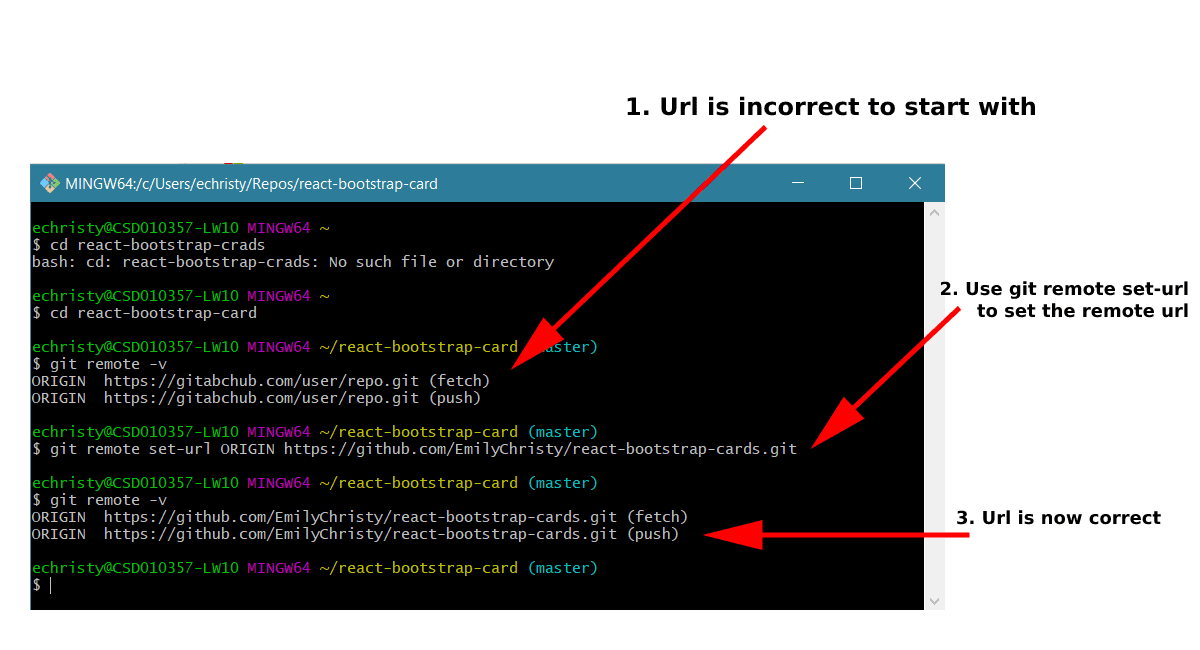
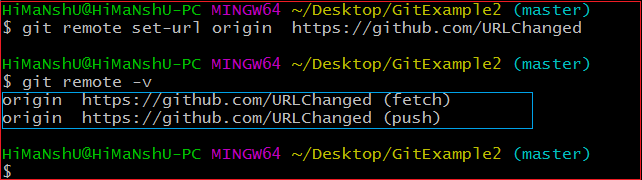
To change the remote For example if the remote name is origin git remote set url origin http newserver myproject git Execute again git remote v to check that the new url has been set both for push and fetch operations
Pre-crafted templates provide a time-saving solution for developing a varied series of documents and files. These pre-designed formats and designs can be made use of for different personal and expert tasks, including resumes, invitations, leaflets, newsletters, reports, discussions, and more, simplifying the material development procedure.
Eclipse Git Change Remote Repository

Eclipse Git How To Sychronize Local Branch With Remoter Repository
How To Add Change URL For Remote Git Repository Tech Language
What Is Git ORIGIN The Git Remote Add Command
Git Remote Javatpoint
GIT Tutorial Remote Repositories Vividbreeze Dev Blog

Drupal Git Remote Existing Distant Project To Local Stack Overflow
Working with remote Repositories Cloning remote Repositories Using the Git import wizard you can clone remote repositories using different transport protocols Additionally you may import existing Eclipse projects into your workspace and share the projects with the Git team provider

Configure Git to rebase during pull operations To use rebase during the pull operation set the pull rebase parameter to true It avoids merge commits if you pull from a remote repository and have divergent changes and instead rebases your local branch on the remote branch it tracks This is the recommended setting by the author of this text 3 3

2 1 Installing EGit in Eclipse Starting with Eclipse Juno EGit is included with the Eclipse itself For older versions of Eclipse we can install the plugin through Help Install New Software and providing the URL http download eclipse egit updates 2 2 Identifying a Commiter
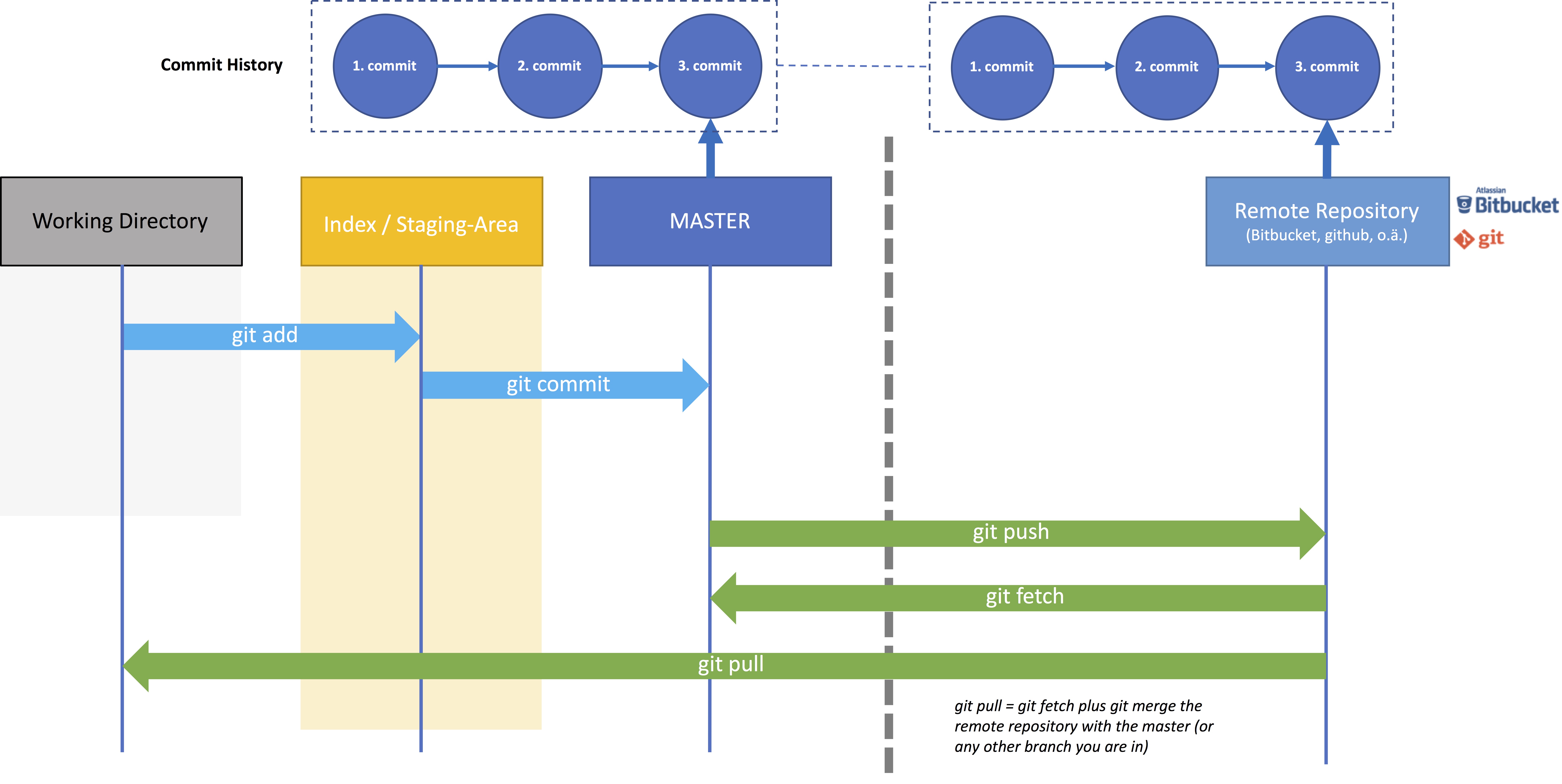
This is a safe way to get an update of all changes to a remote repository There are two ways to fetch changes from the upstream Select Git Fetch in the main menu Alternatively open the Branches popup and click in the upper right corner Watch this video to get a better view on how fetch operation is performed in IDE Update branch

1 Getting Started 1 1 Overview 1 1 1 The Preferences Dialog 1 2 Basic Tutorial Adding a project to version control 1 2 1 Configuration 1 2 1 1 Identifying yourself 1 2 1 2 Setting up the Home Directory on Windows 1 2 1 3 Pointing out the System wide configuration 1 2 2 Create Repository 1 2 3 Track Changes 1 2 4 Inspect History 1 3 GitHub Tutorial
How to change to a new remote repository in Eclipse Create a new GitHub repository Keep it empty Don t need to create README Open Git Repositories window in Eclipse Expand your project repository icon Expand Remotes icon Right click origin icon Select Configure Push Change the URI to point to the new GitHub repository Click Save and Push Select repository type Git and click Next To configure the Git repository select the new project HelloWorld Click Create Repository to initialize a new Git repository for the HelloWorld project If your project already resides in the working tree of an existing Git repository the repository is chosen automatically
Eclipse Git Tutorial There are a number of different ways to grab changes from a remote Git repository and bring them into your local repository The most common way is to simply do a pull By default this will do a fetch and merge but you can configure this to do a fetch and rebase instead You can also do an explicit