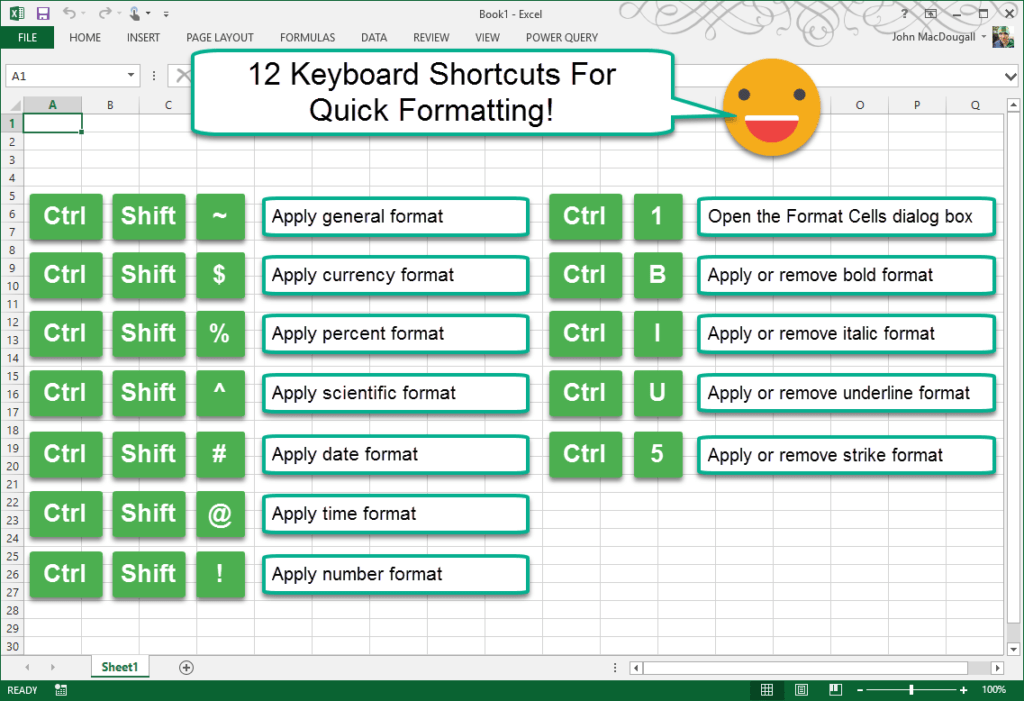
Eclipse Format Shortcut Not Working Guide To Solar Eclipses Telescope Observer 12 Keyboard Shortcuts For Quick Formatting How To Excel Moon Eclipse Free Stock Photo Public Domain Pictures September 27 28 Total Lunar Eclipse In Eastern Time Stellar Neophyte File Solar Eclipse 2008Feb07 New Zealand partial Greg Hewgill jpg Alt Shift I Inline highlighted variable inverse of Alt Shift L Alt Shift M Extract method Expression Selection useful in combination with the extract inline features Alt Shift Up Arrow Widens current selection to cover the next largest expression either highlighted or where the cursor is located
The main preference page can be found under window preferences general keys or faster press ctrl 3 type keys and press enter from here you can see all commands and assign change their The list of shortcuts can be seen in Eclipse if you select Window Preferences General Keys but I don t know what I can do here to fix the shortcuts that are not working Oddly enough other shortcuts do seem to work such as copying Ctrl C or pasting Ctrl V The Eclipse version I am using is Oxygen 1a Release 4 7 1a and I
File Solar Eclipse 2008Feb07 New Zealand partial Greg Hewgill jpg 12 How To Format Code In Eclipse Eclipse Shortcuts Eclipse June 26th Partial Lunar Eclipse More To Explore File 2011 06 15 Lunar Eclipse jpg Wikipedia The Free Encyclopedia Eclipse Find All References In Project Shortcut Key Not Working Eclipse YouTube Eclipse Free Stock Photo Public Domain Pictures Come Cambiare Le L Impostazione Predefinita Su Eclipse 5 Surprising Effects The Total Solar Eclipse Will Have Besides Darkness
Eclipse Format Shortcut Not Working
 Eclipse Format Shortcut Not Working
https://telescopeobserver.com/wp-content/uploads/2018/12/solar-eclipse.jpg
Overview Many developers rely heavily on keyboard shortcuts to work efficiently in their IDE of choice In this tutorial we re going to learn about some of the common shortcuts in the popular Eclipse IDE We ll break the shortcuts down into four general categories Search and navigation Editing our code Refactoring code Running and debugging
Pre-crafted templates provide a time-saving option for producing a varied series of documents and files. These pre-designed formats and designs can be utilized for various personal and professional jobs, including resumes, invitations, flyers, newsletters, reports, presentations, and more, enhancing the content development procedure.
Eclipse Format Shortcut Not Working

Solar Eclipse May 20 2012 jpg
12 How To Format Code In Eclipse Eclipse Shortcuts Eclipse

June 26th Partial Lunar Eclipse More To Explore

File 2011 06 15 Lunar Eclipse jpg Wikipedia The Free Encyclopedia

Eclipse YouTube

Eclipse Free Stock Photo Public Domain Pictures

13 Answers Sorted by 789 On Windows and Linux Ctrl Shift F On Mac F
Ctrl Shift f Code Formatting is not working properly in Eclipse Helios Ask Question Asked 11 years 3 months ago Modified 11 years 3 months ago Viewed 5k times 0 When I try to format code in Eclipse Helios by pressing ctrl shift f the code is getting formatted but the results are very ugly

1 First i try this Ctrl A Ctrl Shift F which is not working after this I search online find different solution for code format in Ecplise for Java code but not working I prefer following links Eclipse import conf xml files and
3 You can format text using the Ctrl Shift F shortcuts You can use Ctrl A to select all text or you can format only several lines which you have selected There is a caveat however If your code does not compile the formatting does not work I don t know whether this is intentional or a bug

I went to Preferences Java Formatter and changed the profiles I also applied another profile made by me and it never works I also went to see which shortcut keys Eclipse had and there s CTRL SHIFT F to Format things I don t know what is happening My Eclipse version is Luna Service Release 2 4 4 2 on Windows 8 1 Hoping for
I noticed that not only Ctrl Backspace did not work but in fact a lot more e g Ctrl Delete or Ctrl It seems that this issue is caused by a bug in the Eclipse s welcome screen To resolve the issue follow these steps Restart Eclipse Uncheck Always show Welcome at start up in the bottom right corner Eclipse show view options and Eclipse short cuts How to format the code using shortcuts Previous video Links for reference Java 19 installation https y
1 I have installed Eclipse Neon with C features on Ubuntu 16 04 My problem is that some more unusual shortcuts do not work such as copy lines ctrl alt down or move lines up alt up or autocomplete ctrl space for example The others more usual like ctrl c or ctrl f or ctrl z do work