Display Max Rows Jupyter Notebook Jupyter Notebook The Options display max rows In Pandas Only Shows A Jupyter Notebook Pandas Display max rows And Display max colwidth Not Working In Jupyter Solved How To Display All Rows In Jupyter Notebook 9to5Answer jupyter Notebook Jupyter Notebook provides an interactive platform to perform exploratory data analysis and is most preferred by Data Scientists and Data Analysts One can alter the number of rows to be displayed in the output cell using pd set option display max rows x when None replaced with x displays all the rows in the data frame One can
Import numpy as np import matplotlib pyplot as plt x np linspace 0 1 30 1000 fig ax plt subplots 1 4 constrained layout True figsize 15 2 ax ax ravel ax 0 plot x np sin x ax 1 plot x np log 1 x ax 2 plot x np sin 30 x ax 3 plot x np sin x np sin 2 x plt show Display large repr max categories max columns max colwidth max dir items max info columns max info rows max rows max seq items memory usage min rows multi sparse notebook repr html pprint nest depth precision show dimensions display unicode ambiguous as wide east asian width display width future infer string
jupyter Notebook Jupyter Notebook Pandas DataFrame Kakakakakku Blog Jupyter Notebook python sas7bdat DataFrame Display All Pandas DF Columns In Jupyter EasyTweaks Pd set option display max rows To Anything Greater Than Default No Simple Guide To Set Pandas Options To Better Display DataFrames Pandas Python Jupyter Notebook Jupyter Notebook python
Display Max Rows Jupyter Notebook
 Display Max Rows Jupyter Notebook
https://i.stack.imgur.com/FkQx9.png
Overview pandas has an options API configure and customize global behavior related to DataFrame display data behavior and more Options have a full dotted style case insensitive name e g display max rows You can get set options directly as attributes of the top level options attribute
Pre-crafted templates offer a time-saving solution for producing a varied range of documents and files. These pre-designed formats and designs can be made use of for various personal and expert tasks, consisting of resumes, invitations, leaflets, newsletters, reports, presentations, and more, streamlining the material production procedure.
Display Max Rows Jupyter Notebook
Pandas Display All Columns Rows And Values Softhints

Jupyter Notebook Pandas DataFrame Kakakakakku Blog

Jupyter Notebook python sas7bdat DataFrame

Display All Pandas DF Columns In Jupyter EasyTweaks

Simple Guide To Set Pandas Options To Better Display DataFrames

Pandas Python

You can force a Jupyter notebook to show all rows in a pandas DataFrame by using the following syntax pd set option display max rows None This tells the notebook to set no maximum on the number of rows that are shown The following example shows how to use this syntax in practice Example Show All Rows in Pandas DataFrame

How to display all rows in Jupyter Notebook Ask Question Asked 6 years 2 months ago Modified 1 year 2 months ago Viewed 23k times Part of R Language Collective 13 I am using Try Jupyter https try jupyter I have following R code to display data 120 rows

Is there a way to widen the display of output in either interactive or script execution mode Specifically I am using the describe function on a Pandas DataFrame When the DataFrame is five columns labels wide I get the descriptive statistics that I want

To display all rows in Jupyter Notebook you can use the max rows and max columns options of the pandas library First import pandas pythonimport PY TOPICS Popular topics Python Using List Pandas String File Django Value of Dataframe Function Numpy Converters Module Modulation Object All topics

1 Answer Sorted by 1 You can set display max rows option in pandas pd set option display max rows None or pd set option display max rows LARGE NUMBER To set it temporarily use a context manager with pd option context display max rows None print df Share Improve this answer Follow answered Aug 9 2021 at 6 26 mozway
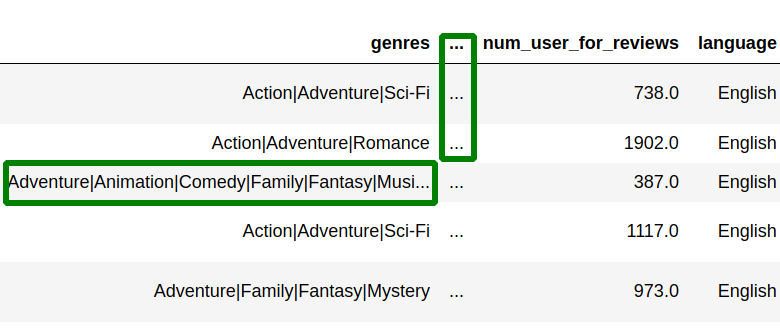
Jupyter and pandas display Sun 02 April 2017 1 show all the rows or columns from a DataFrame in Jupyter QTConcole if the df has a lot of rows or columns then when you try to show the df pandas will auto detect the size of the displaying area and automatically hide some part of the data by replacing with For example to display all the rows of a pandas dataframe set the max rows display option to None The following is the syntax pd set option display max rows None With this we come to the end of this tutorial The code examples and results presented in this tutorial have been implemented in a Jupyter Notebook with a python version 3 8
In this Python Programming Tutorial we will be learning how to display the maximum number of rows and columns of a dataframe on Jupyter notebook Python Dat