Disable Bandwidth Limit Windows 10 How To Change The Limit Reservable Bandwidth In Windows 10 Speed Up 9 Best Bandwidth Monitors For Windows 10 Remove Bandwidth Limit Windows 11 YouTube How To Remove Or Add Bandwidth Limit Windows 11 YouTube How To Limit Windows Update Bandwidth On The Windows 10 YouTube Jun 8 2023 nbsp 0183 32 How to Enable or Disable Touchpad in Windows 10 Published by Shawn Brink Category Hardware amp Drivers 08 Jun 2023 How to Enable or Disable Touchpad in Windows
Learn how to disable auto dubbing on YouTube through the community discussion and find solutions for managing automatic translations and voice overs Sep 23 2020 nbsp 0183 32 How to Enable or Disable Windows Subsystem for Linux WSL in Windows 10 The Windows Subsystem for Linux WSL lets developers run a GNU Linux environment
How To Limit Windows Update Bandwidth On The Windows 10 YouTube 2 Ways To Limit Reservable Bandwidth In Windows 10 Bandwidth View Tixati What Is Bandwidth As It Applies To My Computer Ask Leo How To Limit Bandwidth In Your Windows 10 Computer YouTube How To Set Bandwidth Limits For Downloading Windows Update On Windows Limit Bandwidth Of Windows Update And Store App Updates In Windows 10 How To Limit Bandwidth For Windows Updates In Windows 10 How To Limit Bandwidth And Data Usage In Windows 10
Disable Bandwidth Limit Windows 10
 Disable Bandwidth Limit Windows 10
https://i.ytimg.com/vi/-li1cHa4hT4/maxresdefault.jpg
Nov 7 2019 nbsp 0183 32 How to Enable or Disable Windows PowerShell 2 0 in Windows 10 Published by Shawn Brink Category Apps amp Features 07 Nov 2019 How to Enable or Disable Windows
Pre-crafted templates provide a time-saving service for developing a varied range of files and files. These pre-designed formats and designs can be utilized for numerous individual and expert tasks, consisting of resumes, invites, flyers, newsletters, reports, presentations, and more, simplifying the content production procedure.
Disable Bandwidth Limit Windows 10

2 Windows 10
2 Ways To Limit Reservable Bandwidth In Windows 10

Bandwidth View Tixati

What Is Bandwidth As It Applies To My Computer Ask Leo

How To Set Bandwidth Limits For Downloading Windows Update On Windows
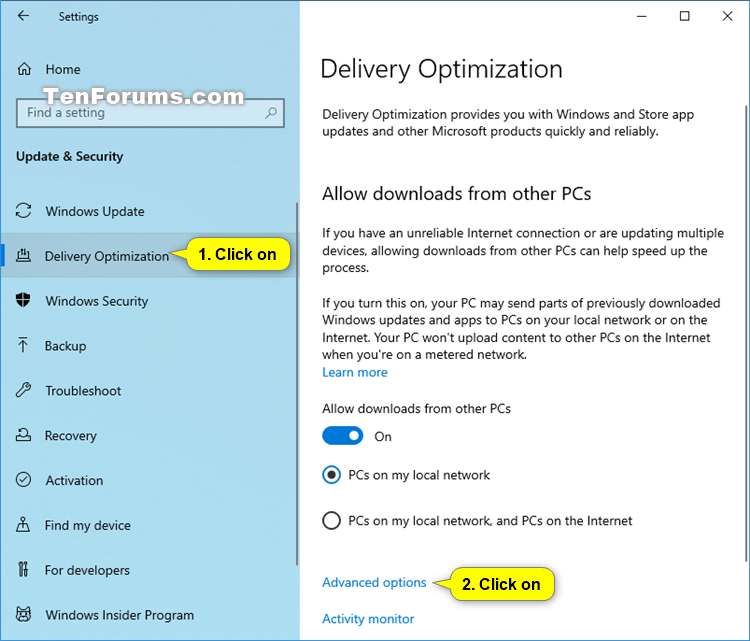
Limit Bandwidth Of Windows Update And Store App Updates In Windows 10

Dec 7 2020 nbsp 0183 32 How to Enable or Disable Developer Tools in Microsoft Edge Chromium Microsoft has adopted the Chromium open source project in the development of Microsoft Edge on the

Nov 8 2021 nbsp 0183 32 How to Enable or Disable Adaptive Brightness in Windows 10 Displays especially on laptops and tablets may utilize ambient light sensors to detect surrounding levels of light

Disable chrome flags from outside of Chrome I have enabled some experiments on stable Chrome however this crashed Chrome I can not click any link nor I can set flags to their

Apr 14 2021 nbsp 0183 32 How to Enable or Disable Mobile Hotspot in Windows 10 By default any user can turn your Windows 10 PC into a mobile hotspot by sharing the Internet connection with other

Jan 2 2024 nbsp 0183 32 Enable or Disable Passwordless Sign in for Microsoft Accounts in Settings If you are not currently signed in to Windows with a Microsoft account then you will need to use Option
[desc-11] [desc-12]
[desc-13]