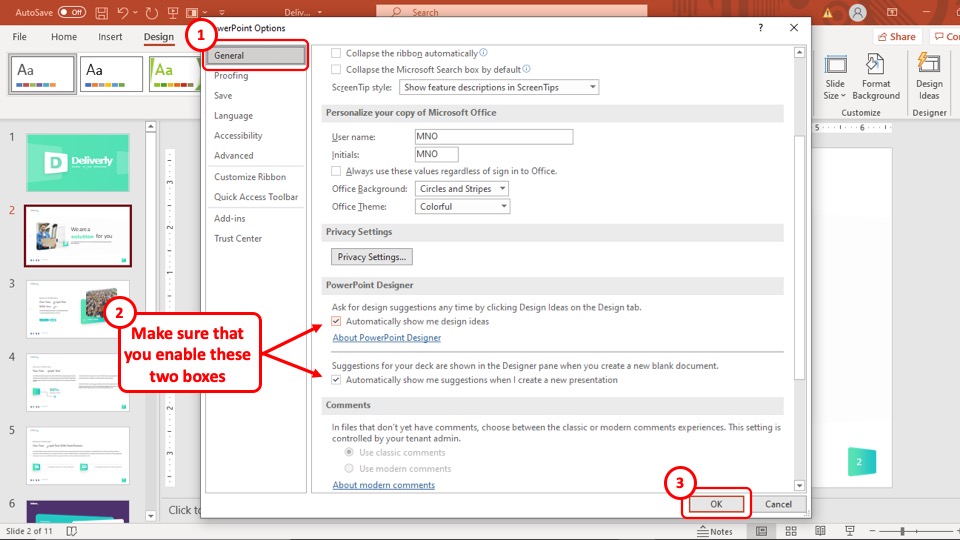
Design Ideas Powerpoint Missing Design Ideas Powerpoint Missing Tutorial Pics Design Idea Button Missing In Powerpoint 365 Microsoft Community Design Ideas Powerpoint Missing Tutorial Pics Design Ideas Powerpoint Missing Tutorial Pics Design Ideas Powerpoint Missing Tutor Suhu WEB Turn off Designer Select File gt Options and in General uncheck Automatically show me design ideas in the PowerPoint Designer section
WEB Is your PowerPoint Design Ideas MISSING Learn if this can be fixed or confirm that your version of PowerPoint does not support Design Ideas This is the companion video of Is Design Ideas Grayed Out But this time we dig into why your Design Ideas Icon is WEB Nov 23 2022 nbsp 0183 32 How to activate or enable PowerPoint Design Ideas on your computer If you have an Office 365 subscription but your Design Ideas button is missing in the Design tab then it s probably not activated Here s how you do it PowerPoint Windows Go to File gt Options In the General tab you ll see the options for PowerPoint Designer
Design Ideas Powerpoint Missing Tutor Suhu Design Ideas In Powerpoint Missing Assetgo Infographic Layout Business Infographic Kindergarten Art Projects 3 In 1 Smart Ideas Powerpoint Bundle Template Ideas sponsored Microsoft Powerpoint Lucidchart Lotuze Creative Business PowerPoint Template Why Does My Design Ideas Not Working On Powerpoint Design Talk Office 2016 Power Point Design Ideas Tab Not Showing Kindly Help Powerpoint Presentation Slide Background Templates Printable Calendar
Design Ideas Powerpoint Missing
 Design Ideas Powerpoint Missing
https://i.ytimg.com/vi/5dTu_ELuWag/maxresdefault.jpg
WEB Fix Broken GRAYED OUT Design Ideas Icon In PowerPoint Is your PowerPoint Design Ideas MISSING Learn if this can be fixed or confirm that your version of PowerPoint does not support
Templates are pre-designed documents or files that can be used for different purposes. They can save effort and time by providing a ready-made format and layout for producing different sort of content. Templates can be utilized for personal or professional tasks, such as resumes, invites, flyers, newsletters, reports, discussions, and more.
Design Ideas Powerpoint Missing
Design Ideas Powerpoint Missing Tutorial Pics

Design Ideas In Powerpoint Missing Assetgo

Infographic Layout Business Infographic Kindergarten Art Projects

3 In 1 Smart Ideas Powerpoint Bundle Template Ideas sponsored

Lotuze Creative Business PowerPoint Template
Why Does My Design Ideas Not Working On Powerpoint Design Talk

WEB Sep 11 2020 nbsp 0183 32 If not there we suggest you go to PowerPoint gt Options gt Customize Ribbon make sure you check the Design tab option Please confirm whether Design Ideas is under the Commands tab If you can t see any contents in the Design Ideas it may be due to some requirements of PowerPoint Designer for Windows

WEB Feb 24 2023 nbsp 0183 32 There may be 3 reasons why your Microsoft PowerPoint does not have the Design Ideas feature Your Microsoft PowerPoint can be an older version of the software or the Design Ideas is not enabled or finally you may be using an unauthorized or an illegal version of the Microsoft PowerPoint software

WEB Mar 17 2018 nbsp 0183 32 1 Please check if File gt Options gt General both Enable Services under Office Intelligent Services and Automatically show me design ideas under Powerpoint Designer are checked 2 Please check out following troubleshooting steps and let us know the feedback https support office en us article Troubl 3

WEB Designer is a feature for Microsoft 365 subscribers but some organizations turn off the feature If you have a Microsoft 365 subscription but don t see the Design Ideas button contact your IT department Reinstall Office to get subscriber features

WEB Jan 22 2024 nbsp 0183 32 So those are nine different ways to fix the PowerPoint Design Ideas command if yours is not working Assuming you have a Microsoft Office 365 subscription and your company has NOT turned this feature off the main thing to remember is to check your content and your layouts
WEB Mar 31 2020 nbsp 0183 32 Amazing design ideas for PowerPoint won t appear out of thin air That s why we ve gathered up these five reliable strategies for you to get design ideas in PowerPoint Let s put an end to generic design presentations and start making PowerPoints that truly pop 1 Build From Pre Existing PowerPoint Templates to get WEB Turn off Designer If you don t want Designer to automatically offer suggestions On the File menu click Options In the PowerPoint Options dialog box click the General tab on the left then scroll toward the bottom and clear the Automatically show me design ideas check box Requirements
WEB Apr 5 2021 nbsp 0183 32 Click the File tab in the Ribbon and then click Options A dialog box appears Select the General category in the categories on the left Ensure that Intelligent Services and Automatically show me design ideas are selected or