Dell Desktop Bios Key How To Enter Bios On Dell Laptop Desktop Bestsoltips Windows 11 Upgrade Bios Settings 2024 Win 11 Home Upgrade 2024 BIOS Dell System BIOS Boot Keys Notebook Desktop PCs Qwerty Keyboard Layout Lulidrive Web System Setup By using the System Setup screen you can configure the BIOS settings iDRAC settings and device settings of your system These settings have already been pre configured per solution requirements Contact Dell EMC before you change these settings NOTE Help text for the selected field is displayed in the graphical browser by default
Web Jan 8 2024 nbsp 0183 32 1 Reboot your computer If you re using an earlier version of Windows or weren t able to use the steps in the Windows 10 or Windows 8 and 8 1 methods you can enter the BIOS by pressing a special key on your keyboard right after the computer restarts 1 Entering the BIOS requires you to restart your PC Web Jun 20 2019 nbsp 0183 32 How to access the Boot Device List https www youtube watch v AyTp uOxMRAThe easy way series https www youtube playlist list PLXoMfmZDOTAytDOB8
Qwerty Keyboard Layout Lulidrive Learn New Things System BIOS Boot Keys For All Laptops Desktop PC CES Dell Announces Studio XPS 13 And 16 Laptops Boing Boing Dell Studio Wikipedia BIOS Keys By Computer Maker Lenovo Dell Sony Etc Enter BIOS Setup In HP Computers The Silicon Underground Dell Desktop OPTIPLEX MICRO 3080 I5 4GB 500GB WinPro Ubuntu Dell Inspiron R15 3521 BIOS Doesn t Show The Option To Boot Basic Drivers Archive DOWNLOAD SAMSUNG NP270E5E BIOS
Dell Desktop Bios Key
 Dell Desktop Bios Key
https://bestsoltips.com/wp-content/uploads/2020/05/How-To-Enter-Bios-On-Dell-Laptop-Desktop.png
Web Dec 20 2021 nbsp 0183 32 List of BIOS access keys for major computer systems from Gateway Asus Toshiba Dell Sony eMachines HP Lenovo Acer and more
Templates are pre-designed documents or files that can be utilized for different purposes. They can conserve effort and time by offering a ready-made format and layout for producing different type of content. Templates can be used for individual or expert jobs, such as resumes, invitations, leaflets, newsletters, reports, presentations, and more.
Dell Desktop Bios Key

Reset Bios Password In Dell Desktops YouTube
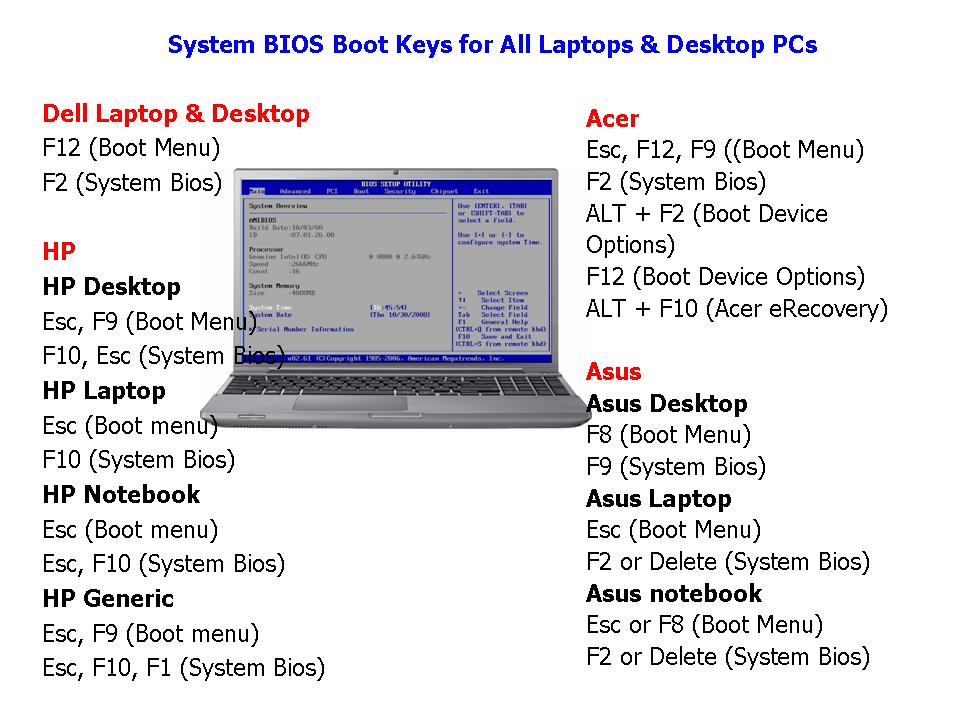
Learn New Things System BIOS Boot Keys For All Laptops Desktop PC

CES Dell Announces Studio XPS 13 And 16 Laptops Boing Boing

Dell Studio Wikipedia

Enter BIOS Setup In HP Computers The Silicon Underground
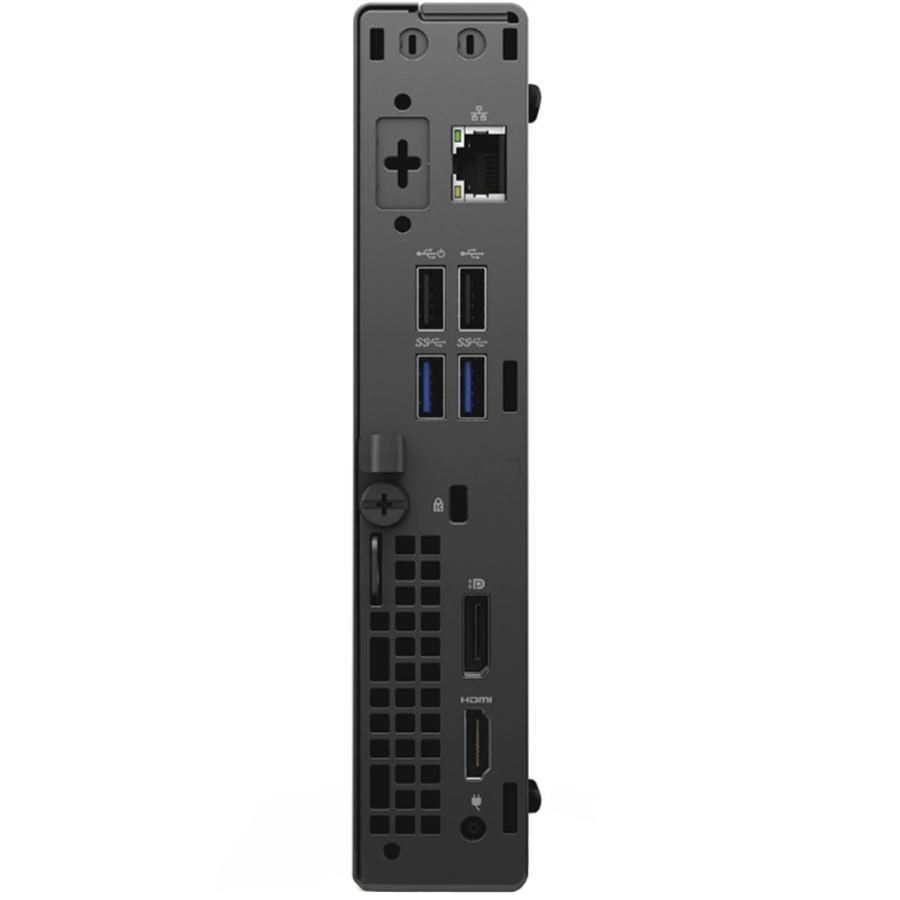
Dell Desktop OPTIPLEX MICRO 3080 I5 4GB 500GB WinPro

Web At the Dell logo screen press the F2 key several times until you enter the BIOS or System Setup Alternatively press the F12 key several times until you see the One Time Boot Menu and then select BIOS Setup or System Setup from the menu

Web Aug 14 2023 nbsp 0183 32 To access the BIOS or System Setup on Dell computers follow these steps Press the F2 key several times at the Dell logo screen during startup Or press the F12 key several times at the Dell logo screen during startup and select BIOS Setup or System Setup from the menu
Web Apr 26 2023 nbsp 0183 32 Dell F2 or F12 ECS DEL Gigabyte Aorus F2 or DEL HP F10 Lenovo Consumer Laptops F2 or Fn F2 Lenovo Desktops F1 Lenovo ThinkPads Enter then F1 MSI DEL for motherboards

Web Sep 24 2023 nbsp 0183 32 Here press the F2 for Dell laptops and the Del key for Dell Desktops to get to the BIOS Some specific desktops may require F1 F3 or F12 Keys to Access Dell Bios From Advanced Startup You can also get to the BIOS UEFI through the Advanced Startup options or Windows Recovery Environment

Web Aug 28 2023 nbsp 0183 32 Quick Links What Is the BIOS Accessing the BIOS UEFI at Startup Accessing the BIOS From Within Windows 10 Creating a Shortcut to Access the BIOS What to Do If You Can t Access the BIOS Key Takeaways The BIOS or UEFI is a software that initializes and tests hardware on your computer and can be accessed to customize
Web Dec 31 2022 nbsp 0183 32 Method 1 Press amp Hold Shift Key and Restart your device Step 1 Click on the Start button then click on the Power icon Step 2 Press and hold the Shift Key then select Restart from the power menu Step 3 While holding the Web Nov 3 2023 nbsp 0183 32 Identify the BIOS shortcut key Look for the key mentioned on the Dell logo screen as the shortcut key to access the BIOS The key can vary depending on your specific Dell model but common keys include F2 F12 or Delete
Web Aug 25 2023 nbsp 0183 32 Easily enter the BIOS UEFI on your Windows 11 PC by pressing a key like F2 or Delete during startup or restart through the Recovery page in Settings You can access the BIOS using Windows Terminal by typing a specific command in PowerShell or Command Prompt and navigating through the Troubleshoot menu in the quot Choose an