Delete Directory Linux And All Files How To Create And Delete Folders In Linux Techieshelp Remove A Directory In Linux How To Delete Directories And Contents From The Command Line Linux Delete Directory YouTube How To Remove Directory In Linux Linux Magazine How Do I Force Delete A Directory In Linux NixCraft Web Aug 10 2021 nbsp 0183 32 To remove non empty directories and all the files without being prompted use rm with the r recursive and f options rm rf dirname To remove multiple directories at once use the rm r command followed by the directory names separated by space rm r dirname1 dirname2 dirname3
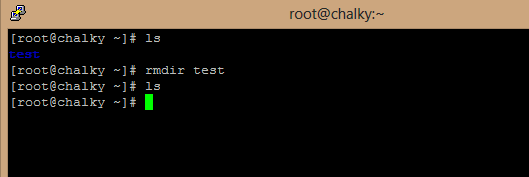
Web Feb 26 2020 nbsp 0183 32 To remove a directory without being prompted use the f option rm rf dir1 To remove multiple directories at once invoke the rm command followed by the names of the directories separated by space The command below will remove each listed directory and their contents rm r dir1 dir2 dir3 Web Jun 8 2022 nbsp 0183 32 You use the rm command to delete files and directories in Linux For directories this command can be used to delete a directory entirely that is it deletes a directory and all files and subdirectories within the directory Here s the syntax of this command rm options files and or directories To remove a file say test txt you can
How Do I Force Delete A Directory In Linux NixCraft How To Delete Remove A Directory In Linux TechPlip Delete A Directory In Linux Practice With The Terminal Codefather How To Delete A File In Linux 3 Ways To Delete All Files In A Directory Except One Or Few Files With Extensions How To Delete A Directory In Linux YouTube Como Excluir Diret rio No Linux De Outros Linux Delete All Files In Directory Using Command Line NixCraft Linux Struktur File Sistem Operasi Linux
Delete Directory Linux And All Files
 Delete Directory Linux And All Files
http://www.techieshelp.com/wp-content/uploads/2014/06/how-to-delete-a-directory-in-Linux.png
Web Nov 10 2023 Ignas T amp Leonardus N 7min Read Remove Directory in Linux How to Delete Files and Folders Learning the Linux command line is essential for system administrators as it s widely used for virtual private server hosting While you can use a hosting control panel server management is more efficient with Linux commands
Templates are pre-designed files or files that can be used for various functions. They can conserve time and effort by offering a ready-made format and layout for producing different sort of material. Templates can be utilized for personal or professional projects, such as resumes, invites, flyers, newsletters, reports, discussions, and more.
Delete Directory Linux And All Files

How To Delete A Directory In Linux

How To Delete Remove A Directory In Linux TechPlip

Delete A Directory In Linux Practice With The Terminal Codefather
How To Delete A File In Linux

How To Delete A Directory In Linux YouTube
Como Excluir Diret rio No Linux De Outros
Web Sep 11 2022 nbsp 0183 32 The procedure to remove all files from a directory Open the terminal application To delete everything in a directory run rm path to dir To remove all sub directories and files rm r path to dir Let us see some examples of rm command to delete all files in a directory when using Linux operating systems

Web The following command will do it for you Use caution though if this isn t your intention as this also removes files in the directory and subdirectories quot f quot is quot force quot which overrides some sanity checks and prompting A safer command to start with would be rm r directoryname

Web Sep 6 2011 nbsp 0183 32 To delete all files and directories including the hidden ones in a directory you can try the following delete the folder then recreate it rm rf dir name amp amp mkdir dir name use find find dir name mindepth 1 delete Here we specify mindepth 1 to exclude the directory dir name itself Take a look at the following link

Web Oct 21 2021 nbsp 0183 32 The rm command in Linux removes files and directories It uses the following syntax rm options file or directory name Note To remove multiple files or directories using the rm command add multiple file or directory names separated by blank spaces The different rm command options include f Forces the removal of all

Web To delete all files and directories including the hidden ones in a directory you can try the following use ls Ab to match all files directories cd dir name amp amp rm rf ls Ab use find to match all files directories find dir name mindepth 1 delete or if your find doesn t support delete find dir name mindepth 1 exec rm rf
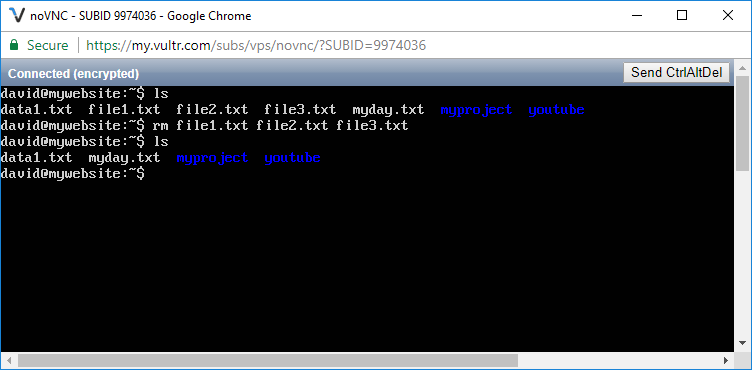
Web Aug 30 2021 nbsp 0183 32 Without options you can use it to delete files But to delete directories you need to use the options for this command The options are as follows r quot recursive quot this option allows you to delete folders and recursively remove their content first Web Jan 9 2019 nbsp 0183 32 How to delete files in Linux Let me show you various cases of removing files 1 Delete a single file If you want to remove a single file simply use the rm command with the file name You may need to add the path
Web Jul 19 2022 nbsp 0183 32 Use the rm command when you re sure you re ready to erase data permanently Unlike trash commands there is no unremove command so use rm judiciously To delete a file use rm file ls dir3 dir2 file3 rm dir3 file3 ls dir3 dir2 To delete a directory and its contents use the r or R option with rm