Delete Commit In Gitkraken Add commit fixup Option Into The Repositories View Issue 1031 How To Delete A GitHub Repository Rewind COMMIT Registreren Git Gitkraken How To Cherry Pick A Commit In GitKraken YouTube Web Oct 13 2016 nbsp 0183 32 In this video Git users will learn how to make and undo commits in GitKraken Learn the quick keyboard shortcuts to stage commit and undo Show more Show more
Web Let s review the many actions you can easily perform with your commits with GitKraken including how to add amend delete and more In GitKraken when you modify add delete or rename any files in your repository your Work In Progress or WIP will display at the top of the graph Web Pick you can keep the commit as is in the history Drop remove the commit from the history Squash combine the commit with the one before it Reword change the commit message Get step by step instructions on how to perform a Git rebase
How To Cherry Pick A Commit In GitKraken YouTube Git Commit How To Git Commit Learn Git Solved Going Back To A Previous Commit In Gitkraken 9to5Answer Commit In GitKraken Client How To Commit Changes Interactive Rebase With GitKraken Client Rewrite Commit History I Want To Delete Or Remove Last Commit In Git Git Questions YouTube GitLab Commit 2020 GitLab Git Gitkraken Commit In GitKraken Client How To Commit Changes
Delete Commit In Gitkraken
 Delete Commit In Gitkraken
https://user-images.githubusercontent.com/58669455/82014276-a781ae80-9652-11ea-8032-41890ba1506d.png
Web Aug 2 2021 nbsp 0183 32 Hi If possible I would welcome a new feature in GitKraken When I right click on any commit there would be a possibility to Remove commit from history I know it is possible to do it many different ways but this feature would
Pre-crafted templates provide a time-saving solution for creating a varied variety of documents and files. These pre-designed formats and designs can be made use of for various personal and professional jobs, including resumes, invites, leaflets, newsletters, reports, discussions, and more, enhancing the content production procedure.
Delete Commit In Gitkraken

How I Can See File Changed Of Multiple Commits In Commits View Issue
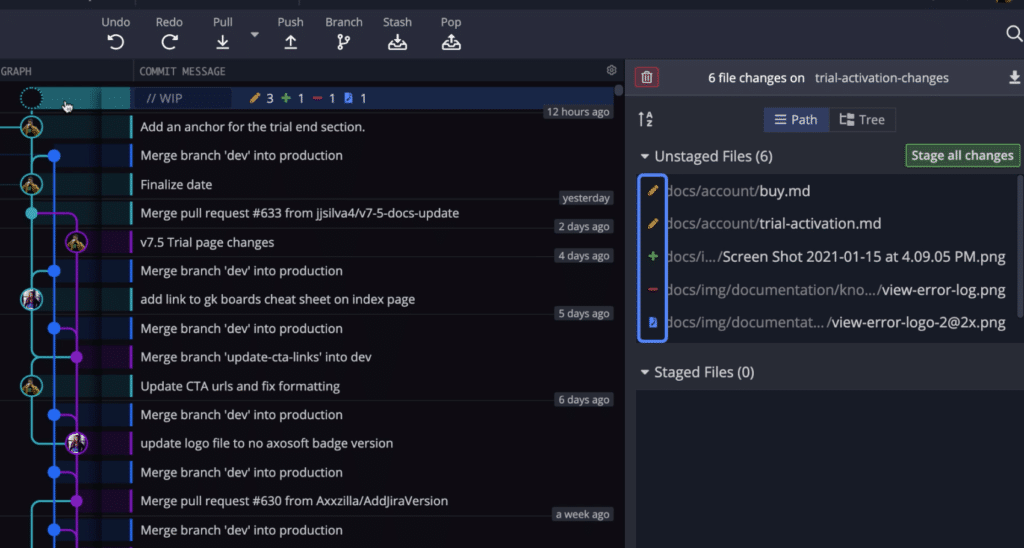
Git Commit How To Git Commit Learn Git

Solved Going Back To A Previous Commit In Gitkraken 9to5Answer

Commit In GitKraken Client How To Commit Changes
I Want To Delete Or Remove Last Commit In Git Git Questions YouTube

GitLab Commit 2020 GitLab

Web Nov 17 2016 nbsp 0183 32 2 Answers Sorted by 1 If you delete a file that is checked in be it by command line windows explorer or whatever GitKraken will realize and the file will appear under quot Unstaged Changes quot as deleted You can stage and commit the file to remove it from your repository
Web with GitKraken Download GitKraken Client Free Learn how to Git undo a commit including how to undo your last Git commit Git undo a local commmit and how to Git undo your last commit and keep the changes

Web Aug 16 2018 nbsp 0183 32 Modified 5 years 6 months ago Viewed 281 times 0 I m using GitKraken The current history for my repo looks like this However I want to remove the most recent commit and merge so that my history looks like this I want to do this through GitKraken alone without using the command line

Web Learn how to Git commit and save your work in GitKraken Client Learn to create commit templates amend reset and revert commits

Web Delete a file from a previous commit by right clicking that file in the commit panel and selecting the Delete file context menu option Delete any file in the repo by ticking the View all files option right clicking the file and selecting the
Web Delete the last commit For example your last commit git push origin aa61ab32 master Now you want to delete this commit then an Easy way to do this following Steps First reset the branch to the parent of the current commit Force push it to the remote git reset HEAD hard git push origin f For particular commit you want to reset is Web Aug 10 2021 nbsp 0183 32 Using git reset in GitKraken Aug 10 2021 Reset is a very neat feature in Git if you want to go back in time and make a change to one or several commits E g if you find an error typo bug etc that you want to edit or remove And in GitKraken this is of course only a few clicks away I have for this demo created a repo with a few commits
Web The following actions can be undone in GitKraken Client Checkout Commit Discard Delete branch Remove remote Reset branch to a commit You can also redo actions if you undo them by mistake Have feedback about this article Did we miss something Let us know Note this form is for webpage feedback only For support contact us On this page