Define Odbc Data Source Connect To An ODBC Data Source SQL Server Import And Export Wizard Defining A New Datasource With The ODBC Data Source Administrator Copy Data From And To ODBC Data Stores Azure Data Factory Azure File Kissing Prairie Dog Edit 3 jpg Wikimedia Commons LEGO Star Wars Das Erwachen Der Macht Deluxe Edition PS4 NEU OVP If the data source that contains your organization chart information isn t listed on this page either the database doesn t exist or the database is not defined as an ODBC data source To create a new database and define it as an ODBC data source or to define an existing database as an ODBC data source click Create Data Source
First and foremost ODBC is a specification for a database API This API is independent of any one DBMS or operating system although this manual uses C the ODBC API is language independent The ODBC API is based on the CLI specifications from Open Group and ISO IEC ODBC Data Source Definition Once the ODM data source shortcut has been created on the ODM Server you can define the ODBC data source To define an ODBC data source on the ODM Server Data Sources ODBC to open the ODBC Data Source Administrator dialog From the User or SystemAdd to open the Create New Data Source dialog Finish to open the
LEGO Star Wars Das Erwachen Der Macht Deluxe Edition PS4 NEU OVP Oracle Odbc Driver For Sql Server Fivelop Se Connecter Une Source De Donn es PostgreSQL Assistant Importation bertragen Von ODBC Datenverbindungen Auf Einen Anderen Computer ODBC Data Sources Network Inventory ODBC DATA SOURCE YouTube Wie Zu Dividieren MS Access 2016 Datenbank MS Access Blog Mysql Matlab Query Builder Define ODBC Data Source Stack Overflow Argus Data Insights Deutschland
Define Odbc Data Source
 Define Odbc Data Source
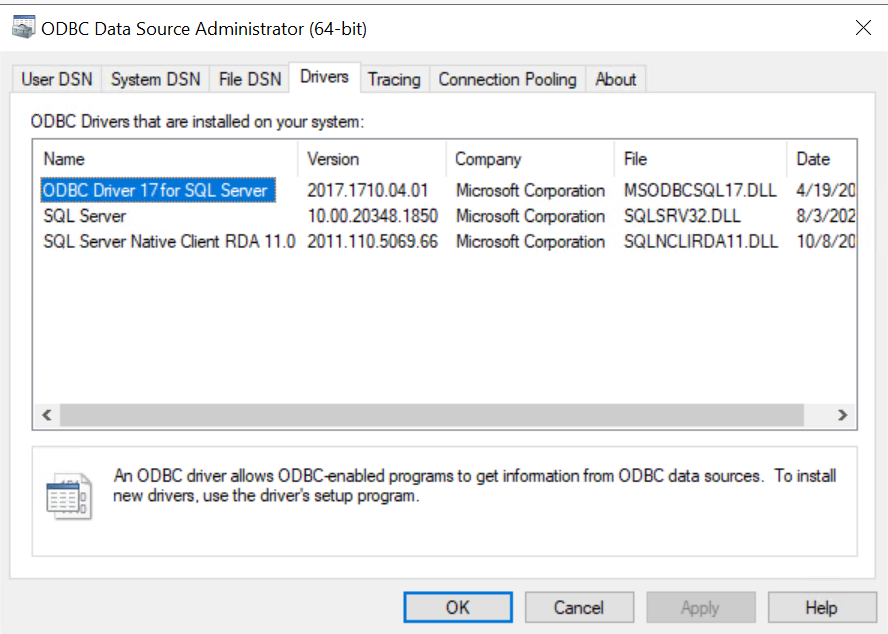
https://learn.microsoft.com/en-us/sql/integration-services/import-export-data/media/installed-64-bit-odbc-drivers.png?view=sql-server-ver16
Follow these steps to define an ODBC data source Open the Windows Control Panel and select Administrative Tools Select Data Sources to open the ODBC Data Source Administrator dialog Click the User DSN tab to display the current list of user data sources Click Add to search for the driver and include it in the list if the driver for your
Templates are pre-designed files or files that can be utilized for numerous functions. They can conserve effort and time by supplying a ready-made format and layout for creating various sort of material. Templates can be utilized for individual or expert tasks, such as resumes, invites, flyers, newsletters, reports, discussions, and more.
Define Odbc Data Source

Gel schte WhatsApp Nachricht Sichtbar Machen So Geht s
Oracle Odbc Driver For Sql Server Fivelop

Se Connecter Une Source De Donn es PostgreSQL Assistant Importation

bertragen Von ODBC Datenverbindungen Auf Einen Anderen Computer

ODBC DATA SOURCE YouTube

Wie Zu Dividieren MS Access 2016 Datenbank MS Access Blog

There are two ways you can define an ODBC data source name On a client computer open Administrative Tools in Control Panel and double click Data Sources ODBC This will open the ODBC Data Source Administrator which you can use to create a DSN In an ODBC application call SQLConfigDataSource A SQL Server data source contains

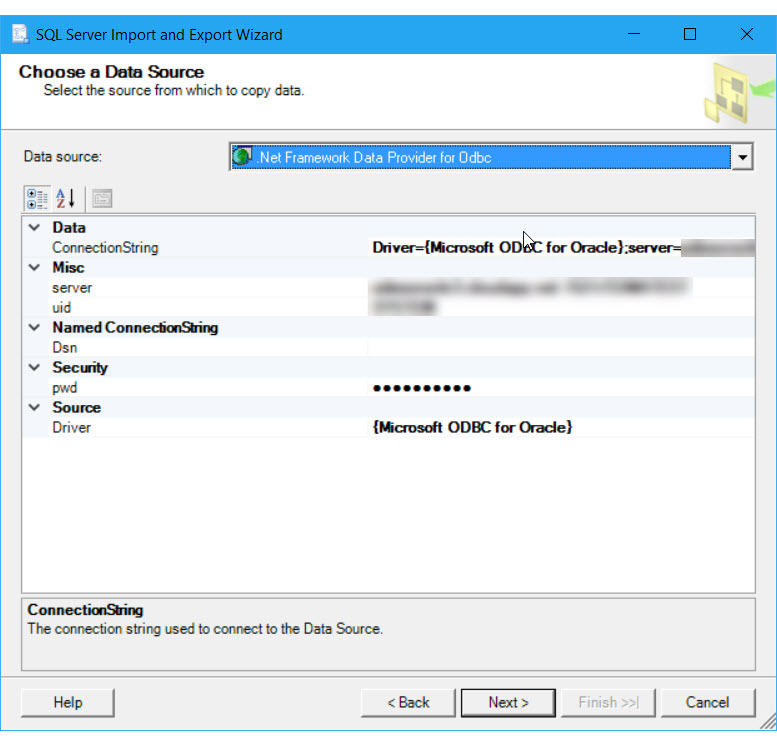
Step 1 Select the data source The ODBC drivers installed on your computer aren t listed in the drop down list of data sources To connect with an ODBC driver start by selecting the NET Framework Data Provider for ODBC as the data source on the Choose a Data Source or Choose a Destination page of the wizard

If you use both properties the CommandText property s value takes precedence For OLE DB sources the CommandType property describes the value of the CommandText property For ODBC sources the CommandText property functions exactly like the SQL property and setting the property causes the data to be refreshed

It is the name that applications use to request a connection to an ODBC Data Source In other words it is a symbolic name that represents the ODBC connection It stores the connection details like database name directory database driver UserID password etc when making a connection to the ODBC

Data sources usually are created by the end user or a technician with a program called the ODBC Administrator The ODBC Administrator prompts the user for the driver to use and then calls that driver The driver displays a dialog box that requests the information it needs to connect to the data source
To define an ODBC data source follow these steps Procedure Open the Server Explorer Right click the Processesicon beneath the server on which you want to create the process and choose Create New Process The TurboIntegrator window opens Choose the top ODBCin the Data Source Type box displays the fields required to define an ODBC source Installation and Configuration Guide Step 2 Define an ODBC Data Source You must define an ODBC data source on the Search Server to connect to Microsoft SQL Server The Table Loader which directly loads data into the database You must create ODBC data sources for each database that you plan to access
Data sources are the databases or files accessed by a driver and are identified by a data source name DSN Use the ODBC Data Source Administrator to add configure and delete data sources from your system The types of data sources that can be used are described in the following table Expand table