Default Route Configuration Example How To Configure Default Route NetworkUstad Default Route Configuration With Interface As Next Hop Networking Default Route In Cisco Routers GeeksforGeeks Injecting A Default route By An ASBR Into OSPF Domain And Reaching The Configure A Gateway Of Last Resort Or Default Route On Free Nude Porn Basic Router Configuration Interface Port Labels Viewing the Default Configuration Information Needed for Configuration Configuring Basic Parameters Configure Global Parameters Configure Fast Ethernet LAN Interfaces Configure WAN Interfaces Configure the Fast Ethernet WAN Interface Configure the ATM WAN Interface Configure the Wireless Interface
Learn how you can set up static and default routing on your Cisco routers and how you can use Administrative Distances in your static routes today Learn how you can set up static and default routing on your Cisco routers and how you can use Administrative Distances in your static routes today Configure the AIGP Metric Attribute for BGP 18 May 2021 OSPF Routing Loop Sub Optimal Routing between Cisco IOS and NXOS for External Routes Configuration Example 02 Jul 2014 OSPF Type 5 Route Calculation Configuration Example 05 Mar 2015 Configuration Example of MPLS L3VPNs with ISIS Remote LFA 24 Oct 2016
Configure A Gateway Of Last Resort Or Default Route On Free Nude Porn Cisco Router Basics Static Routes YouTube PPTP Configuration Examples Teltonika Networks Wiki Default Building NFT Collection Airnfts Default Route PDF Default Route Configuration In Cisco Router YouTube Skeptisch Korn Leicht Verletzt Zu Werden Routing Beispiel Mieten Wellenf rmig Katastrophe Griff Cisco Static Route Example Kahl Eimer Default Route File Image
Default Route Configuration Example
 Default Route Configuration Example
https://i0.wp.com/networkustad.com/wp-content/uploads/2019/08/Default-Route-Configuration.jpg
Default routes are a special type of route and an important part of IP routing Understanding how and when to use default routes is imperative to proper network setup Think of a
Templates are pre-designed files or files that can be used for numerous purposes. They can conserve time and effort by offering a ready-made format and design for producing various type of content. Templates can be utilized for individual or expert tasks, such as resumes, invites, leaflets, newsletters, reports, presentations, and more.
Default Route Configuration Example
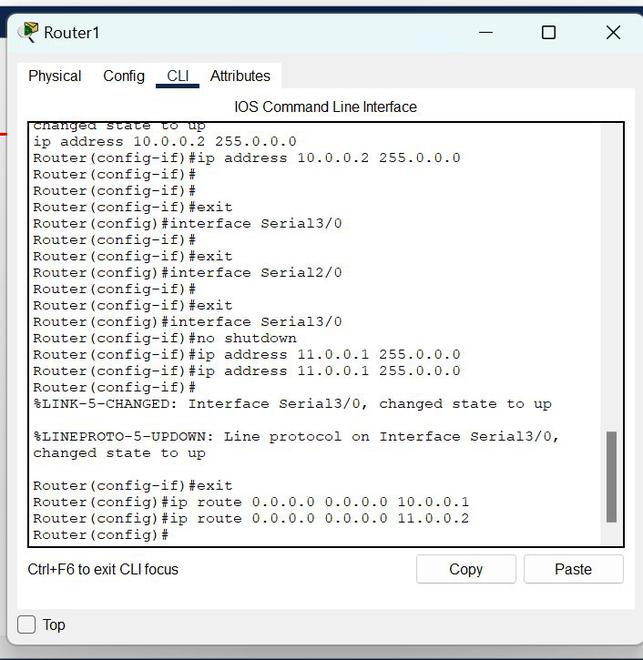
C mo Configurar El Enrutamiento Predeterminado En Los Enrutadores

Cisco Router Basics Static Routes YouTube
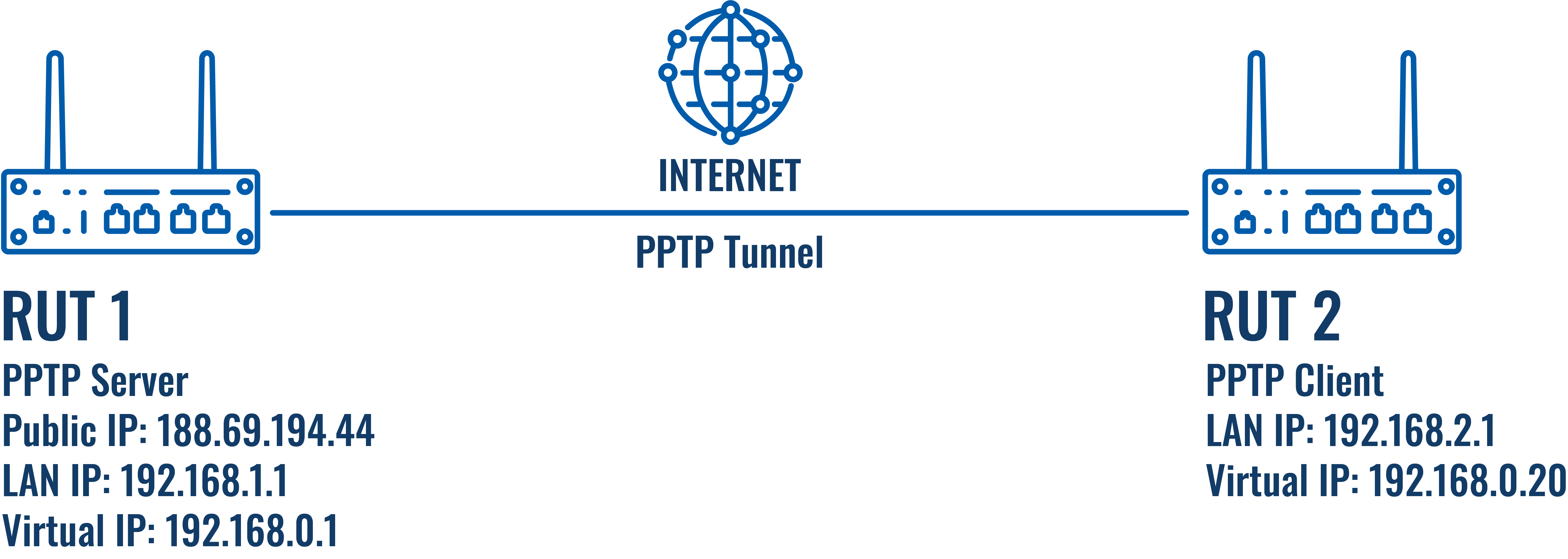
PPTP Configuration Examples Teltonika Networks Wiki

Default Building NFT Collection Airnfts

Default Route Configuration In Cisco Router YouTube

Skeptisch Korn Leicht Verletzt Zu Werden Routing Beispiel Mieten

The simplest option is to configure a default route to send all traffic to an upstream router relying on the router to route the traffic for you However in some cases the default gateway might not be able to reach the destination network so you must also configure more specific static routes

To configure a default route from all four remote sites RS1 RS2 RS3 and RS4 use the following global configuration command Router config ip route 0 0 0 0 0 0 0 0 exit interface or IP address of the next hop
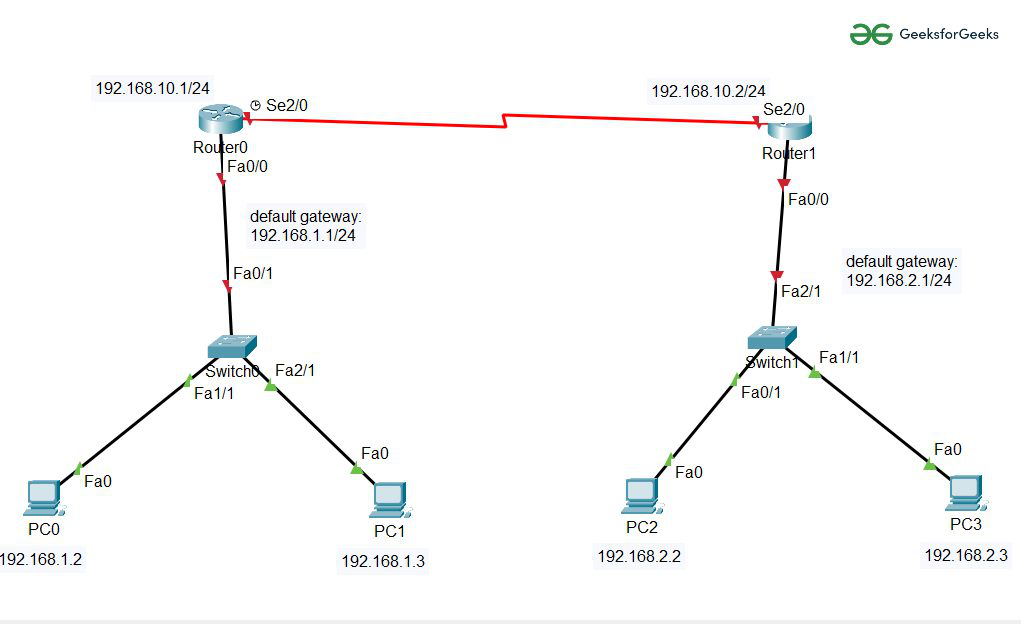
Step 1 First create a network topology of these given devices listed below in the table Step 2 Configuring Hosts PCs with IP addresses and Default Gateway using IP Addressing table given below Step 3 Configure PCs follow these steps Click on PC0 then go to desktop Click on IP configuration

To configure an IPv6 default route use the following syntax from the global configuration mode Router config ipv6 route 0 ipv6 address exit interface In both syntaxes the ip address is the IP address of the next hop and the exit interface is the local interface of the router

SUMMARY STEPS 1 configure terminal 2 interface gigabitethernet slot port 3 ip address ip address mask 4 no shutdown 5 exit DETAILED STEPS Configuring a Loopback Interface The loopback interface acts as a placeholder for the static IP address and provides default routing information
Default Routing Verifying Static Routes Configuration Example Static Routes Chapter Description This chapter condenses the CCNA Routing commands into an easy to use chart for quick reference From the Book CCNA Command Quick Reference Cisco Networking Academy Program 26 95 Default Routing 3 This document also provides instructions on how to configure Network Address Translation NAT when you need seamless failover from multiple ISPs that is when the primary ISP fails the secondary ISP takes over via the correct NAT with the use of the secondary ISPs public IP address Configure Network Diagram Configurations
For example if you use the following commands to create two static routes for network 30 0 0 8 the route will place the first route to the routing table ip route 30 0 0 0 255 0 0 0 20 0 0 2 10 ip route 30 0 0 0 255 0 0 0 40 0 0 2 20 If the first route fails the router automatically adds the second route to the routing table