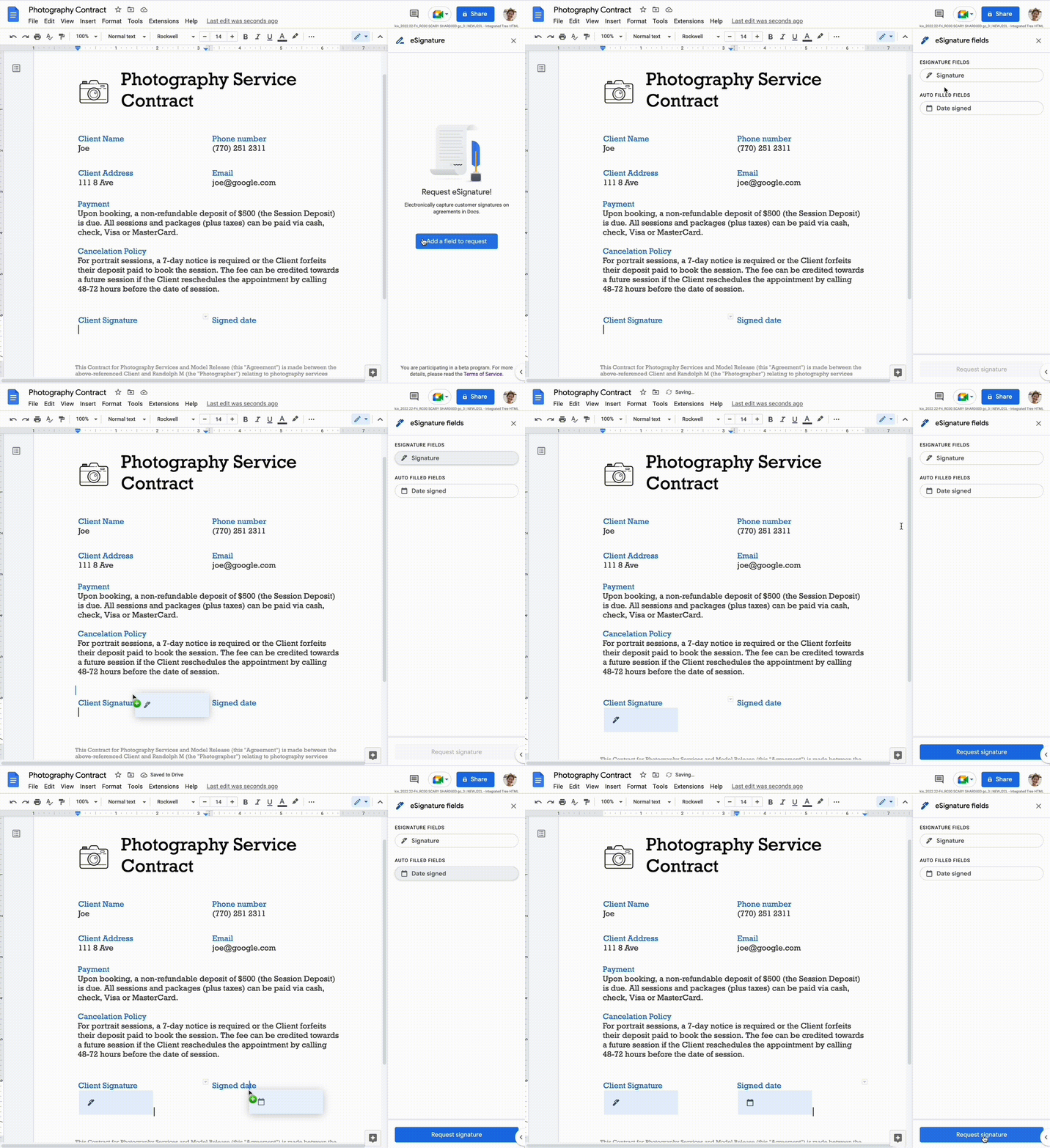
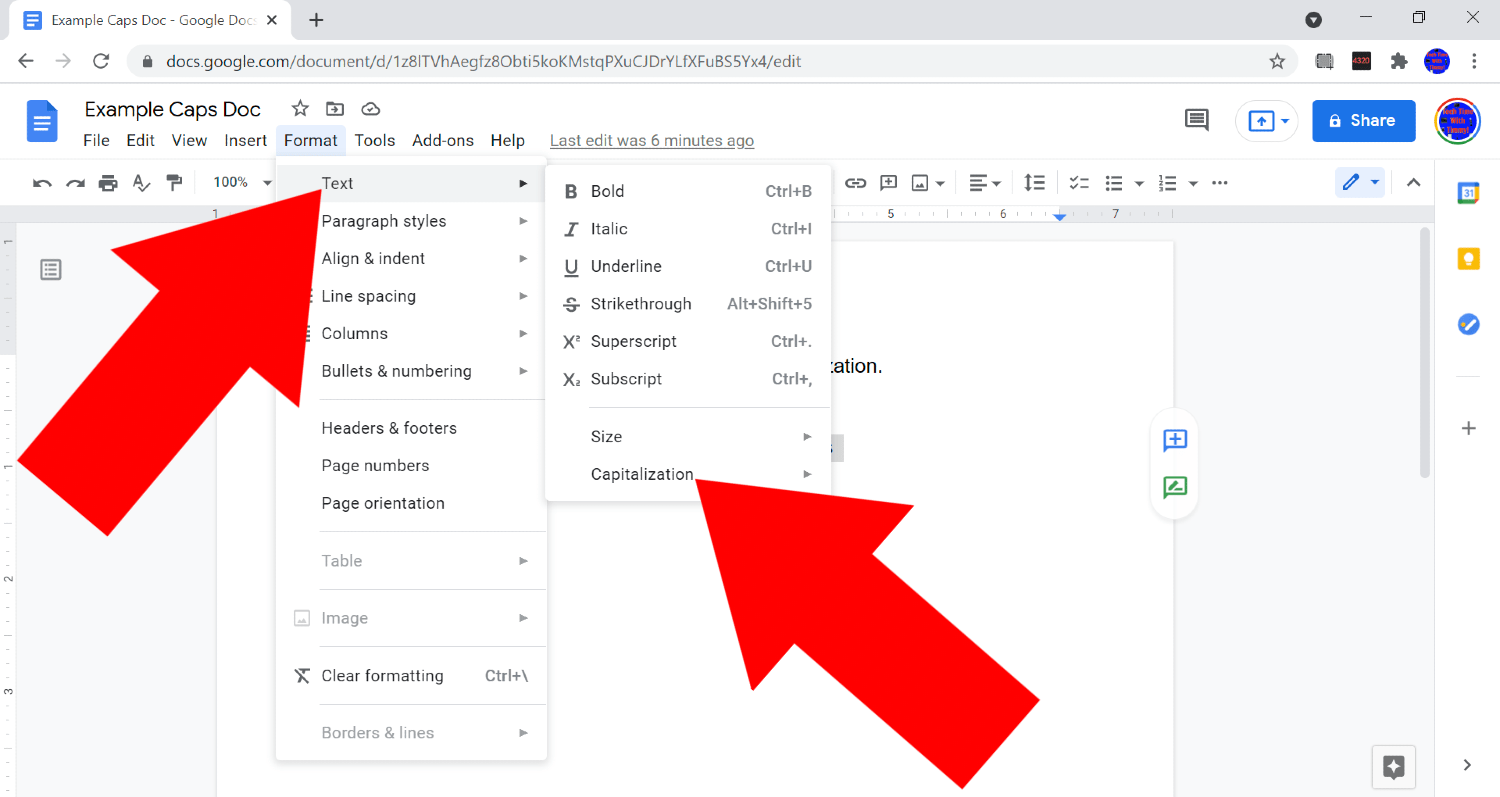
Date Formats In Google Docs You May Soon Be Able To Sign Documents Right In Google Docs Digital Sign In Sheet Template Google Docs Just Want A Script Breakdown Sheet How To Create A New Document In Google Docs Best Make A Timeline Google Docs Create In Office How To Format A Screenplay In Google Docs Web Apr 4 2022 nbsp 0183 32 Creating a custom format for the time works the same way as the date Head to Format gt Number gt Custom Date and Time in the menu to open the format window Related To start with an existing format select it at the bottom to place its elements in the editing box and remove those you don t want to use To add elements click the arrow on
Web May 30 2018 nbsp 0183 32 1 My question is similar to Google Docs date in dd MM yy format and How can I change the input format for dates in Google Docs spreadsheet BUT unlike those answers I m trying to get the format with years first which is non ambiguous more tech friendly and can be sorted alphabetically Web Select the locale with the date format you want for example US is mm dd yyyy and UK is dd mm yyyy Updated
How To Format A Screenplay In Google Docs Creare Documenti In Google Docs Come Funziona TuttoDigitale Professionally Designed Written Free Product Development Plan Template How To Adjust Image Size In Google Docs Acaconsultancy Google Sheets Date Format Which Why And How Coupler io Blog Google Docs Deleted Files Online Sale UP TO 68 OFF How To Add A Google Maps Location To Google Docs Reviews App How To Add Table Of Contents In Google Docs Better Tech Tips Vrogue How To Delete A Page In Google Docs SoftwareKeep How To Delete A
Date Formats In Google Docs
 Date Formats In Google Docs
https://storage.googleapis.com/gweb-uniblog-publish-prod/original_images/Insert.gif
Web Apr 26 2021 nbsp 0183 32 To change the default date format to quot MM DD YYYY quot set the Locale value to quot United States quot or another region that uses that format To save the change click quot Save Settings quot After changing your locale any dates already entered into the Sheet will be automatically translated to the date format of the locale you chose and any date values
Templates are pre-designed files or files that can be utilized for various purposes. They can conserve effort and time by offering a ready-made format and layout for developing various type of content. Templates can be utilized for personal or expert jobs, such as resumes, invitations, leaflets, newsletters, reports, discussions, and more.
Date Formats In Google Docs

How To Do Subscript In Google Docs

Creare Documenti In Google Docs Come Funziona TuttoDigitale

Professionally Designed Written Free Product Development Plan Template
How To Adjust Image Size In Google Docs Acaconsultancy
Google Docs Deleted Files Online Sale UP TO 68 OFF
How To Add A Google Maps Location To Google Docs Reviews App
Web Sep 4 2021 nbsp 0183 32 Format a Date in Google Docs Create an Event Using the Date Edit an Interactive Date If you want to include an interactive date in your document Google Docs gives you simple ways to do it Once you insert it you can customize the format and use the date to schedule an event in Google Calendar

Web Google Docs Editors NETWORKDAYS INTL WORKDAY INTL EPOCHTODATE function Converts a year month and day into a date Sample Usage DATE 1969 7 20 DATE A2 B2 C2 Syntax DATE year

Web To apply a custom date or time format to your spreadsheet On your computer open a spreadsheet in Google Sheets Highlight the data you want to format Click Format Number Click Custom

Web To change the date format to dd mm yy go to your Google Apps gear wheel gt settings gt Language gt click the drop down box and select English UK that gets you dd mm yyyy by default Sorry if you are anything but British but that seems the best way to do it as a user

Web Jan 23 2012 nbsp 0183 32 DATEVALUE returns integers that can be used in formulas To get dates change the cell format to Date If providing an explicit string input to DATEVALUE rather than a cell reference surrounding quotation marks are required Some date formats are not understood by Google Sheets
Web Mar 15 2023 nbsp 0183 32 Default Google Sheets date format Select all cells you d like to format Go to Format gt Number in the spreadsheet menu and pick Date to see the date only or Date time to get both date and time in a cell The integers successfully turn into the format that you ll recognize at a glance Web Click Format Conditional formatting A toolbar will open to the right Create a rule Single color Under quot Format cells if quot choose the condition that you want to trigger the rule Under
Web Feb 23 2016 nbsp 0183 32 You should convert your dates in formatted strings when you insert them in your doc in the replace loop The function to use is Utilities formatDate and is documented here It is quite straightforward to use example var formattedDate Utilities formatDate new Date quot GMT quot quot yyyy MM dd quot