Date Format In Google Sheets Formula Date Format Google Sheets Formula Catalog Library Date Format Google Sheets Formula Catalog Library Use Different Date Format On Google Sheets Chart Stack Overflow How To Use Conditional Formatting Based On Date In Google Sheets How To Use Google Sheets To Automatically Format Dates In DD MM YYYY To change date format in Google Sheets follow these steps Select the cells containing the dates that you want to format Click More formats on the top menu
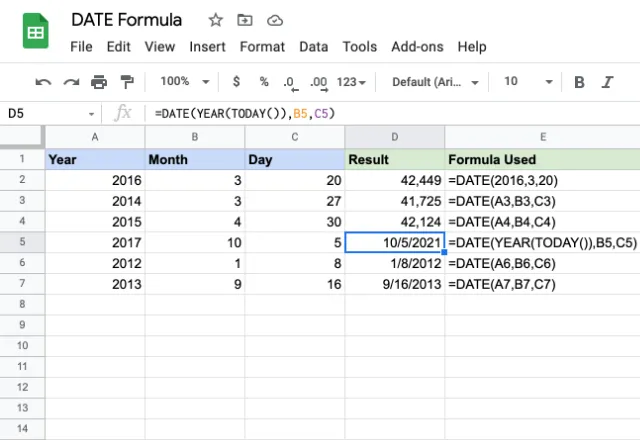
Talha Faisal Last updated November 23 2023 There are many methods to change the date format in Google Sheets luckily they re all pretty straightforward In Step 1 First select an empty cell to place the DATE formula Step 2 Type DATE to start the DATE formula Step 3 Indicate the year month and date of the desired date in that order Hit
How To Use Google Sheets To Automatically Format Dates In DD MM YYYY How To Use Google Sheets To Automatically Format Dates In DD MM YYYY Google Sheets Date Format Which Why And How Coupler Io Blog Hot Sex Setting A Default Date Format In Excel Pixelated Works How To Change Date Format In Google Sheets And Convert Date To Number International Date Format Beinyu How To Change Date Format In Google Sheets And Convert Date To Number How To Change The Date Format In Google Sheets Easy Methods Forms app How To Change Date Format In Google Sheets And Convert Date To Number
Date Format In Google Sheets Formula
 Date Format In Google Sheets Formula
https://blog.sheetgo.com/wp-content/uploads/2021/10/DATE-formula-in-Google-Sheets-1.png
Select the cell where you want the date and go to Format Number Custom Date and Time in the menu When the Custom Date and Time Formats window opens
Templates are pre-designed documents or files that can be utilized for various purposes. They can save effort and time by providing a ready-made format and design for creating various type of content. Templates can be used for individual or expert tasks, such as resumes, invites, flyers, newsletters, reports, presentations, and more.
Date Format In Google Sheets Formula
Setting A Default Date Format In Excel ManyCoders

How To Use Google Sheets To Automatically Format Dates In DD MM YYYY

Google Sheets Date Format Which Why And How Coupler Io Blog Hot Sex

Setting A Default Date Format In Excel Pixelated Works

International Date Format Beinyu
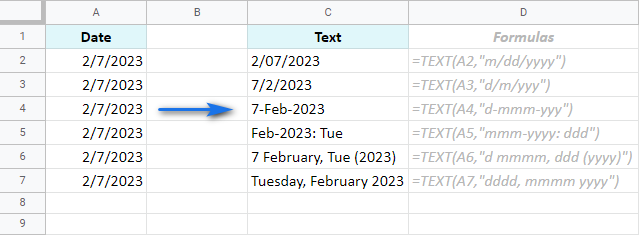
How To Change Date Format In Google Sheets And Convert Date To Number

515 rowsDate DATE DATE year month day Converts a provided year month
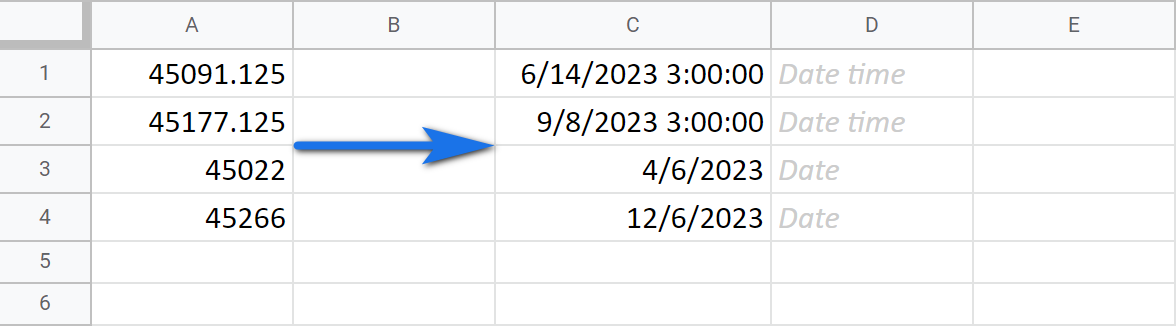
Format dates in Google Sheets manually In the following dataset let s change the format of data in column J from yyyy mm dd into mm dd yyyy For this select the range J2 J11 or entire column and go

DATEVALUE returns integers that can be used in formulas To get dates change the cell format to Date If providing an explicit string input to DATEVALUE rather
There are plenty of Google Sheets date functions but the most basic is DATE Quite simply you enter numbers representing a year a month and a day and the formula returns these values in a date format For example

Using the following formula you can combine cells A2 B2 and C2 to form a complete date DATE A2 B2 C2 To assemble a date in the correct format you can
Google Sheets provides three functions for this purpose YEAR MONTH and DAY Each of these functions takes a date serial number as an argument and returns the Sample Usage DATE 1969 7 20 DATE A2 B2 C2 Syntax DATE year month day year The year component of the date month The month component of the date day The
Step 1 Select the cell or range you want to format then click on the Format menu hover your mouse over the Number submenu to expand it and choose the Date