Create Ssh Key Ubuntu 20 04 SSH Keys | How to Setup in Ubuntu 20.04 - YouTube Ubuntu 20.04 SSH Server - Linux Tutorials - Learn Linux Configuration Generating and Working with SSH Keys on Ubuntu 20.04 | by Maduka Jayawardana | Medium Ubuntu 20.04 SSH Server - Linux Tutorials - Learn Linux Configuration How to remote SSH to Ubuntu Server 20.04 root Without Password Using Windows Command Prompt - NetworkReverse.com Generate SSH keys on Ubuntu When you start an ssh session from the ssh prompt input these commands ssh keygen t rsa To create a new keypair with your email address as a comment type the following command ssh keygen t RSA b 4096 C your email domain The output is Generating public private rsa key pair
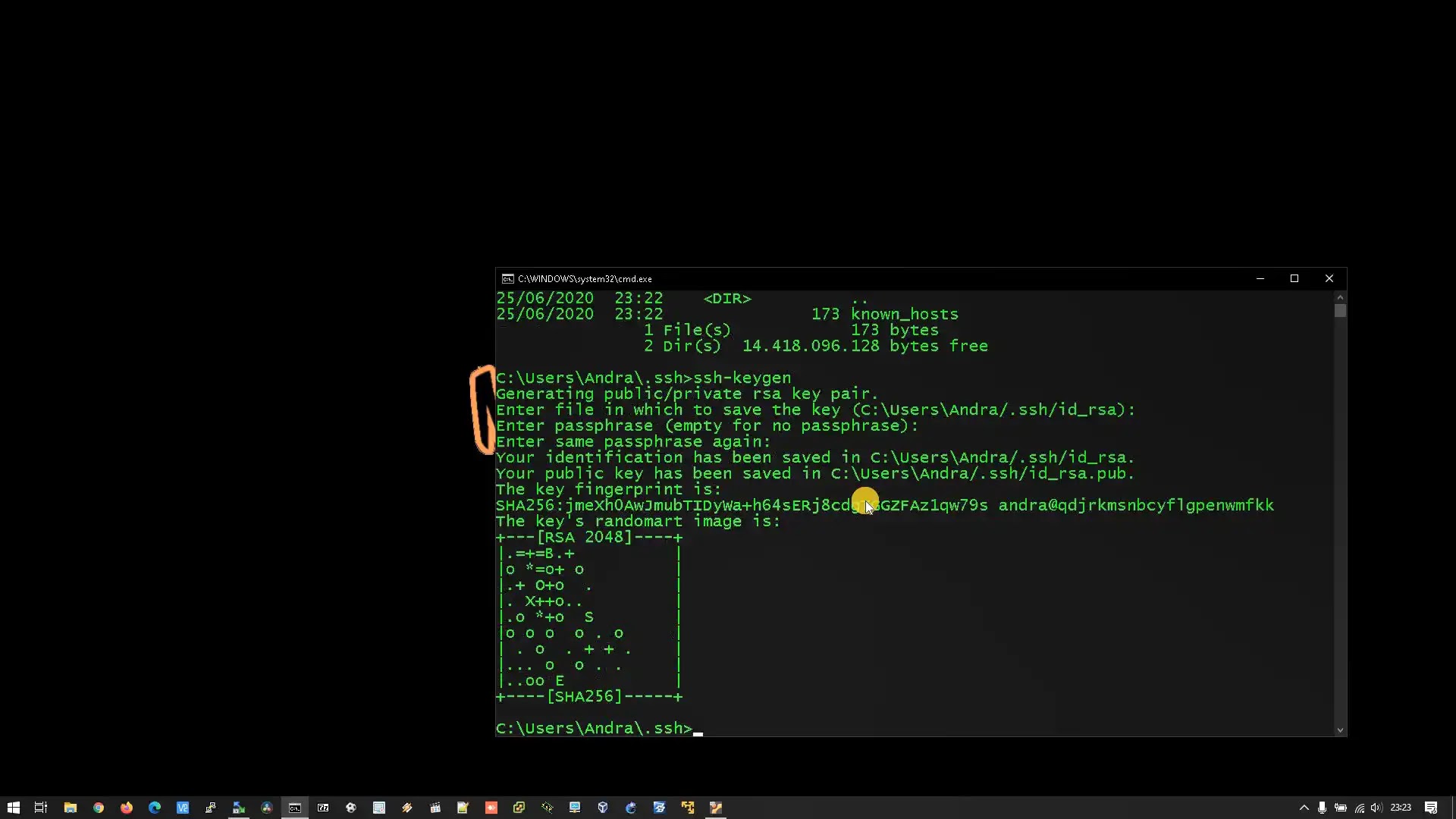
The first step is to create a key pair on the client machine usually your computer ssh keygen By default recent versions of ssh keygen will create a 3072 bit RSA key pair which is secure enough for most use cases you may optionally pass in the b 4096 flag to create a larger 4096 bit key How to Setup SSH keys on Ubuntu 20 04 SSH protocol is used for establishing a secure connection between a client and its host or server It uses the public key based as well as password based mechanism It is supported by almost every Linux based OS In this post we will learn about SSH key generation and connecting to remote servers
How to remote SSH to Ubuntu Server 20.04 root Without Password Using Windows Command Prompt - NetworkReverse.com How to Setup SSH Keys on Ubuntu 20.04 - Cloudbooklet How to Set Up SSH Keys on Linux - Ubuntu 20.04 - YouTube How To Install and Enable SSH Server on Ubuntu 20.04 – devconnected raspberrypi - Why is an SSH public key being installed on my new Ubuntu 20.04.1 instance before I can log in for the first time? Am I being hacked? - Ask Ubuntu Allow SSH root login on Ubuntu 20.04 Focal Fossa Linux - Linux Tutorials - Learn Linux Configuration Ubuntu 20.04 Initial Server Setup - DevAnswers.co Install Ubuntu Server | Ubuntu Ubuntu Server 20.04 installieren | STÜBER SYSTEMS Blog
Create Ssh Key Ubuntu 20 04
 Create Ssh Key Ubuntu 20 04
https://i.ytimg.com/vi/VvqJ5hZnpJ4/maxresdefault.jpg
How to set up ssh keys on ubuntu server 20 04 Louis Sanchez Jul 18 2021 an hour ago 2 1k Follow these steps to set up public key authentication Step 1 Change to the home directory with cd cd Step 2 Create a ssh directory if it doesn t already exist mkdir ssh Step 3 Create a file named authorized keys under the ssh directory
Pre-crafted templates offer a time-saving solution for creating a diverse range of documents and files. These pre-designed formats and designs can be utilized for different individual and expert jobs, including resumes, invites, flyers, newsletters, reports, presentations, and more, simplifying the content creation procedure.
Create Ssh Key Ubuntu 20 04
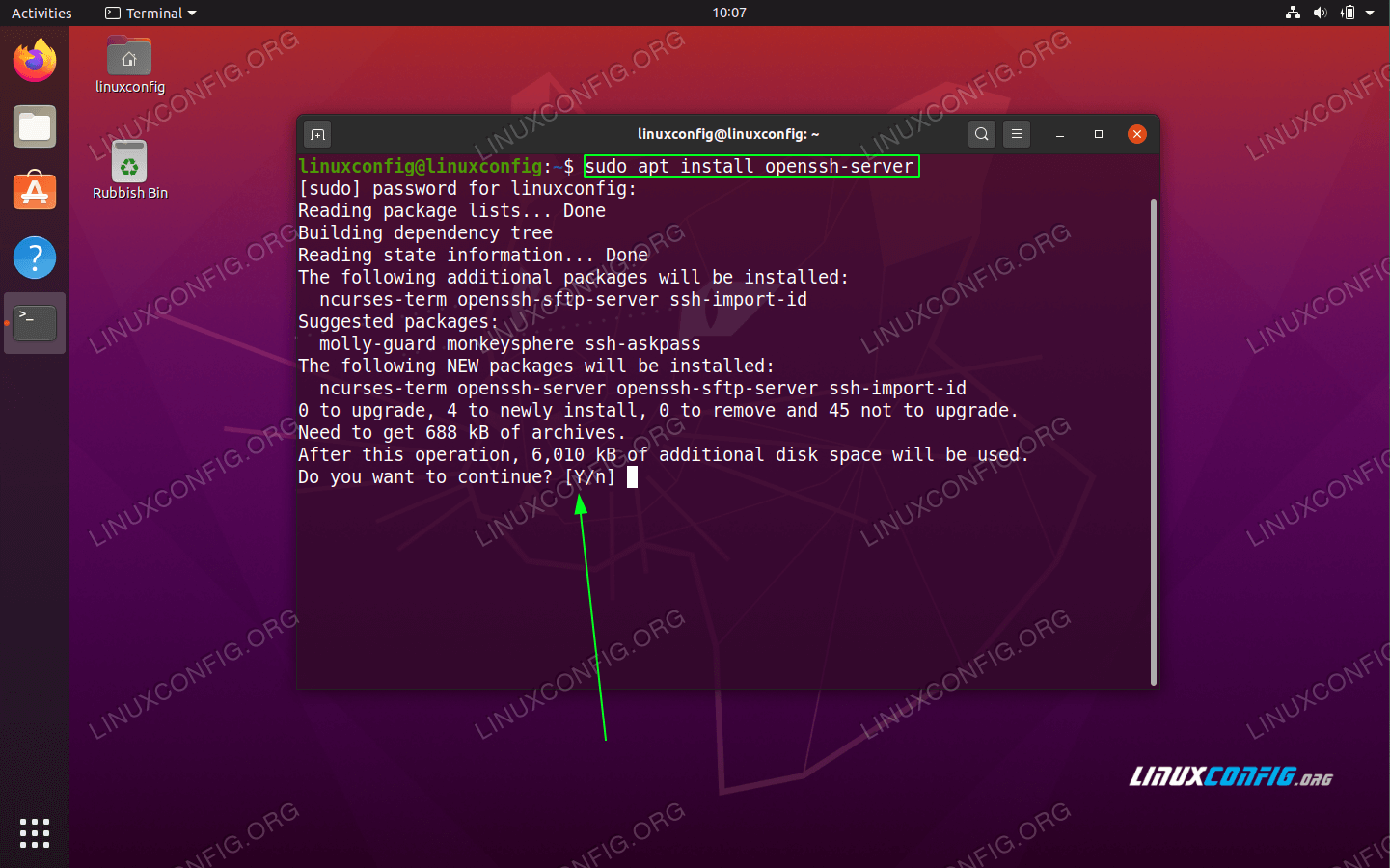
Ubuntu 20.04 SSH Server - Linux Tutorials - Learn Linux Configuration

How to Setup SSH Keys on Ubuntu 20.04 - Cloudbooklet

How to Set Up SSH Keys on Linux - Ubuntu 20.04 - YouTube
How To Install and Enable SSH Server on Ubuntu 20.04 – devconnected
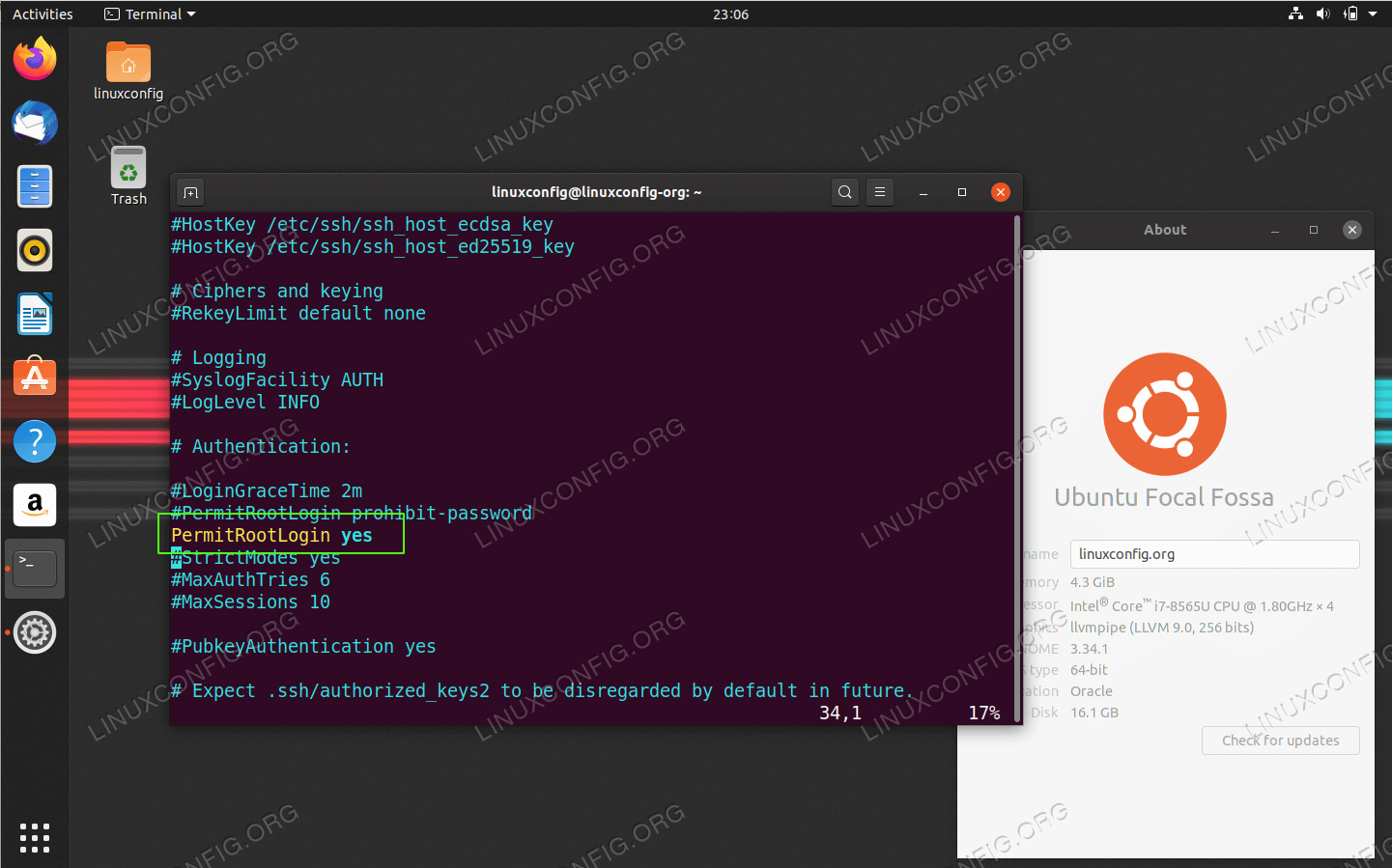
Allow SSH root login on Ubuntu 20.04 Focal Fossa Linux - Linux Tutorials - Learn Linux Configuration

Ubuntu 20.04 Initial Server Setup - DevAnswers.co

This article explains how to generate SSH keys on Ubuntu 20 04 systems We ll also show you how to set up an SSH key based authentication and connect to remote Linux servers without entering a password Creating SSH keys on Ubuntu The chances are that you already have an SSH key pair on your Ubuntu client machine

Steps to Creating SSH Keys on Ubuntu 20 04 1 Create the Key Pair To create a new SSH key on Linux run the following command on the client machine ssh keygen This will generate a key pair that consists of a public and a private key Use the following command ssh keygen To create an SSH key on Linux use ssh keygen
To Set Up SSH Keys on Ubuntu 20 04 follow the below steps that will help you to increase your knowledge Step 1 Putting together the Key Pair First create a key pair on the client your computer ssh keygen

This creates a new SSH key using the provided email as a label Generating public private ALGORITHM key pair When you re prompted to Enter a file in which to save the key you can press Enter to accept the default file location Please note that if you created SSH keys previously ssh keygen may ask you to rewrite another key in which case we recommend creating a custom named SSH key
Step 1 Create New User Create a new user with password disabled using the following command sudo adduser username disabled password Follow the prompts and confirm with Y which creates the user with the user s home directory in home username Grant sudo access to new user
Creating a Pair of SSH Keys These instructions were tested on Ubuntu Fedora and Manjaro distributions of Linux In all cases the process was identical and there was no need to install any new software on any of the test machines To generate your SSH keys type the following command ssh keygen The public key ssh id rsa pub will be inserted into the remote user s ssh authorized keys keys file once the user has been authenticated and the connection will be closed Output Number of key s added 1 Now try logging into the machine with ssh username server ip address and check to make sure that only the key s you wanted were
In the video below we show how to create and authorize SSH edb25519 keys to login to a Linux server running Ubuntu server 20 04 for example SSH keys are a more secure method of authentication than using a username and password and edb25519 is a more modern and less intensive algorithm then RSA