Copyright Symbol Code In Word Copyright Logo Chrome Copyright Symbol Free Stock Photo Public All Rights Reserved Copyright Logo Copyright Symbol Trademark Symbol Copyright Symbol Icon Black Color Flat Style Vector Image Make The Copyright Symbol On Windows Or MacOS Computers How To Insert A Copyright Or Trademark Symbol In Word 3 Ways With Verkko To insert the copyright symbol press Ctrl Alt C To insert the trademark symbol press Ctrl Alt T To insert the registered trademark symbol press Ctrl Alt R There s even a faster way to enter copyright and trademark symbols By using the default AutoCorrect feature type C T or R enclosed in parentheses such as c
Verkko 8 huhtik 2021 nbsp 0183 32 Inserting a copyright trademark or registered trademark symbol using keyboard shortcuts You can also use Ctrl keyboard shortcuts to insert special characters or symbols as follows Copyright press Ctrl Alt C Registered trademark press Ctrl Alt R Trademark press Ctrl Alt T 3 Verkko 5 marrask 2022 nbsp 0183 32 Place the cursor where you d like to insert the copyright symbol Press and hold the Alt key and then press quot 0169 quot using the numeric keypad Once you release the Alt key the copyright symbol will be inserted Inserting a Copyright Symbol Without a Numeric Keypad If your Windows PC doesn t have a numeric keypad you
How To Insert A Copyright Or Trademark Symbol In Word 3 Ways With How To Quickly Type Copyright Symbol In Word 2016 office365 Copyright Symbol Icon 568822 Vector Art At Vecteezy Free Download Registered Trademark Symbol Copyright Symbol Logo HTML Copyright Symbol YouTube How To Get Special Characters Using Alt Key Codes Or The Word Symbols What Is The Copyright Symbol On Keyboard Architectslasopa Copyright Symbol C Free Stock Photo Public Domain Pictures Copyright Logo Chrome Copyright Symbol Free Stock Photo Public
Copyright Symbol Code In Word
 Copyright Symbol Code In Word
https://banner2.cleanpng.com/20180429/ite/kisspng-sound-recording-copyright-symbol-trademark-logo-5ae68a53d88464.4010673115250581318869.jpg
Verkko 27 syysk 2021 nbsp 0183 32 Ctrl Alt C Note This copyright symbol shortcut works only in Microsoft Word for Windows If you need this symbol in a different document other
Templates are pre-designed documents or files that can be utilized for various purposes. They can save effort and time by providing a ready-made format and layout for creating various type of content. Templates can be used for personal or professional tasks, such as resumes, invites, leaflets, newsletters, reports, presentations, and more.
Copyright Symbol Code In Word
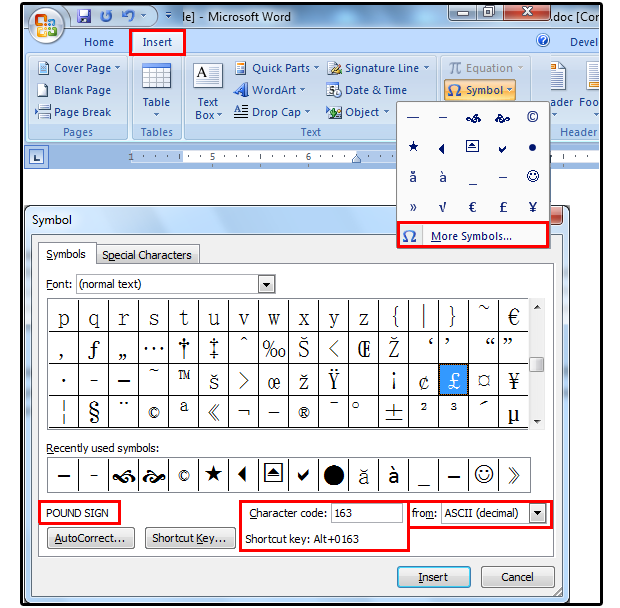
How To Get Special Characters Using Alt Key Codes Or The Word Symbols
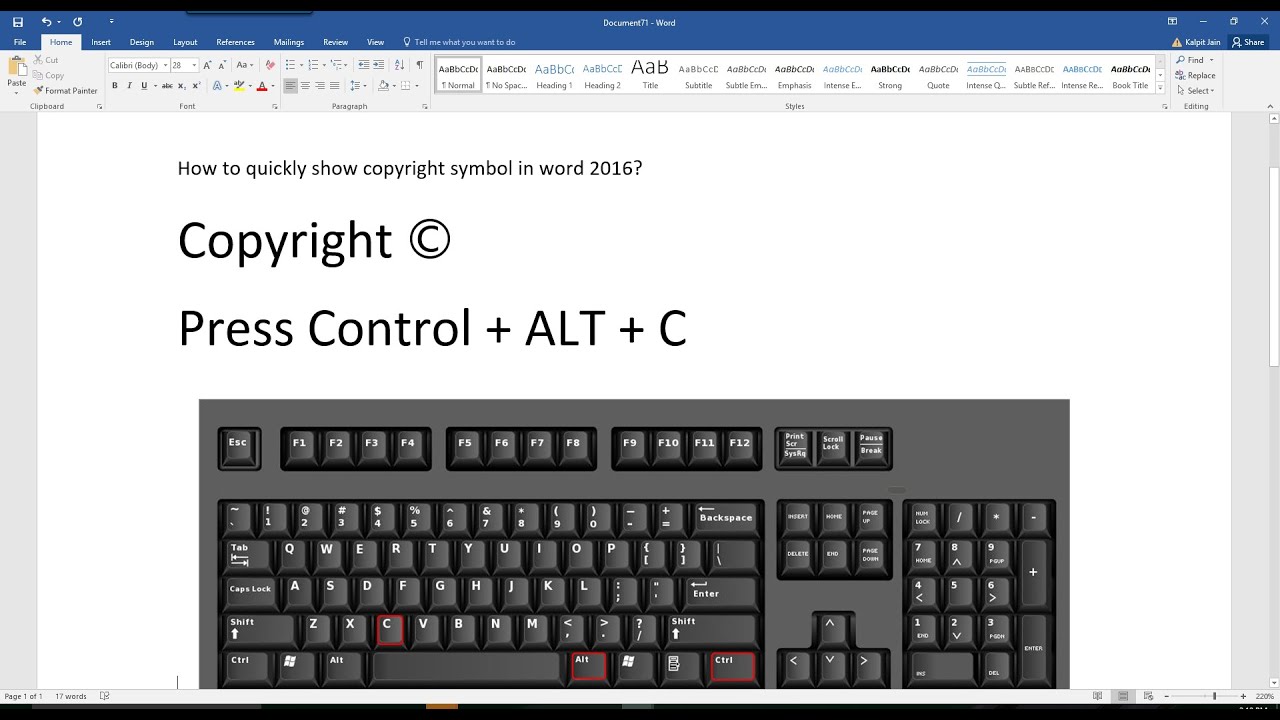
How To Quickly Type Copyright Symbol In Word 2016 office365

Copyright Symbol Icon 568822 Vector Art At Vecteezy

Free Download Registered Trademark Symbol Copyright Symbol Logo
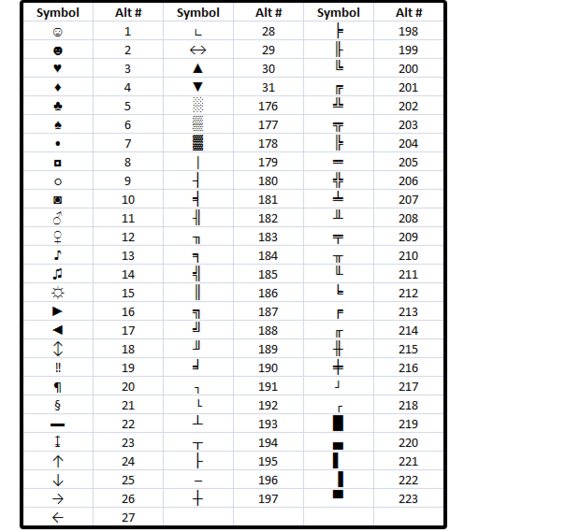
How To Get Special Characters Using Alt Key Codes Or The Word Symbols

What Is The Copyright Symbol On Keyboard Architectslasopa

Verkko Click a symbol in the immediate list or click More Symbols and then click the symbol you want Copyright and trademark symbols can also be added by using a keyboard shortcut For example To insert the copyright symbol press Ctrl Alt C To insert the trademark symbol press Ctrl Alt T

Verkko 23 tammik 2021 nbsp 0183 32 However the Windows shortcut for the Copyright Symbol that works across all applications is the alt code shortcut which is Alt 0169 will be discussed in the next section The Copyright Symbol shortcut for Microsoft Word is Ctrl Alt C

Verkko 18 maalisk 2021 nbsp 0183 32 Once our document is opened type in the ASCII code 00A9 where you want the copyright symbol inserted After that highlight the ASCII code by left clicking and dragging your mouse over the text Then press ALT X on your keyboard You should see the ASCII code transform into the copyright symbol

Verkko 26 tammik 2021 nbsp 0183 32 On the ribbon quot Insert quot gt quot Symbol quot gt quot Copyright Sign quot see quot Special Characters quot tab for Shortcut keys https support microsoft en us office insert a symbol in word 2a061ae9 5a6c 4407 b618 8dc3c9fd4f44

Verkko 1 marrask 2022 nbsp 0183 32 The copyright logo symbol can be made on a Windows computer with the numerical keypad The Alt code keyboard shortcut for the copyright symbol is Alt 0169 press and hold the Alt key while typing 0169 For most laptops and other compressed keyboards the process is different
Verkko For Windows users simply press down the Alt key and type 0169 using the numeric keypad then let go of the Alt key If you are using MS Word just type c and press the spacebar The below table contains all the shortcuts you need to type this Symbol on the keyboard for both Mac and Windows Verkko Last Updated January 2 2023 This wikiHow teaches you how to place a symbol such as the copyright symbol or the division sign in a Microsoft Word document You can do this in Microsoft Word for both Windows and Mac Method 1
Verkko Accessibility center Add characters like currency music or check mark symbols to your document