Copyright Symbol Alt Code How To Type The Copyright Symbol With Keyboard Shortcuts How To Type Anything Alt Alt alt QQzovo Sound Recording Copyright Symbol Registered Trademark Symbol Copyright Law Of The United States Copyright Symbol Alt Code On Keyboard Copy And Paste Software Accountant Copyright Symbol Alt Code On Keyboard Copy And Paste Software Accountant Web Copyright Symbol Information easy to copy variants customizer and more The copyright symbol is typically represented as the letter quot c quot in a circle This symbol is often used to
Web The ALT code for the copyright 169 symbol on Windows systems is 0169 To enter the Web 27 sep 2021 nbsp 0183 32 Obey the instructions below to type the Copyright symbol on a Windows PC using this alt code Step 1 Place your insertion pointer where you need to type the 169 symbol Step 2 Press and hold the Alt key on your keyboard Step 3 Whilst you press and hold the Alt key using the numeric keypad type
Copyright Symbol Alt Code On Keyboard Copy And Paste Software Accountant Copyright Symbol Copy And Paste ALT Codes Alt Key Codes Computer Shortcuts Computer Basics Computer Shortcut Keys Alt Codes YouTube Unicode Box With Arrow Boxjulf Windows ALT NUMBERPAD Characters Copyright Symbol Ascii DriverLayer Search Engine Star Alt Code Windows 7 Explained How To Type Copyright Symbol On Mac
Copyright Symbol Alt Code
 Copyright Symbol Alt Code
https://i0.wp.com/howtotypeanything.com/wp-content/uploads/2020/09/Type-Copyright-Symbol-4.gif?resize=647%2C230&ssl=1
Web 24 mei 2021 nbsp 0183 32 To insert the copyright symbol using Windows Alt Codes press Alt 0169 using the numeric pad present on your keyboard This will insert the symbol at the current cursor location Note Please remember Alt codes only
Templates are pre-designed files or files that can be utilized for various purposes. They can save effort and time by providing a ready-made format and layout for producing various sort of material. Templates can be used for individual or professional tasks, such as resumes, invitations, leaflets, newsletters, reports, discussions, and more.
Copyright Symbol Alt Code

Copyright Symbol Ascii DriverLayer Search Engine

Copyright Symbol Copy And Paste

ALT Codes Alt Key Codes Computer Shortcuts Computer Basics Computer Shortcut Keys
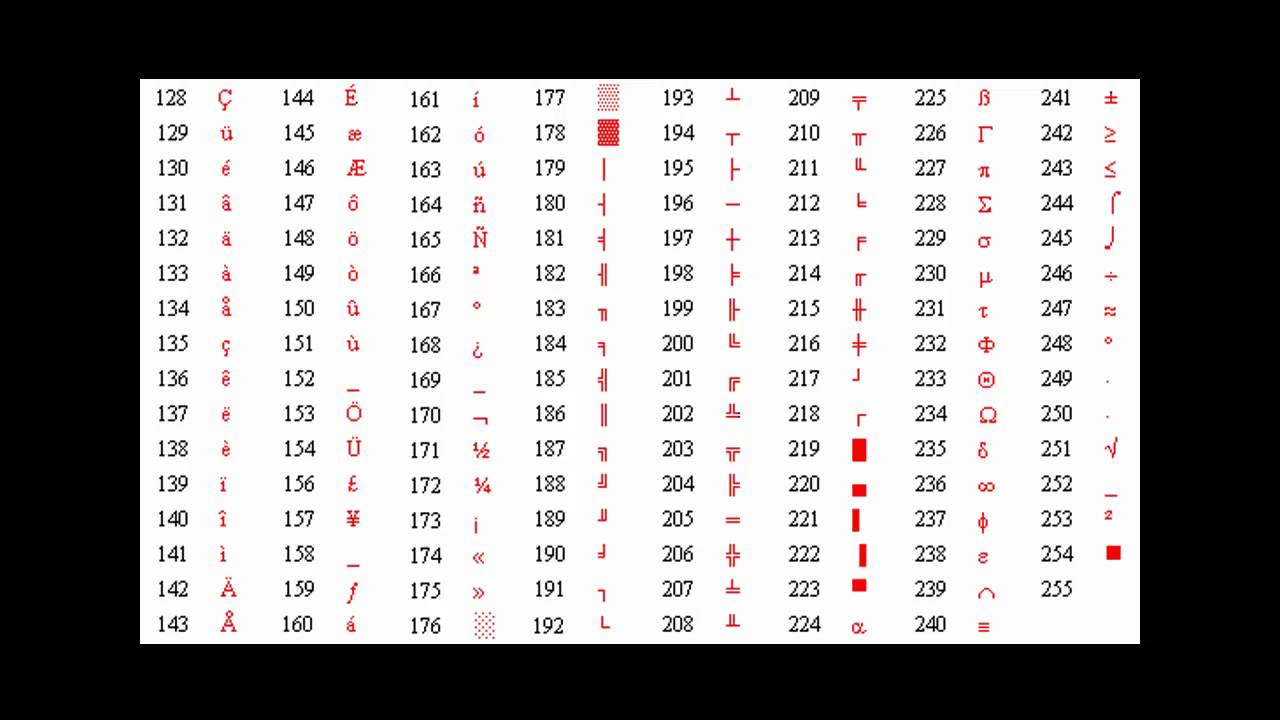
Alt Codes YouTube
Windows ALT NUMBERPAD Characters
Copyright Symbol Ascii DriverLayer Search Engine

Web Windows Alt 0169 Met de linker Alt toets en numeriek toetsenbord AltGr c Met de Alt Gr toets Mac Geen sneltoets hiervoor Selecteer de 169 uit het Speciale tekens venster alt cmd T Bij MS Word kan het via Insert Symbol Advanced Symbol of Invoegen Symbolen Meer symbolen Gerelateerde tekens 169 Copyright teken

Web Copyright Symbol on Windows Press and hold the ALT key type the numbers 0169 to get

Web To insert the copyright symbol press Ctrl Alt C To insert the trademark symbol press Ctrl Alt T To insert the registered trademark symbol press Ctrl Alt R

Web 1 nov 2022 nbsp 0183 32 The copyright logo symbol can be made on a Windows computer with the numerical keypad The Alt code keyboard shortcut for the copyright symbol is Alt 0169 press and hold the Alt key while typing 0169 For most laptops and other compressed keyboards the process is different Look for tiny numbers above the 7 8 9 U I O J K

Web 5 nov 2022 nbsp 0183 32 Insert the copyright symbol on Windows by pressing Alt 0169 on a numeric keypad Or press Windows to use the emoji keyboard On Mac press Option G on your keyboard You can also use the emoji keyboard on Mac by pressing Control Command Space The copyright symbol 169 hints to others that something is
Web 1 aug 2023 nbsp 0183 32 On a Windows PC you have two methods to type the copyright symbol an Alt code and the Character Map utility Use the Copyright Numeric Keypad ALT Code If your Windows keyboard has a number pad the fastest way to insert the copyright symbol is to use the Alt 0169 code sequence Here s how Press and hold the Alt key Web 6 aug 2022 nbsp 0183 32 If you know the Unicode reference you can also just type it in your document using the standard keyboard and then press Alt X For example for the trademark symbol type 2122 and then while the cursor is still after the final 2 press Alt X The only caveat is that the character immediately before the first digit of the Unicode reference
Web Copyright Symbol 169 Quick Guide To type the Copyright Symbol on Mac press Option G shortcut on your keyboard For Windows users simply press down the Alt key and type 0169 using the numeric keypad then let go of the Alt key If you are using MS Word just type c and press the spacebar