Connect To Microsoft Forms Data Microsoft Forms Information Technology Olivet Nazarene University Move Microsoft Forms Data To Microsoft Lists Power Platform Community Spatially enabling Microsoft Forms Data For Power Esri Community Tutorial Create A Dashboard From Microsoft Forms Data Delap Using Microsoft Forms Data With Power Bi ThemeLower Connect YouTube to your TV using a TV code When you link your phone or tablet to your smart TV or streaming device using a TV code you can watch YouTube on your TV when you re not
You c an use your phone s mobile data to connect another phone tablet or computer to the internet Sharing a connection this way is called tethering or using a hotspot Some phones To connect some devices to your phone without a cord you can use Bluetooth After you pair a Bluetooth device for the first time your devices can connect automatically If your phone is
Using Microsoft Forms Data With Power Bi ThemeLower The Elm Microsoft Forms Your Solution To Surveys And Gathering Solved Unable To Connect To Microsoft Forms Test Connec Power Baac Software Request Form Fy19 Using Microsoft Forms And Microsoft Power Automate To Upgrade Your Microsoft Forms Data Revol Microsoft Forms Data Revol Microsoft Forms Data Revol Azure C Microsoft Identity Authentication Stack Overflow
Connect To Microsoft Forms Data
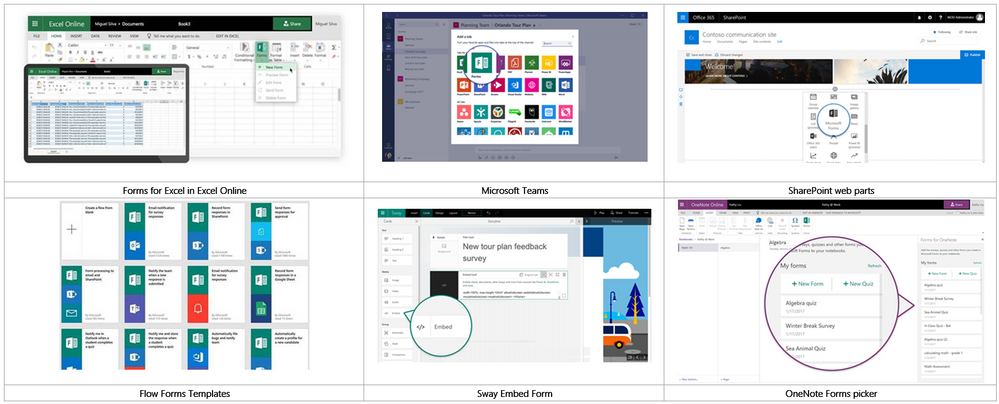 Connect To Microsoft Forms Data
https://it.olivet.edu/sites/default/files/inline-images/forms-2.PNG
Tip When you connect to a public Wi Fi network like in a cafe you might need to sign in through a portal page These portals are often detected by Chrome and prompt you to sign in Learn
Templates are pre-designed documents or files that can be utilized for numerous purposes. They can save time and effort by providing a ready-made format and layout for developing different kinds of content. Templates can be used for individual or professional tasks, such as resumes, invitations, flyers, newsletters, reports, discussions, and more.
Connect To Microsoft Forms Data

Spatially enabling Microsoft Forms Data For Power Esri Community
The Elm Microsoft Forms Your Solution To Surveys And Gathering

Solved Unable To Connect To Microsoft Forms Test Connec Power

Baac Software Request Form Fy19

Microsoft Forms Data Revol

Microsoft Forms Data Revol

This article will guide you through setting up and using Drive for desktop To get started follow these steps Learn about Drive for desktop benefits

On your computer Chrome Remote Desktop is available on the web To use your mobile device for remote access download the Chrome Remote Desktop app

Select the device you want to connect to Enter the code that displays on your TV screen Tap Pair Tip On your Android phone to quickly access the TV remote from any screen add it to

An Internet connection and secure wireless network Important Make sure your mobile device is connected to the Wi Fi network you want to connect your Nest speaker or display to Get

Connect your TV amp device to the same Wi Fi network From the Google TV home screen select All settings Under quot Network amp Internet quot find the name of the Wi Fi network your TV is
[desc-11] [desc-12]
[desc-13]