Connect Powerbi To Tableau Data Source Connecting PowerBI Dashboards To Data Sources Concurrency Connect Your CRM Online Data To PowerBI For Analysis Power Bi Vs Tableau Choosing One For Your Next Data Project An Introduction To Power BI Dataflows Power BI Architecture 7 Components Explained With Working DataFlair Web Sep 5 2023 nbsp 0183 32 By default when you create a Power BI Desktop report that connects to a cloud data source then upload it into a workspace in the Power BI service Power BI creates a personal cloud connection and binds it to your dataset for which you must provide credentials
Web 19 min Module 10 Units How does Microsoft Power BI differ from Tableau What do these two tools share in common Let s explore how they connect to data and help you build visualizations Start Overview Introduction 4 min Introduction to the Power BI Desktop 2 min Differences in terminology 2 min Relationships 1 min CALCULATE function 2 min Web Oct 18 2023 nbsp 0183 32 Connect to a data source To connect to a data source select the data source from the Get Data window and select Connect The following screenshot shows Web selected from the Other data connection category A connection window appears Enter the URL or resource connection information and then select OK
Power BI Architecture 7 Components Explained With Working DataFlair Power BI Architecture Explained With Practical Examples 2022 SAP BW 4HANA Connectivity Options In Microsoft Power BI 2022 Power BI Architecture Components Explained In Data Flow Diagram BeiLover Connect Database In Sybase To Microsoft PowerBI Via ODBC Data POWERBI TRY THE NEW GANTT AND FUNNEL VISUALS Modern Work Blog Power BI Gateways To Power BI Connect PowerBI To Your On Prem Data How To Connect Athena To Power BI Tableau Prisoft Technology
Connect Powerbi To Tableau Data Source
 Connect Powerbi To Tableau Data Source
http://images.concurrency.com/2015/03/Out-of-Box-CRM-Dashboard.png
Web Set Up Data Sources Applies to Tableau Cloud Tableau Desktop Tableau Server After you connect to your data use the Data Source page to set up the data source and prepare your data for analysis There are many optional configurations that you can make before you begin your analysis
Templates are pre-designed files or files that can be utilized for various purposes. They can conserve effort and time by supplying a ready-made format and design for creating various kinds of content. Templates can be used for individual or expert tasks, such as resumes, invites, leaflets, newsletters, reports, discussions, and more.
Connect Powerbi To Tableau Data Source

Connecting The Microsoft Power BI Service To AWS Data Sources Using

Power BI Architecture Explained With Practical Examples 2022

SAP BW 4HANA Connectivity Options In Microsoft Power BI 2022
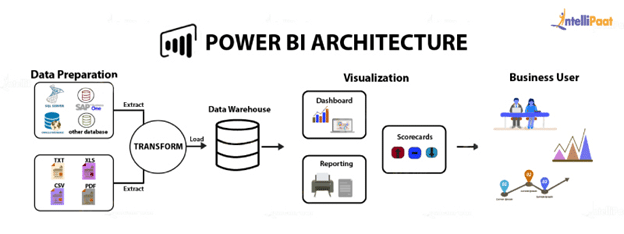
Power BI Architecture Components Explained In Data Flow Diagram

POWERBI TRY THE NEW GANTT AND FUNNEL VISUALS Modern Work Blog

Power BI

Web Identify basic concepts and terminology on Power BI data connections Connect to your data in Power BI by using live and import methods Perform data transformations by using Power Query Editor Share your data transformation steps by using Advanced Query Editor Set up relationships in the data modeling view

Web Jul 14 2021 nbsp 0183 32 In this blog we will explore the prerequisites steps and limitations of connecting Power BI datasets in Tableau using the Microsoft Analysis Services connection Pre requisites Make sure you have the latest versions of Power BI desktop and Tableau Desktop installed

Web Oct 17 2023 nbsp 0183 32 1 To explain how to connect Power BI and Fabric data items by using Tableau Desktop 2 To consider why someone might use Tableau to connect to Power BI or Fabric 3 To highlight key considerations for Power BI semantic model developers when they have Tableau users
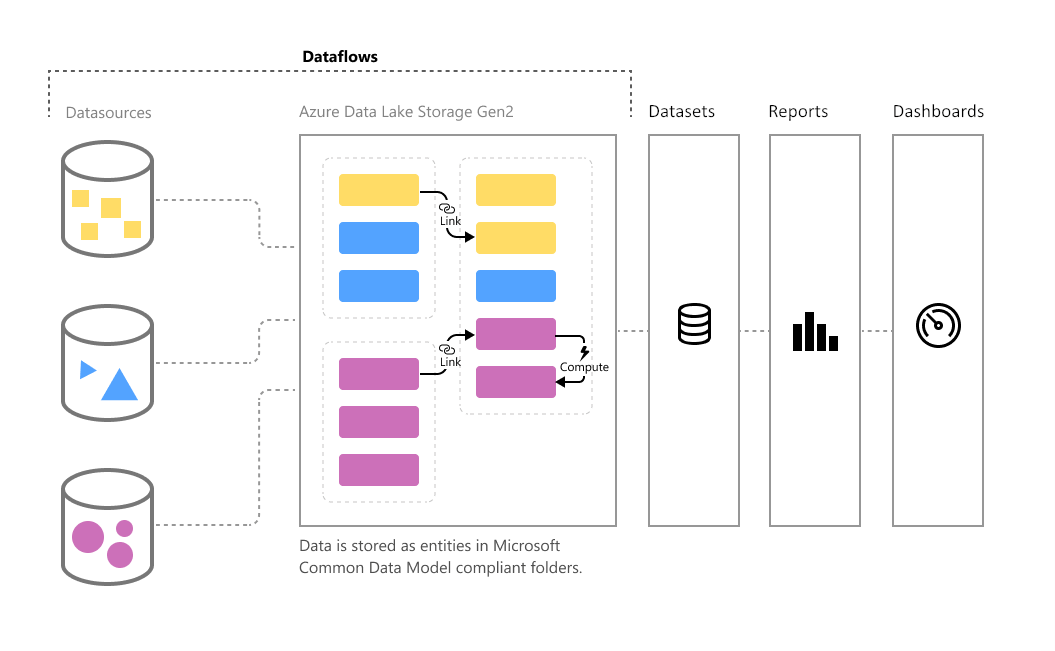
Web Feb 12 2020 nbsp 0183 32 We re now ready to connect to this dataset from Tableau Connecting Tableau to Power BI To begin open Tableau Desktop and create a new data source Select the connect option for Microsoft Analysis Services

Web Aug 13 2018 nbsp 0183 32 Unzip the TDSX and pull out the TDS file Parse the TDS file for pertinent info like server port type schemas tables and custom SQL The power queries are broken down into funtions and one
Web Upload Excel or text based data sources xlsx csv tsv directly in your browser Connectors Connect to data housed in a cloud database or on a server in your enterprise For more information about connecting to data see Creators Connect to Data on the Web Web Jun 9 2023 nbsp 0183 32 Power BI uses Power Query to connect to data sources Power BI data sources are documented in the following article Power Query including Power BI connectors Each data source article in the Power Query documentation describes the capabilities of the data connector such as whether DirectQuery is supported
Web Jan 11 2023 nbsp 0183 32 With Power BI Desktop you can easily connect to the ever expanding world of data If you don t have Power BI Desktop you can download and install it There are all sorts of data sources available in Power BI Desktop The following image shows how to connect to data by selecting Get data gt Other gt Web