Configure Ssh Ubuntu Server Install And Configure SSH Service In Linux BENISNOUS Ubuntu Server Getting Started With A Linux Server BENISNOUS How To Enable SSH On Ubuntu 18 04 Linuxize How To Enable SSH On Ubuntu Debian With Configuration Steps Update Ssh Ubuntu Server SSH or Secure Shell is a protocol used to securely log onto remote systems It is the most common way to access remote Linux servers In this guide we will discuss how to use SSH to connect to a remote system Deploy your frontend applications from GitHub using DigitalOcean App Platform Let DigitalOcean focus on scaling your app Core Syntax
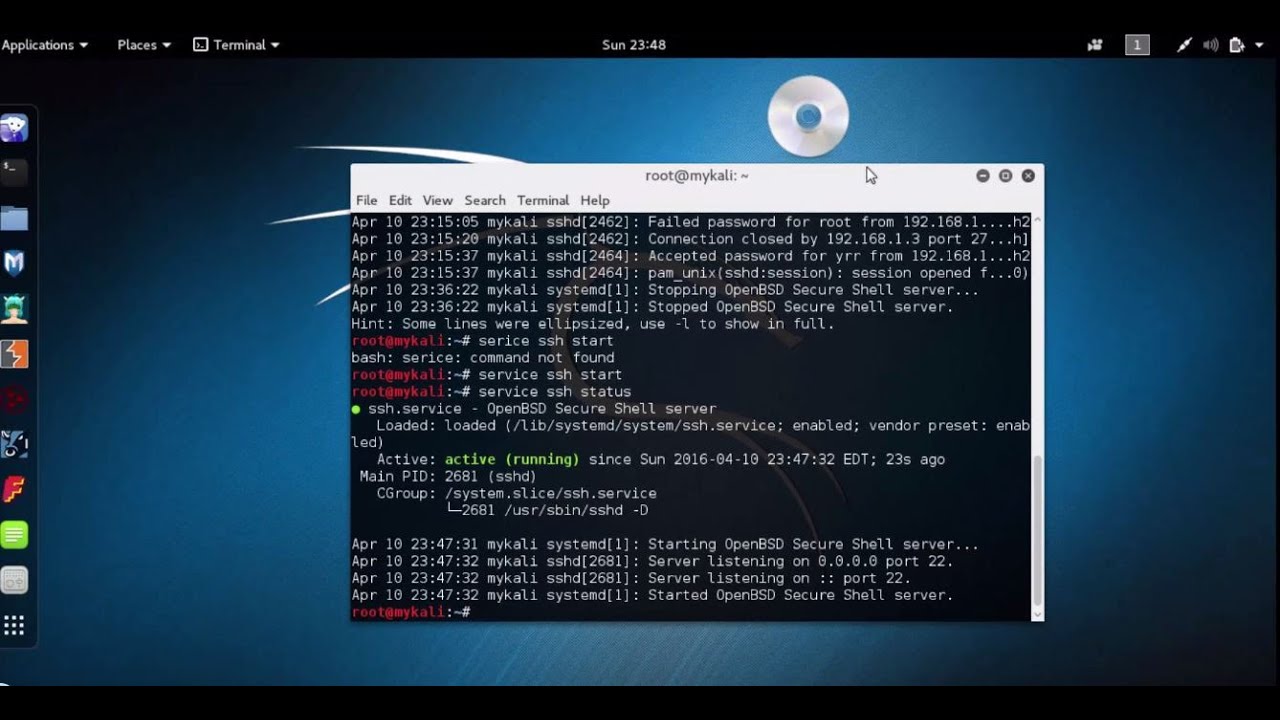
Install the openssh server in order to perform an installation of the SSH server on your Ubuntu 20 04 system sudo apt install openssh server OpenSSH server installation on Ubuntu 20 04 Server Desktop Check the status After the SSH server package installation the SSH server daemon should be up and running Step 1 Creating the Key Pair The first step is to create a key pair on the client machine usually your computer ssh keygen By default recent versions of ssh keygen will create a 3072 bit RSA key pair which is secure enough for most use cases you may optionally pass in the b 4096 flag to create a larger 4096 bit key
Update Ssh Ubuntu Server Configure SSH In Cisco Router Using Packet Tracer YouTube Pin On Software Common SSH Configuration Options Ubuntu How To Configure SSH Key Based Authentication On A Linux Server Dev How To Install SSH Server On Ubuntu I Have A PC I Have A PC C mo Instalar Y Configurar Un Servidor SSH Ubuntu YouTube Ubuntu Cannot SSH Ubuntu Server YouTube Ubuntu Enable Ssh Digfasr
Configure Ssh Ubuntu Server
 Configure Ssh Ubuntu Server
https://benisnous.com/wp-content/uploads/2020/10/Install-and-configure-SSH-service-in-Linux.jpg
To install and enable SSH on Ubuntu follow the steps below 1 Open the terminal either by using the CTRL ALT T keyboard shortcut or by running a search in Ubuntu Dash and selecting the Terminal Icon 2 Before starting the installation process check if an SSH server has already been installed on your computer with the following ssh command
Templates are pre-designed files or files that can be utilized for numerous purposes. They can save effort and time by providing a ready-made format and layout for developing different kinds of material. Templates can be utilized for personal or professional tasks, such as resumes, invites, leaflets, newsletters, reports, presentations, and more.
Configure Ssh Ubuntu Server
How To Configure SSH On Cisco Router Or Switch Technig
Configure SSH In Cisco Router Using Packet Tracer YouTube

Pin On Software
Common SSH Configuration Options Ubuntu

How To Install SSH Server On Ubuntu I Have A PC I Have A PC

C mo Instalar Y Configurar Un Servidor SSH Ubuntu YouTube
In order to install a SSH server on Ubuntu 20 04 you need to have sudo privileges on your server Note there are no practical differences between adding a user to sudoers on Ubuntu and Debian To check whether you have sudo privileges or not you can launch the following command sudo l

Introduction Once you have installed an OpenSSH server sudo apt get install openssh server you will need to configure it by editing the sshd config file in the etc ssh directory sshd config is the configuration file for the OpenSSH server ssh config is the configuration file for the OpenSSH client Make sure not to get them mixed up
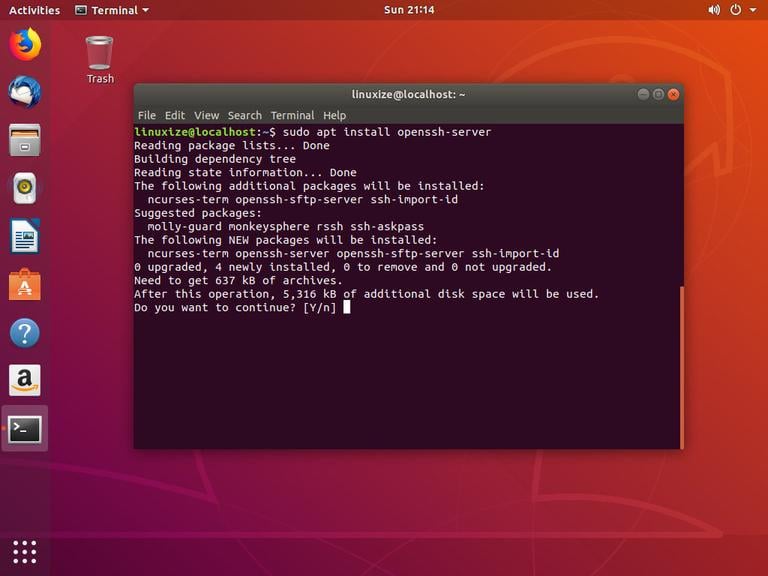
Step 1 Install OpenSSH Server packages on Ubuntu 22 04 20 04 We shall start with OpenSSH server installation process on Ubuntu 22 04 20 04 But first update OS package list as configured in sources repositories
Enabling SSH on Ubuntu is fairly straightforward Perform the following steps as root or user with sudo privileges to install and enable SSH on your Ubuntu system Open the terminal with Ctrl Alt T and install the openssh server package sudo apt update sudo apt install openssh server

How do I configure a new Ubuntu installation to accept ssh connections Ask Ubuntu I just installed Ubuntu How do I set it up to allow me to ssh into it Right now I get ssh connect to host x x x x port 22 Operation timed out Ubuntu Community Ask Developer Design Hardware Insights Juju Shop More Apps Help Forum Launchpad MAAS Canonical
Configure SSH Server After step 1 you should be able to connect to this Ubuntu server or desktop remotely via ssh and or scp commands You may however configure it to listen on a different port specify which users allowed to login change the authentication methods etc To do so edit the etc ssh sshd config via the command below The process for configuring SSH access for your new user depends on whether your server s root account uses a password or SSH keys for authentication If the root Account Uses Password Authentication If you logged in to your root account using a password then password authentication is enabled for SSH You can SSH to your new user account by opening up a new terminal session and using SSH
Configure SSH SSH server has a couple of default settings you should change for a more secure connection First open the SSH configuration file sudo nano etc ssh sshd config The port is set to 22 by default change it to another port Additionally set the PermitRootLogin field to no