Command To Delete Folder And Subfolders Linux How To Delete Files Folders And Subfolders In Command Prompt Www How To Delete Folder With Subfolders Using Commands On Windows 11 How To Delete Folder With Subfolders Using Command Line On Windows 10 How To Delete Folders And Subfolders In Powershell Technos Cron Command To Delete Folder Including All Sub folders And Files IT Delete the directory and its contents To delete the directory and all its contents use the rm command with the r option which stands for recursive Type rm r my directory and press Enter You will be prompted to confirm the deletion Type y and press Enter to confirm
To delete a directory using rmdir enter the command followed by the name of the directory you want to remove For instance if you want to delete a directory named dir1 you would type rmdir dir1 If the directory is not empty you will get the following error rmdir failed to remove dir1 No such file or directory Pass the name of the folders separated with the space character rm r dir1 dir2 dir3 To delete a non empty directory folders containing files use the r option with the command The r flag or recursive flag will delete all the files and sub folders of the specified directory recursively rm r directory
Cron Command To Delete Folder Including All Sub folders And Files IT How To Change File Permissions In Kali Linux Systran Box Delete ALL Files And Subfolders From Folder In PHP Cron Command To Delete Folder Including All Sub folders And Files IT List All The Files In A Folder And Subfolders Using Power Query YouTube How To Delete Folder And Sub Folder Or Directory With Command Prompt How To Restore Or Recover Deleted Commands In Linux Linuxhowto Linux Delete All Files In Directory Using Command Line NixCraft Pin On How To
Command To Delete Folder And Subfolders Linux
 Command To Delete Folder And Subfolders Linux
https://www.thewindowsclub.com/wp-content/uploads/2019/06/Delete-files-folders-using-Command-Prompt-1200x720.jpg
Remove all swp files underneath the current directory use the find command in one of the following forms The delete option means find will directly delete the matching files This is the best match to OP s actual question Using type f means find will only process files Option exec allows find to execute an arbitrary command per file
Templates are pre-designed documents or files that can be utilized for numerous purposes. They can conserve time and effort by offering a ready-made format and layout for developing various kinds of material. Templates can be utilized for individual or professional projects, such as resumes, invitations, leaflets, newsletters, reports, presentations, and more.
Command To Delete Folder And Subfolders Linux
How To Audit Deleted Files In Windows Server

How To Change File Permissions In Kali Linux Systran Box

Delete ALL Files And Subfolders From Folder In PHP

Cron Command To Delete Folder Including All Sub folders And Files IT

How To Delete Folder And Sub Folder Or Directory With Command Prompt

How To Restore Or Recover Deleted Commands In Linux Linuxhowto
This is potentially dangerous and may accidentally clobber stuff sudo is not required most of the time and neither is f since without it rm asks for you confirmation on files you may not want to delete like this without writeable bit or immutable flag Only use either when it s needed Martin Tournoij

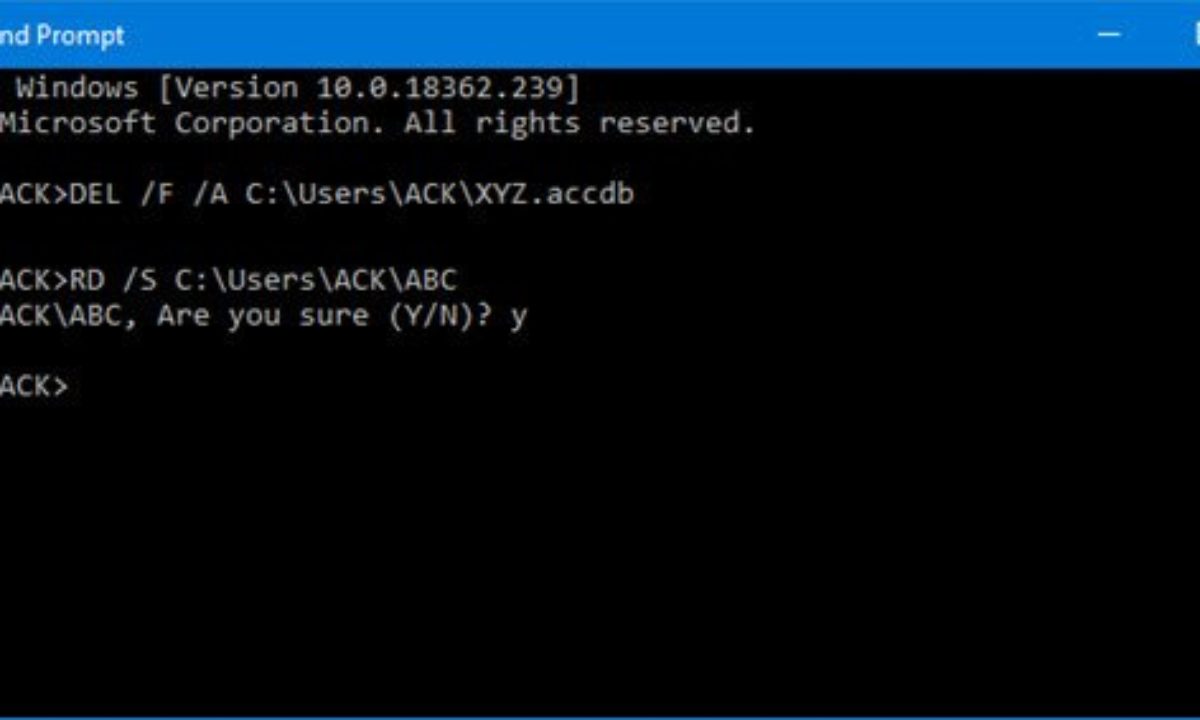
To delete file del PATH TO FILE To delete folder with all files in it rmdir s q PATH TO FOLDER To delete all files from specific folder not deleting folder itself is a little bit complicated del s cannot delete folders but removes files from all subfolder So two commands are needed

The rm command in Linux removes files and directories It uses the following syntax rm options file or directory name Note To remove multiple files or directories using the rm command add multiple file or directory names separated by blank spaces The different rm command options include f Forces the removal of all files or
2 First you need to list the directories and then remove them without hampering the normal files ls d only lists the sub directories and piping it with rm removes the directories and contents keeping the loose files intact This command should do the job ls d xargs rm rf Share

Use the rm command to remove non empty directories This command is meant for removing files but we can combine it with options like r rf and d to delete a directory Here s the syntax for the command rm option FileOrFolderName Use the r or recursive option to remove the directory and its content
To delete a folder with subfolders with Command Prompt on Windows 10 use these steps Open Start on Windows 10 Search for Command Prompt right click the top result and select the Run as administrator option Type the following command to delete an empty folder and press Enter rmdir PATH TO FOLDER NAME Be very careful with the rm command Using it the wrong way can delete all the files on your hard drive Related How to Create Multiple Subdirectories with One Linux Command You can also create a directory containing several subdirectories or a directory tree using one command
To remove everything in a directory without removing the directory type in rm rfv dontDeleteMe Please note the part is very important If you put a space before the it will delete all your files in your current directory Also be very careful playing with rm r and all in the same command They can be a disastrous combination