Clear Recent List How To Clear Recent List In Excel Synclasopa How To Clear Recent List In Excel Geekasl How To Clear Recent List In Windows Search Result Of Photos Administrator DriveWorks Documentation How To Clear Recent List When You Type In The Search Box Type Here To Search On Taskbar How Select Options Press the Clear button Uncheck the Show recently used files option Uncheck the Show frequently used folders option Untick the Show files from Office option Press the Ok button Close the File Explorer With that the recent files history is cleared in File Explorer Steps with more details
To disable Recent Files through the Registry Editor Open the Run window by typing run in the search bar in the bottom left corner of your screen Alternatively press the Windows key R Click on Start on the left side From the right side turn off Show recently added apps and Show recently opened items in Jump Lists on Start or the taskbar When you turn off recent items and frequent places it will clear all recent items from jump lists and File Explorer
How To Clear Recent List When You Type In The Search Box Type Here To Search On Taskbar How How To Shrink The Taskbar On Windows 11 Facebook Excel 2016 Recent Files Location Lasopanetworks How To Clear Recent List In Word Excel And PowerPoint How To Clear Recent List In Word Excel And PowerPoint How To Clear Recent List In Excel For Mac Mserlexpress Spherical Coordinates Integral Calculator Hopdecc Beachside Windows Live Photo Gallery Clear Recent List
Clear Recent List
 Clear Recent List
https://i2.wp.com/www.alphr.com/wp-content/uploads/2021/07/Screenshot_7-12.png
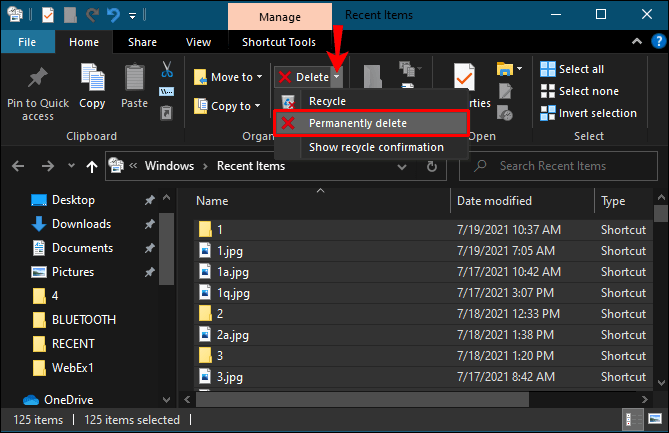
Content Clear Recent Files from File Explorer Delete Histories from The Registry Disable Jump Lists From Settings Clear Recent Files from File Explorer The File Explorer is the nerve center for everything you ve accessed If you want to clear all of your recent files from Windows this is probably where you should start
Templates are pre-designed files or files that can be used for numerous functions. They can conserve effort and time by supplying a ready-made format and layout for producing various sort of material. Templates can be used for personal or expert jobs, such as resumes, invites, leaflets, newsletters, reports, discussions, and more.
Clear Recent List

How To Clear Recent List In Word Excel And PowerPoint

How To Shrink The Taskbar On Windows 11

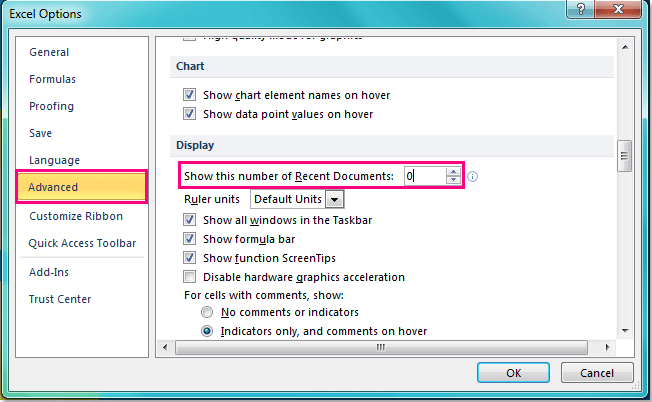
Excel 2016 Recent Files Location Lasopanetworks

How To Clear Recent List In Word Excel And PowerPoint

How To Clear Recent List In Excel For Mac Mserlexpress
You ve probably noticed that File Explorer keeps a list of files and folders you ve recently opened displaying them at the bottom of the File Explorer window It s handy for sure but there are times you ll want to clear that file history Here s how to do it

We show you how to access and clear the all recent files list in Windows 11 and Windows 10 for enhanced productivity or privacy By Markus Kasanmascheff February 14 2024 1 12 pm CET
Clear Recent Files and Folders in Windows 11 10 You can delete Recent Files and Folders in Windows 11 10 using the following methods Using Folder Options Using Settings Using Registry
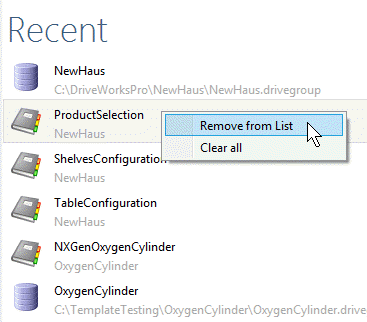
1 Clear File Explorer history Left click the Start button type File Explorer Options and select the first result that appears Click on the General tab go to the Privacy menu and click the Clear button Close the File Explorer Options window and check if your recent files are still available

17 Feb 2024 How to Reset and Clear Recent Items and Frequent Places in Windows 10 Recent items is a list of the files that you have used or opened recently These items are displayed as Recent files in Quick access and under Recent in jump lists on the Start menu and taskbar
How to clear your Recent Files in Windows 10 1 Open File Explorer on your computer It should be an image of a folder pinned to your taskbar but if it isn t pinned you can open any folder to Step 1 Open File Explorer click File and choose Change folder and search options Step 2 Under the General tab click the Clear button to clear File Explorer history immediately This way can easily help remove recent files from Quick Access
05 Apr 2020 How to Turn On or Off Recent Items and Frequent Places in Jump Lists in Windows 10 Recent items is a list of the files that you have used or opened recently These items are displayed as Recent files in Quick access and under Recent in jump lists on the Start menu and taskbar