Chrome Remote Desktop Forgot Password How To Set Up Chrome Remote Desktop On A VPS Chrome Remote Desktop Best Chrome Remote Desktop Alternative Pulseway Downloaden Van Chrome Remote Desktop Kennisbank SitiHost Google Releases Chrome Remote Desktop Beta 9to5Google WEB Mar 31 2013 nbsp 0183 32 Chrome Remote Desktop can be used in one of two ways to offer remote assistance to someone or to take remote control of another computer of your own Click the Get started button in the My Computers section Click the
WEB Feb 22 2024 nbsp 0183 32 Want to sign into a computer from another desktop or a mobile device Here s how to use Google s Chrome Remote Desktop to make the connection WEB Jul 23 2020 nbsp 0183 32 If you have permissions compute instances admin and iam serviceAccountUser by following the document you can generate new passwords for your windows VM
Google Releases Chrome Remote Desktop Beta 9to5Google C ch i u Khi n M y T nh T Xa V i Chrome Remote Desktop Xgame Chrome Remote Desktop Host Is Offline Dottorrent Free Download Using Chrome Remote Desktop To Connect To A Windows PC NEW TECH BOOLE CHROME REMOTE DESKTOP ACCESS YOUR PC FROM ANYWHERE 29 Best Chrome Remote Desktop Alternatives Reviews Features Pros 4G DTAC Chrome Remote Desktop Pantip Chrome Remote Desktop Adquiere Un Tema Oscuro Con Una Nueva Interfaz De Google Remote Access Setup
Chrome Remote Desktop Forgot Password
 Chrome Remote Desktop Forgot Password
https://bitlaunch.io/blog/content/images/size/w2000/2020/06/RemoteDesktopApp.png
WEB Jul 30 2022 nbsp 0183 32 Just simply sudo passwd whoami and you can use your new password for the remote desktop Here s the link that I found the solution https cloud google architecture chrome desktop remote on compute engine xfce Hope this can help you Share
Templates are pre-designed documents or files that can be used for numerous purposes. They can save effort and time by providing a ready-made format and design for developing different kinds of material. Templates can be used for personal or professional tasks, such as resumes, invitations, flyers, newsletters, reports, presentations, and more.
Chrome Remote Desktop Forgot Password
Chrome Remote Desktop Forgot PIN Three Ways To Easily Fix It
C ch i u Khi n M y T nh T Xa V i Chrome Remote Desktop Xgame

Chrome Remote Desktop Host Is Offline Dottorrent

Free Download Using Chrome Remote Desktop To Connect To A Windows PC
29 Best Chrome Remote Desktop Alternatives Reviews Features Pros

4G DTAC Chrome Remote Desktop Pantip

WEB Jul 22 2016 nbsp 0183 32 You can search through your saved passwords from the top center or Ctrl f keys to open the search dialog box and enter the possible name on interest such as quot remote quot PS to the right of the passwords is the visibility icon of a eye or something click that to see what the are

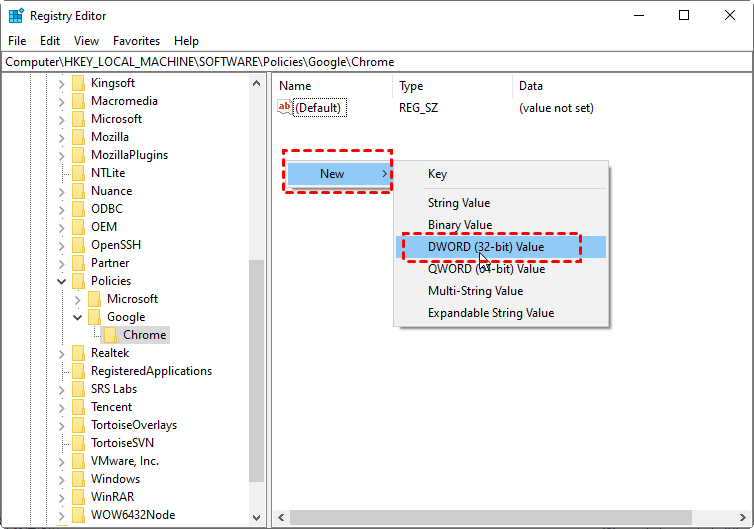
WEB Nov 22 2022 nbsp 0183 32 Here we summarize three common solutions for you to easily fix Chrome Remote Desktop forgot PIN problem Solution 1 Uninstall and reinstall Chrome Remote Desktop Since you can reset Chrome Remote Desktop PIN after reinstalling Chrome Remote Desktop this method can help you solve this problem Step 1 Expand

WEB Jan 29 2020 nbsp 0183 32 Yes just go to https remotedesktop google headless on a device that you don t mind signing into with your Google account and it will walk you through setting up access to the remote machine If that doesn t work you can try these manual instructions for Windows Install Chrome Remote Desktop on that machine

WEB Access a computer remotely On your computer open Chrome In the address bar at the top enter remotedesktop google access and press Enter Click Access to select which computer you

WEB Securely access your computer whenever you re away using your phone tablet or another computer Share your screen to collaborate in real time or connect with another computer to give or receive
WEB Nov 13 2021 nbsp 0183 32 https remotedesktop google access From a Windows or Mac you can setup persistent remote access From your dad s computer visit and login at the URL I pasted above Scroll to the bottom and click the download button in the quot Set up remote access quot section WEB This help content amp information General Help Center experience Search Clear search
WEB Aug 30 2022 nbsp 0183 32 Disable PIN authentication in Chrome Remote Desktop using Group Policy Disable PIN authentication in Chrome Remote Desktop using Registry Editor Closing words This article discusses 2 ways you can disable the PIN authentication step while connecting to a remote computer using Chrome Remote Desktop