Check Service Running Oracle Linux Oracle E Business Suite On Oracle Cloud A Guide Prescience Technology Oracle Linux 6 9 Released With Unbreakable Enterprise Kernel 4 1 12 What Are Solutions For Running Oracle WebLogic Server On The Azure Run Like Hell Running Oracle Linux Inside Virtualbox Preconfiguration A Look At Oracle Linux Version 8 3 Web The ps commands would only tell you if a database was running it wouldn t tell you if the software was installed if a DB wasn t up You can investigate the locate or find commands to search for common files e g sqlplus but you re probably better off just asking the DBA for the settings to use
Web To start a service either run its etc init d script directly with the start argument for example etc init d sshd start Starting sshd OK or use the service command with the start argument service sshd start Starting sshd OK Similarly to stop a service use the stop argument service sshd stop Stopping sshd OK Note Web Mar 1 2021 nbsp 0183 32 Method 1 Listing Linux Running Services with service command To display the status of all available services at once in the System V SysV init system run the service command with the status all option If you have multiple services use file display commands like less or more for page wise viewing
A Look At Oracle Linux Version 8 3 Oracle Linux On Your Home Or Small Office Server Linux Notes From How To Backup Oracle VM And Oracle Linux Virtualization Manager Ingin Majukan Pendidikan Sains Dan Teknologi Di Indonesia ITB Adopsi The World s Best Companies Rely On Oracle Linux You Should Too Run Like Hell Running Oracle Linux Inside Virtualbox Preconfiguration How To Resolve Connected To An Idle Instance On Windows Ed Chen Logic Darwin IT Finally Created An Oracle Linux 8 2 Myself Oracle Linux Server 7 4 Installation Guest Additions On Oracle
Check Service Running Oracle Linux
 Check Service Running Oracle Linux
https://www.prescience.com.au/wp-content/uploads/2018/03/Oracle-Plane-SF.jpg
Web Aug 27 2020 nbsp 0183 32 Type the following command to view all services and unit status on your Linux system since boot time sudo systemctl Click to enlarge Use the grep command egrep commandto filter out required units services sudo systemctl grep ssh sudo systemctl egrep apache nginx lighttpd php
Pre-crafted templates offer a time-saving option for developing a diverse series of documents and files. These pre-designed formats and layouts can be used for numerous personal and expert tasks, consisting of resumes, invites, flyers, newsletters, reports, discussions, and more, streamlining the content production process.
Check Service Running Oracle Linux

Oracle Linux Download Linux Tutorials Learn Linux Configuration

Oracle Linux On Your Home Or Small Office Server Linux Notes From

How To Backup Oracle VM And Oracle Linux Virtualization Manager

Ingin Majukan Pendidikan Sains Dan Teknologi Di Indonesia ITB Adopsi
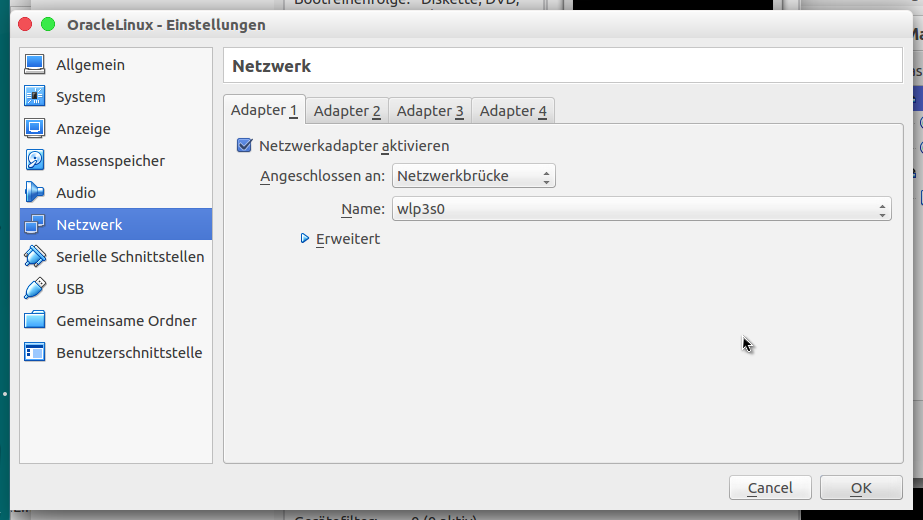
Run Like Hell Running Oracle Linux Inside Virtualbox Preconfiguration

How To Resolve Connected To An Idle Instance On Windows Ed Chen Logic

Web Aug 19 2023 nbsp 0183 32 Use quot systemctl type service state running quot to see all running services on a Linux system with systemd It provides details like name load sub state and description Systemd is a system and service manager in Linux that launches services Services are background tasks without a UI while daemons are launched on boot

Web The systemctl command is used to stop start restart and check the status of a specified service Unlike the service command most systemctl commands do not produce any status output on the command line Services can be referenced with or

Web The service command is used to stop start restart and check the status of a specified service service httpd stop service httpd start service httpd restart service httpd status Use the following command to get the status of all services service status all

Web May 3 2022 nbsp 0183 32 Use the systemctl is active command to check if the nfs server service is running active or not running inactive systemctl is active nfs server Use the systemctl is enabled command to check if the nfs server service is enabled or disabled

Web Jun 8 2018 nbsp 0183 32 In order to do that I need to know SID or Service Name Long time ago I would run TNSPing exe to get service name but this program is not available any more Oracle is not distributing it Is there a way to access this info somewhere An example for Linux oracle krw ssps db 02 ps ef grep tnslsnr oracle 6090 1 0 2015
Web May 5 2020 nbsp 0183 32 Note that quot tnsping quot won t actually test whether a service is running only whether the listener is running on the specified hostname and port number from the connection string You could use any made up service name and still get an quot ok quot response as long as the listener is up Web Mar 14 2014 nbsp 0183 32 1 quot select value from v parameter where name like service name quot returns ORA 00942 table or view does not exist Anders Jakobsen Mar 14 2014 at 8 48
Web Mar 22 2012 nbsp 0183 32 The service command can be used to check the status of configured services using the status all option The service command should be run as root service status all acpid pid 2320 is running anacron is stopped atd pid 2528 is running auditd pid 1946 is running automount pid 2295 is running