Check Mapped Drives Via Cmd Find The IP Address Of A Mapped Network Drive In Windows Winhelponline Find The IP Address Of A Mapped Network Drive In Windows Winhelponline Pin On Powershell And Cmd Cmd Commands To Check Hard Drive How To Map Network Drives From The Command Prompt In Windows Network Drive Networking Prompts Web Sep 6 2023 nbsp 0183 32 Open a command prompt and type the following command wmic logicaldisk get name Press Enter and you will see the list of Drives You can also use the following parameter wmic logicaldisk
Web I have a network drive mapped to Z Is there a simple command to know the full network path from cmd I e if cmd shows Z ABC I had like a command to output networkDrive MappedDir ABC net use is fine but I would like to get the full path of the current working directory for quick copies Web 54 You need to make sure that the drive is mapped under the user which is running the command prompt Try typing net use U and see what info it gives you If it s not showing the drive as being mapped try remapping the drive net use U servername share path You can also try changing directories by using cd d U rather than just U
How To Map Network Drives From The Command Prompt In Windows Network Drive Networking Prompts Map Network Drive Command Line Password Recovery Change From X To C Drive In Cmd Zoomfy Full Guide How To Find The Path Of A Network Drive Windows 10 Networking Windows 10 Retynutri Blog How To Mount And Map A Network Drive In Windows 10 Dignited Remove Drive Mapping Windows Forum Spiceworks How To Map Network Drives From The Command Prompt In Windows YouTube How To Hide Files In Windows Using CMD
Check Mapped Drives Via Cmd
 Check Mapped Drives Via Cmd
https://www.winhelponline.com/blog/wp-content/uploads/2019/06/mapped-drive-find-ip-address-2.png
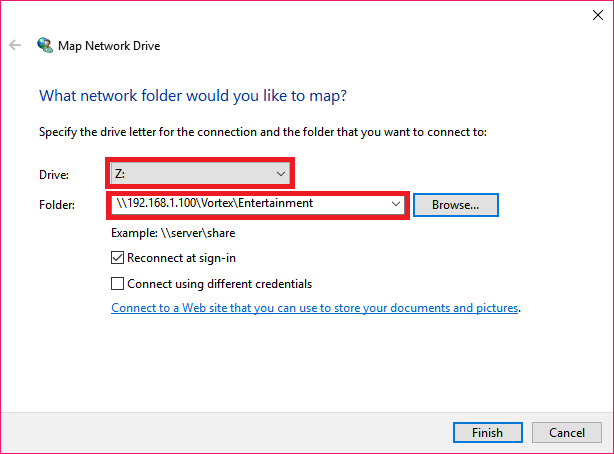
Web Map a network drive in Windows Map a network drive to get to it from File Explorer in Windows without having to look for it or type its network address each time Open File Explorer from the taskbar or the Start menu or press the Windows logo key E Select This PC from the left pane
Templates are pre-designed files or files that can be used for numerous functions. They can conserve effort and time by offering a ready-made format and layout for developing various kinds of material. Templates can be used for personal or expert jobs, such as resumes, invites, leaflets, newsletters, reports, presentations, and more.
Check Mapped Drives Via Cmd

How To Check Mapped Drives In Windows 10 Any Computer
Map Network Drive Command Line Password Recovery
Change From X To C Drive In Cmd Zoomfy

Full Guide How To Find The Path Of A Network Drive Windows 10 Networking Windows 10
How To Mount And Map A Network Drive In Windows 10 Dignited

Remove Drive Mapping Windows Forum Spiceworks

Web Jan 8 2014 nbsp 0183 32 The following cmd run as Administrator will show all drive maps for all users pulling the info from the registry for f quot tokens 1 delims quot i in reg query HKEY USERS f S k v findstr v c quot End of search quot do echo amp reg query quot i Volatile Environment quot s f USERNAME v 2 gt NUL amp reg query i Network f RemotePath s
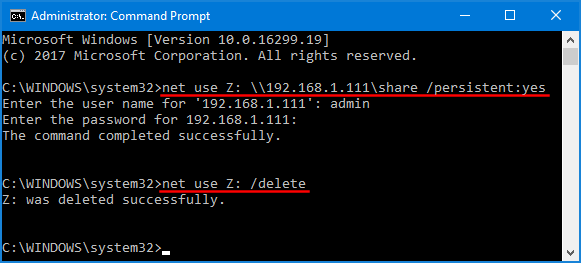
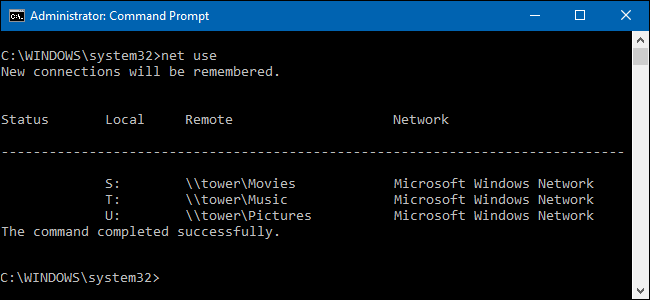
Web Aug 11 2017 nbsp 0183 32 To map a network drive type the following command and then hit Enter net use DRIVE PATH DRIVE is the drive letter you want to use and PATH is the full UNC path to the share So for example if we wanted to map drive letter S to the share tower movies we d use the following command net use s tower movies

Web Mar 12 2021 nbsp 0183 32 I am trying to see if there is a way to view the mapped drives via CMD PS I have tried net use it is only showing the drives that are mapped manually net use f I know what the mappings are if I look at the logon bat file but Im looking to view it without having to look find the file

Web net view to get a list of computers If you have a computer s name try net view computer to get a list of shares source Once you know what share you re after you want to go with net use Map a drive with net use x computer share replace X with the drive letter you want to assign

Web Jul 27 2023 nbsp 0183 32 Step 1 Open the Command Prompt window again as we explained above Step 2 Type the following commands in order and hit Enter after each one Then you will see a list of drives on the
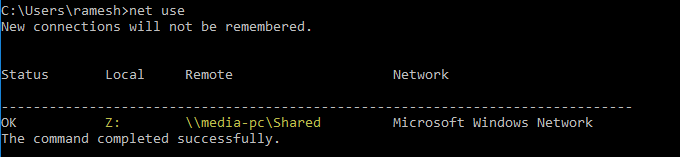
Web Apr 6 2021 nbsp 0183 32 2 Let s map the drive letter F to the DEVSRV server file share C To do so specify the drive letter to map the network drive to followed by the UNC path of the remote file share net use f DEVSRV c You can use any letter to map the network drive to if it s not already in use Web Jan 31 2014 nbsp 0183 32 7 Answers Sorted by 347 In Windows if you have mapped network drives and you don t know the UNC path for them you can start a command prompt Start Run cmd exe and use the net use command to list your mapped drives and their UNC paths C gt net use New connections will be remembered
Web Dec 2 2014 nbsp 0183 32 As already commented below similar answers if exist z does not check if a drive letter is just mapped Instead it returns true if a drive letter is mapped AND if the destination is available So with your solution you cannot delete a mapped drive that is currently unavailable stackprotector