Check Internet Speed Command Line Windows How To Test Internet Speed In Command Line YouTube Test Your Internet Speed With Command Line YouTube Slow Internet Home Internet Internet Speed Command And Control Test Internet Speed Command Line Linux Ubuntu Or Debian YouTube How To Check Your Internet Speed Using Run Command On Windows 11 10 To use the ping command simply open a command prompt and type ping hostname or ping ip address and then press enter
With Speedtest CLI you can easily Measure internet connection performance metrics like download upload latency and packet loss natively without relying on a web browser Test the internet connection of your Linux desktop a remote server or even lower powered devices such as the Raspberry Pi with the Speedtest Server Network Screenshot of running the Fast CLI from command line Speedtest using the speed test CLI npm This solution works on any system where npm is available including Windows Mac and Linux Install via npm npm install location global speed test Run the speed test speed test
How To Check Your Internet Speed Using Run Command On Windows 11 10 Linux Command Line Powercmd How To Check Internet Speed From Command Line Using Speedtest CLI Tool Solved Windows 7 Collect Wireless Signal Strength Via 9to5Answer Internet Speed Monitor Using Raspberry Pi 4 The Engineering Projects Solved How To Check If Windows Has Automatic Updates 9to5Answer Testing Your Internet Speed From The Command Line On Windows Linux Or Mac Check Internet Speed From The Command Line Solved How To Change Dir Quickly And Effectively In 9to5Answer
Check Internet Speed Command Line Windows
 Check Internet Speed Command Line Windows
https://i.ytimg.com/vi/191hvsaqpIw/maxresdefault.jpg
Check it out if you work with command line on a daily basis speedtest cli is a great tool to test out the speed of a given VM or a Windows workstation that you are remoting Speedtest is an application that measures the latency jitter packet loss download bandwidth and upload bandwidth of the network connection between the
Templates are pre-designed documents or files that can be utilized for numerous purposes. They can conserve time and effort by offering a ready-made format and design for creating different type of material. Templates can be used for personal or expert jobs, such as resumes, invitations, flyers, newsletters, reports, presentations, and more.
Check Internet Speed Command Line Windows

How To Check Internet Speed In My Pc Coallake Otusloc

Linux Command Line Powercmd

How To Check Internet Speed From Command Line Using Speedtest CLI Tool

Solved Windows 7 Collect Wireless Signal Strength Via 9to5Answer

Solved How To Check If Windows Has Automatic Updates 9to5Answer
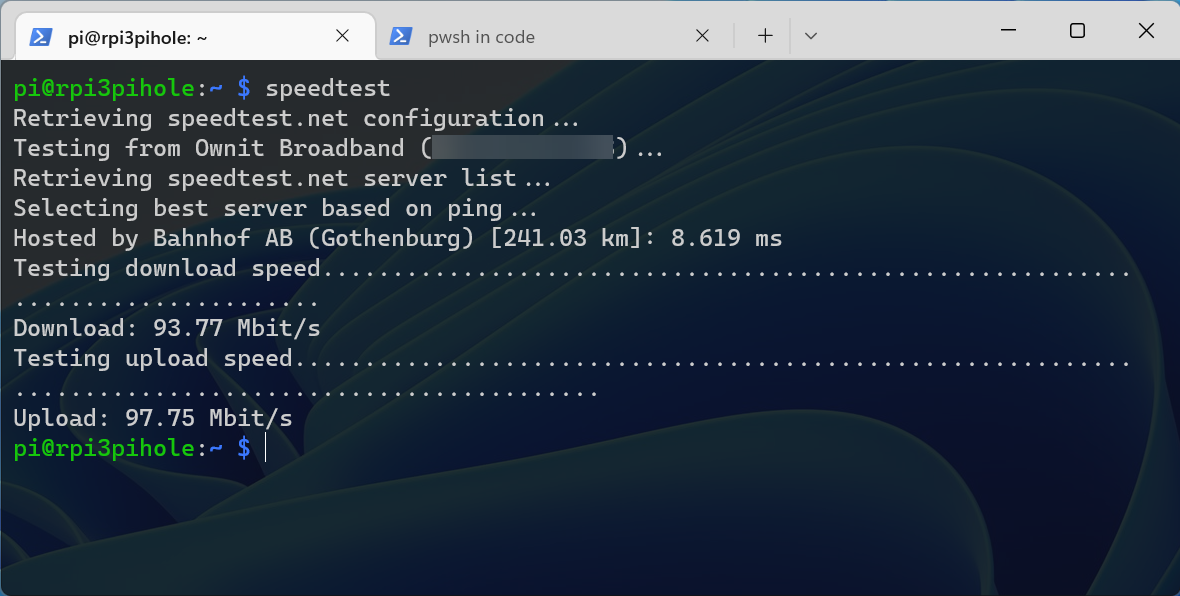
Testing Your Internet Speed From The Command Line On Windows Linux Or Mac

1 How to check the internet connection in CMD 2 How to traceroute in CMD tracert command to troubleshoot network and internet problems 3 How can I see all the network adapters on my computer using CMD 4 How to check your network connection in CMD 5 How to renew the IP address of your network adapter 6

How does it work Think of it like a sonar When you ping any server you send the echo request ICMP to the target And based on the time it took and the amount of the data that came back you can test the reliability and speed of your connection Here is how you use Ping 1 Open command prompt

Command Prompt PowerShell On Windows 10 the network adapter is an essential component that offers the means to connect to the network and internet using a wired or wireless connection and

In order to test our broadband speed we generally visit online speed testing sites like Speedtest or Fast however there are many a times we may want to test the speed of the internet from the command line terminal

Three open source tools that enable you to check your internet and network speeds at the command line are Speedtest Fast and iPerf Speedtest Speedtest is an old favorite It s implemented in Python packaged in Apt and also available with pip You can use it as a command line tool or within a Python script Install it with
I am trying to check the internet speed from my windows 8 laptop over a period of say 24 hours So I would like to repeatedly run a command to test the speed from the websites seem more realistic 10 MB s vs 0 5 MB s from wget but I don t know how to run these from the command line and extract the results windows 8 command line wget I need to test the speed of an Internet connection I can test it by connecting to sites line fast or speedtest but I want to perform a continuous test and to save the results on a file I
Use the command speedtest cli share Other options you can set with speedtest cli include list which will list all the speedtest server that you can use to test your Internet speed The default option is the server closest to your location but if you want to test the connection speed from a remote location say from Singapore to USA