Check Directory Size Linux Sort How To Delete A Directory In Linux TechRadar How To Get The Directory Size From The Command Line In Ubuntu Get Folder Size Powershell Shop Cheapest Save 44 Jlcatj gob mx V rifier La Taille Du R pertoire Sous Linux Autre Check Directory Size In Linux Method 1 Sorting Directories with the Disk Usage Analyzer Ubuntu Debian and Linux Mint users who prefer graphical disk analysis tools may wish to try using sudo apt get install baobab from the prompt
Option 1 Display the Size of a Directory Using the du Command The du command stands for disk usage This command is included by default in most Linux distributions You can display the size of your current directory by typing du in the command line du To list all directories and sort them by size you can pipe the output of this command and pass it through the sort utility like this 1 du h max depth 1 sort h Listing All The Directories And Sorting Them By Size Note that you don t have to be in a directory to check its size You can specify any directory like this
Check Directory Size In Linux Sort Command In Linux YouTube How To Get The Size Of A Directory In Linux How To Sort Files By Size In Linux YouTube Toolbx Database Task Panel Custom Directory Cannot Be Saved Issue 7324 Sorting Data Check Directory Size In Linux Command To Check Hard Disk Size In GB In Linux Ubuntu
Check Directory Size Linux Sort
 Check Directory Size Linux Sort
https://cdn.mos.cms.futurecdn.net/d7irTuWxvymeEZHnjqumXa-1200-80.jpg
Reference 4 ways to get the size of a directory in Linux The du command This command lets the user get a quick view of the disk usage The best way to use it is by giving it the directory you want to see the size of It should look a little something like this
Pre-crafted templates use a time-saving option for producing a diverse variety of files and files. These pre-designed formats and designs can be used for numerous personal and professional jobs, including resumes, invitations, leaflets, newsletters, reports, discussions, and more, simplifying the content creation procedure.
Check Directory Size Linux Sort
Commonly Used Linux Commands

Sort Command In Linux YouTube

How To Get The Size Of A Directory In Linux

How To Sort Files By Size In Linux YouTube

Database Task Panel Custom Directory Cannot Be Saved Issue 7324

Sorting Data
6 Answers Sorted by 66 With GNU sort and GNU du which it appears you have since you state you are using du s h option du sh sort rh Files and directories or du sh sort rh Directories only The output looks something like this 22G foo 21G bar 5 4G baz 2 1G qux 1021M wibble 4 0K wobble Share Follow

2 What exactly do you mean by the size of a directory The number of files under it recursively or not The sum of the sizes of the files under it recursively or not The disk size of the directory itself A directory is implemented as a special file containing file names and other information Keith Thompson Sep 18 2011 at 18 48

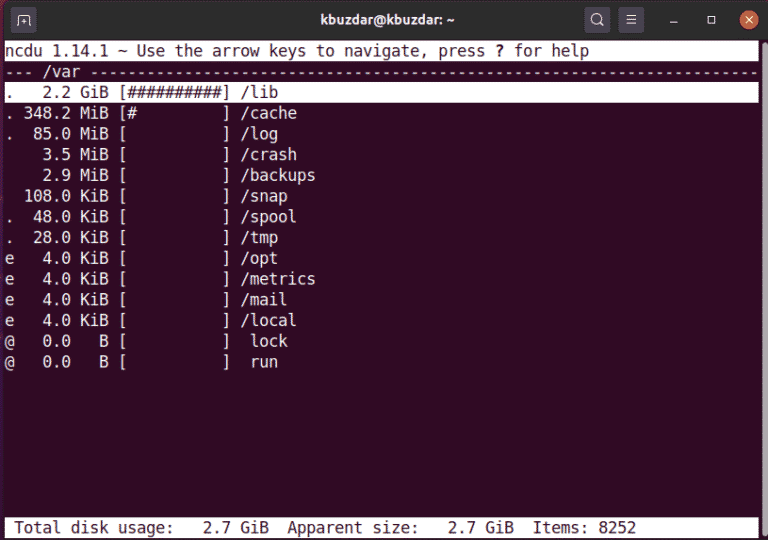
We can use du and sort commands to list and sort files according to their size du ah max depth 1 sort h 451M dir2 751M dir1 1 2G file4 dat 2 4G Let s see the options we used for the du command a reports size of all files and not just of directories

12 Answers Sorted by 436 Simply use something like ls lS path to folder Capital S This will sort files by size Also see man ls S sort by file size If you want to sort in reverse order just add r switch Update
Use the option l and you can list the files and directories along with their attributes Size is one of the attributes displayed by the ls l command Though you can see the sizes of the file they are displayed alphabetically If you want to find the biggest or smallest files in the current working directory you can sort the files by size
Following command shows you one level of directories and their sizes du max depth 1 path sort r k1 1n If one of them really sticks out the last one on the list is the largest due to sort r then you re run the command on that directory and keep going until you find the offending directory file If all you want is the ten biggest While the Linux command ls can display the sizes of files it doesn t work properly with directories which will always be displayed as 4096 bytes You ll need to use the du command to recurse into subdirectories and print out a total Using The du Command The best replacement for ls is to use du with a couple flags du had 1 The h flag stands for human readable and will format the
Type du sh dir Press Enter to run the command The output will display the size of this directory du s option will display only a total size not the sizes of individual files du h option will print directory size in human readable format e g 1K 234M 2G Linux course for Beginners