Charles Macos Proxy Not Working Install Eksctl On MacOS By Docker Captain YouTube MAC Address Checker IMEI info Jak Wstawi Emotikony Do Poczty MacOS Blog 10 Hidden MacOS Ventura Features You Need To Know About Why After Enable MacOS Proxy In Charles Proxy Internet Traffic Is Not Web Oct 20 2021 nbsp 0183 32 Optional set up steps to improve the Charles experience for specific traffic Disable macOS proxy on Charles go to Proxy Proxy settings macOS tab Disable macOS proxy and disable auto enable at launch Setup Charles to only proxy the locations you want Get the hostname of your application say xyz
Web Dec 20 2021 nbsp 0183 32 Part 1 Certificate Set Up The first part of the guide will help you add the Charles SSL Certificate to your Mac so that Charles can decrypt any local HTTPS traffic Step 0 Download and install Charles Step 1 Open Charles then go to Help gt SSL Proxying gt Install Charles Root Certificate Step 2 The Keychain Access window will Web Nov 7 2020 nbsp 0183 32 Step 1 Open Charles then go to Help gt SSL Proxying gt Install Charles Root Certificate Step 2 The Keychain Access window will open up Notice Charles Proxy CA shows up with an X
Why After Enable MacOS Proxy In Charles Proxy Internet Traffic Is Not Why After Enable MacOS Proxy In Charles Proxy Internet Traffic Is Not Synchroniser Avec MacOS Documentation Nextcloud Latest User Manual Latest What Is The Latest Version Of MacOS Current MacOS For 2022 2023 charles CSDN MacOS Charles charles Macos Proxy CSDN Charles Proxy Not Working On Android Emulator No SNI Provided Please Want MacOS Sonoma For An Intel Mac Here s What You re Giving Up MacOS Monterey Problems How To Fix The Most Common Issues TechRadar
Charles Macos Proxy Not Working
 Charles Macos Proxy Not Working
https://i.ytimg.com/vi/x-mGTJrJF60/maxresdefault.jpg
Web Dec 11 2019 nbsp 0183 32 MacOS network settings Open up your client and configure your HTTP proxy settings to point to your host s connected IP address and the default Charles port 8888 Do this by going to Settings gt WiFi and tapping on the i next to your currently connected WiFi
Pre-crafted templates offer a time-saving solution for creating a diverse variety of files and files. These pre-designed formats and layouts can be used for numerous personal and professional tasks, including resumes, invites, leaflets, newsletters, reports, discussions, and more, enhancing the content development process.
Charles Macos Proxy Not Working

Charles Proxy Not Working On Android Emulator No SNI Provided Please

Why After Enable MacOS Proxy In Charles Proxy Internet Traffic Is Not
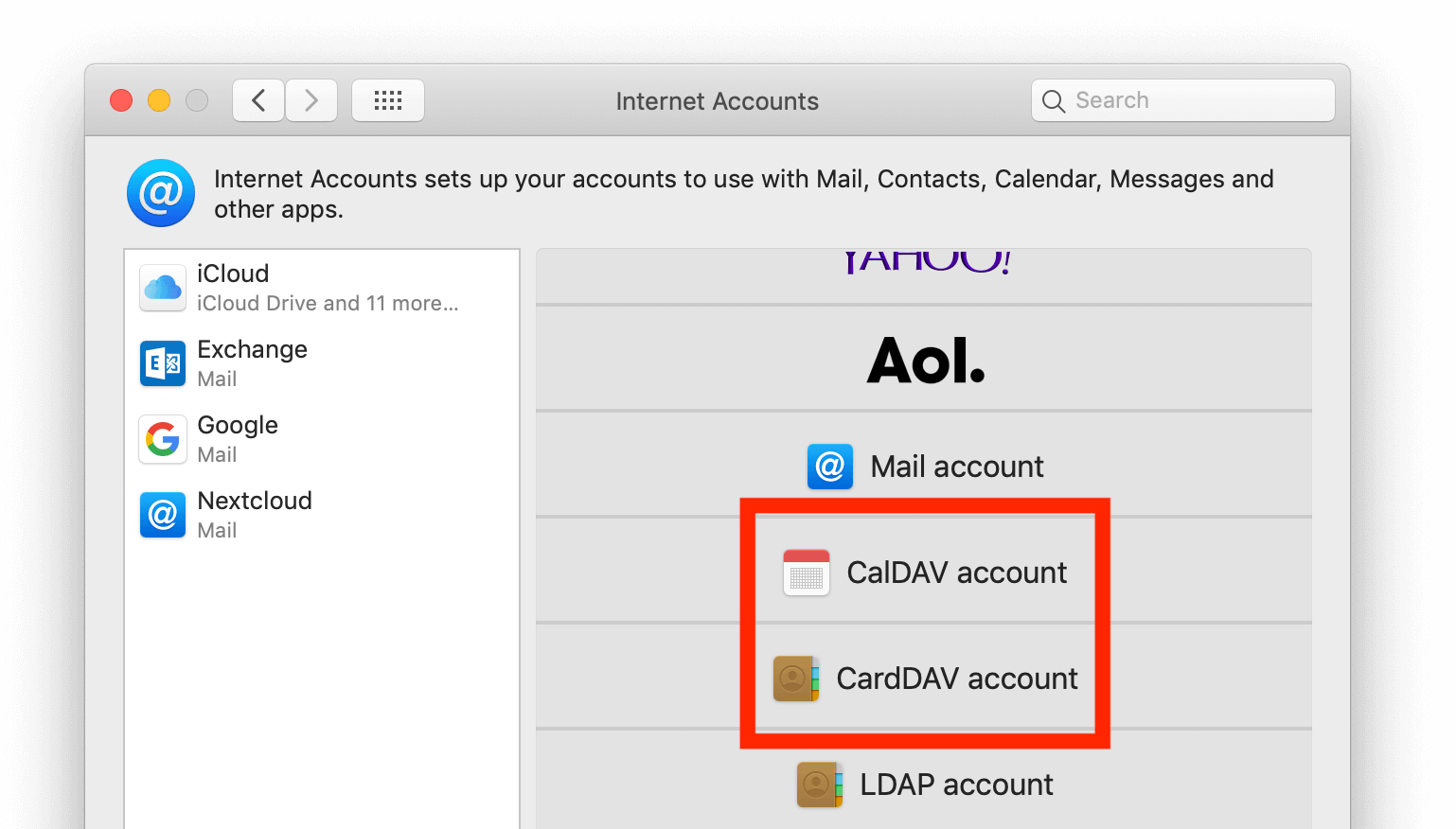
Synchroniser Avec MacOS Documentation Nextcloud Latest User Manual Latest

What Is The Latest Version Of MacOS Current MacOS For 2022 2023

MacOS Charles charles Macos Proxy CSDN

Charles Proxy Not Working On Android Emulator No SNI Provided Please

Web Charles will thankfully not automatically perform man in the middle attacks on all your SSL connections You need to enable SSL proxying on a per domain basis Either by context clicking the connection and choosing Enable SSL Proxying from the menu or in the SSL Proxying Settings window in the Tools menubar

Web Nov 4 2019 nbsp 0183 32 In this guide I will help you set up Charles on macOS to view the iOS application s traffic You can download a free trial from the Charles website Make sure to download the macOS DMG

Web Fortunately Charles can autoconfigure the proxy settings in many cases including Windows Internet Explorer proxy settings used automatically by most Windows applications macOS proxy settings used automatically by most macOS applications Mozilla Firefox proxy settings all platforms Windows Proxy Settings

Web Apr 8 2022 nbsp 0183 32 Make sure that both the computer and the phone are not using a virtual private network The computer and the phone are in the same network environment The computer has the Charles root certificate installed The phone has successfully installed Charles certificate and trusts it

Web Go to the Connections tab Click on the LAN Settings You ll see a Proxy panel Uncheck the Use a Proxy checkbox Click OK until you ve closed the Internet Options Mac OS X Go to your System Preferences Open the Network preferences
Web 1 year ago Add a Comment Replies I tried with a wrong proxy IP and the network still working good That doesn t tell you much The goal of our proxy support is to add connectivity in environments where it s otherwise restricted If your network isn t restricted there s no guarantee we ll go through the proxy Share and Enjoy Quinn The Eskimo Web Sep 12 2017 nbsp 0183 32 Step 1 Download Charles proxy and then install Charles Download Charles Web Debugging Proxy Application Step 2 Open Charles Step 3 Navigate to Proxy gt select MAC OS X Proxy Step 4 Navigate to Proxy gt Proxy Settings gt enable Use a dynamic port Step 5 Navigate to Help gt SSL Proxying gt Install Charles Root Certificate
Web Oct 17 2017 nbsp 0183 32 Check website how to use Charles Proxy to debug http www woodsviewchalet This video shows how to catch traffic of Chrome or Safari via Charles on Mac or say how to set up Chrome to