Character Code For Tick In Excel Check Mark In Excel Wingdings IMAGESEE Check Mark For Excel My XXX Hot Girl CheckMark In Excel Examples How To Insert Checkmark Symbol How Do I Insert A Check Mark In Excel 2010 Microsoft Excel Tips From How To Insert A Tick Symbol Checkmark In Excel Compute Expert Web Oct 9 2023 nbsp 0183 32 3 Insert emojis using Icons Similar to Symbols there s an Icons option in Excel that helps you insert emojis into your spreadsheets Click on the Insert menu at
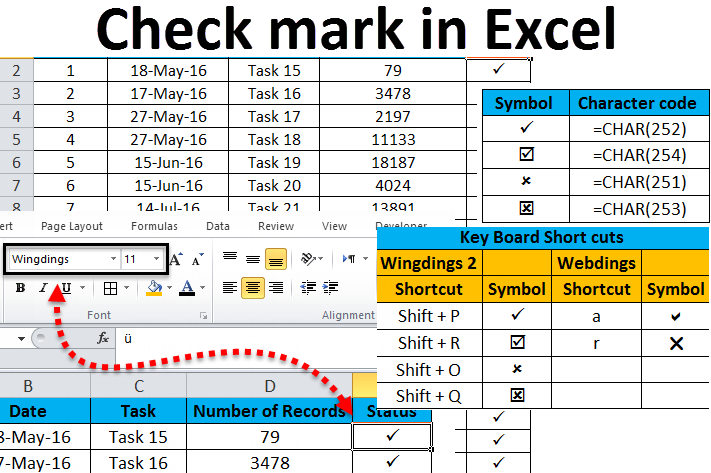
Web Oct 5 2023 nbsp 0183 32 You can use the Segoe UI Symbol font to get tick marks in Excel This font also allows you to insert a tick mark without the need to change the default fonts in the cell The inserting process is similar to Web Apr 10 2023 nbsp 0183 32 The character code for the check mark symbol is Alt 0252 The character codes for check marks are just as same as the codes that are used in the
How To Insert A Tick Symbol Checkmark In Excel Compute Expert How To Add Check Marks To A Table In Excel Insert A Tick Symbol Porn Tick Sign In Excel Shortcut Add Tick Symbol In Excel Using Keyboard How To Insert A Check Mark In Excel 9 Steps with Pictures Tot Timpul Maximiza i Insuficien Auditiv Excel Insert Symbol Check CheckMark In Excel Examples How To Insert Checkmark Symbol How To Insert Tick Mark In Excel Sheet Counterhead Wingdings Checkmark Or Tick Box Symbol History And Ascii Code ZOHAL How To Insert A Tick Mark In Excel Sheet How To Add A Tick Symbol
Character Code For Tick In Excel
 Character Code For Tick In Excel
https://spreadsheeto.com/wp-content/uploads/2017/09/wingdings-check.png
Web A tick symbol in Excel is very useful if you have a task list to do list or a checklist and you want to tick off a task or activity once it has been completed A tick symbol or also
Pre-crafted templates use a time-saving option for producing a diverse range of files and files. These pre-designed formats and designs can be used for various personal and professional projects, including resumes, invitations, flyers, newsletters, reports, presentations, and more, simplifying the content creation procedure.
Character Code For Tick In Excel

How To Insert A Check Mark In Excel 6 Steps with Pictures
How To Add Check Marks To A Table In Excel Insert A Tick Symbol Porn

Tick Sign In Excel Shortcut Add Tick Symbol In Excel Using Keyboard

How To Insert A Check Mark In Excel 9 Steps with Pictures
CheckMark In Excel Examples How To Insert Checkmark Symbol
How To Insert Tick Mark In Excel Sheet Counterhead
Web 220 rows nbsp 0183 32 Apr 16 2021 nbsp 0183 32 Character code list for Excel CHAR function

Web Oct 11 2023 nbsp 0183 32 Step 3 Type WingDings 2 in Font Box of Symbol and Select the Checkmark Symbol Note Ensure you ve selected either the Wingdings or Wingdings 2 font in
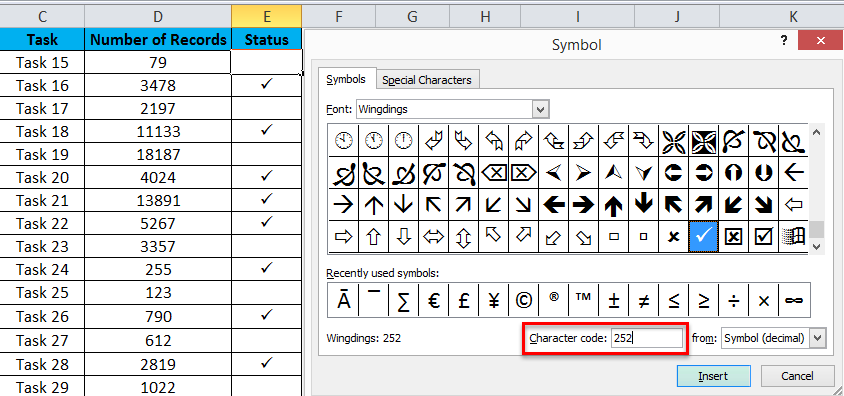
Web Jan 13 2022 nbsp 0183 32 For reference the Character Code is 254 To see what Segoe has to offer select quot Segoe UI Symbol quot in the Font drop down list Then type one of the following
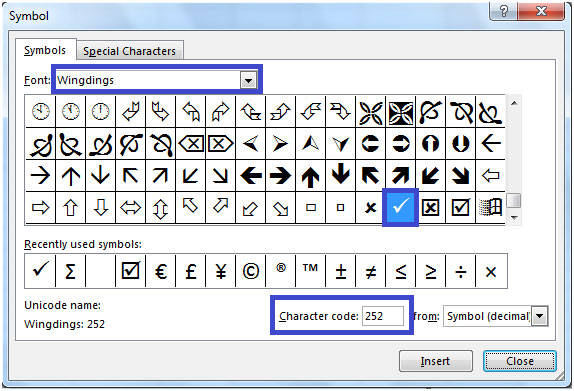
Web Feb 3 2022 nbsp 0183 32 Another quick way is to use the character code of the tick symbol Remember that you will need the numerical keypad as rather than the keyboard There

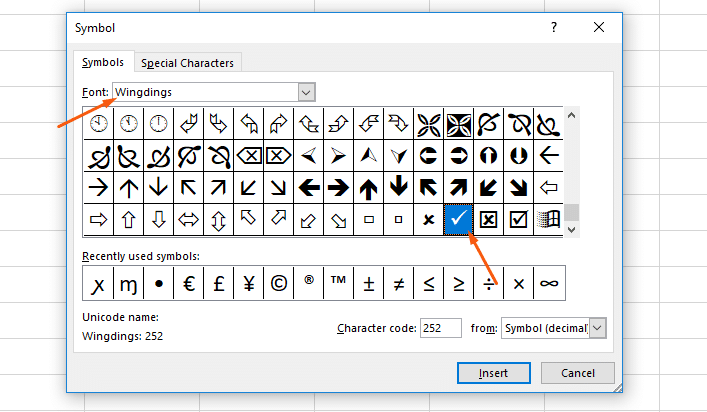
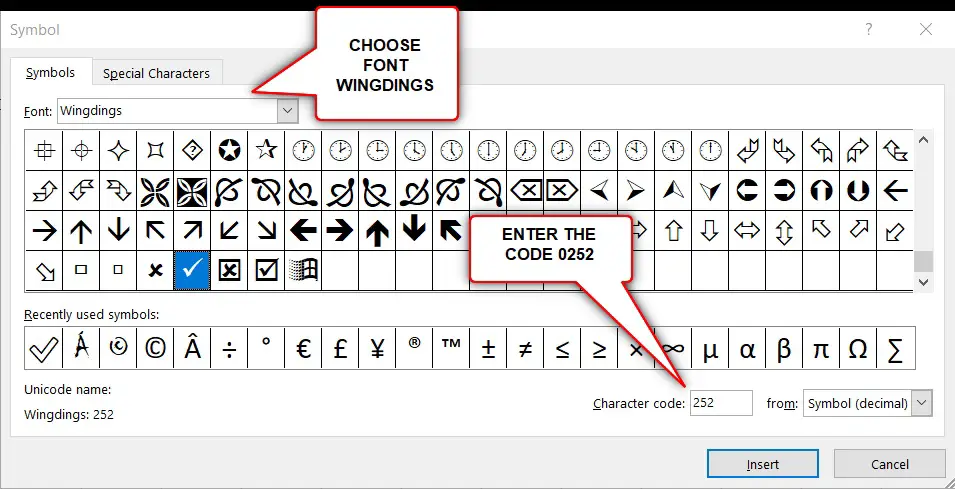
Web Select Tick Symbol You can select a tick symbol or enter character code 252 Click on Insert Button Alt Code to Insert Tick mark symbol You can change the font to wingdings and use Alt 0252 to insert Tick mark
Web Sep 20 2020 nbsp 0183 32 Ms Word Alt X code for Tick Mark or Check mark and Tick in Box To insert thick or check mark type 1F5F8 and press Alt X immediately following it Web What is Check Mark Tick Symbol in Excel A check mark in Excel shows whether or not a given task is done Remember it is different from the checkbox There are three
Web How to insert a tick symbol checkmark in excel 1 symbol menu How to insert a tick symbol checkmark in excel 2 alt character code How to insert a tick