Change User Password Ubuntu Linux4Dummies How To Reset Your Password In Ubuntu How To Change Password In Ubuntu How To Change Root Password In Ubuntu Linux LinuxStoney Now You Can Try Ubuntu In A Web Browser With Ubuntu Online 21 10 How To Reset Root Password On Ubuntu 18 04 20 04 LTS Web Nov 19 2019 nbsp 0183 32 3 min read In this guide we ll explain how to change a user password in Linux We will also show you how to force users to change their password the next time they log in The instructions should work on any Linux distribution including Ubuntu Debian and CentOS
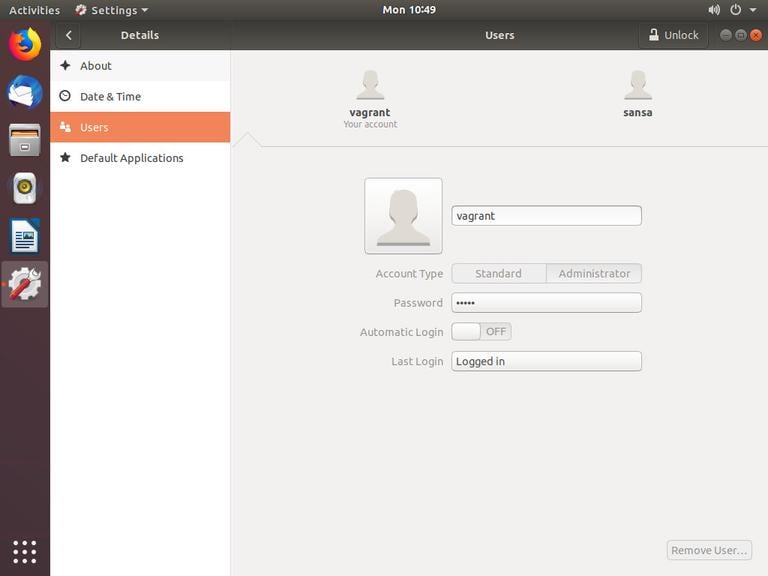
Web Apr 24 2019 nbsp 0183 32 To change a user password click on the password dotted lines a popup window to change user password should appear Ubuntu User Details Enter the current password and set a new password and confirm it Then click Change to save the changes Change User Password in Ubuntu Changing User Password in Ubuntu via Web Feb 24 2023 nbsp 0183 32 To change the current user s password click on Password from the Authentication amp Login section Enter the current password set the new one and click on Change To change another user s password click on Unlock first You ll need to enter a sudo user account s password for authentication
How To Reset Root Password On Ubuntu 18 04 20 04 LTS Linux Change User Password passwd Change MySQL User Password Using Command Line Using Ubuntu How To Change User Password In Ubuntu How To Change Password On Ubuntu 18 04 Bionic Beaver Linux How To Reset Forgotten Password On Ubuntu 20 04 How To Change User Password In Ubuntu Linuxize How To Reset Password On Ubuntu Easily Ubuntu Password Reset Change Password In Microsoft Account Jastronic
Change User Password Ubuntu
 Change User Password Ubuntu
http://www.psychocats.net/ubuntu/images/resetpasswordoneiric01.png
Web Sep 15 2021 nbsp 0183 32 To change the password for any user select the respective account name You can even make changes to your admin account by selecting the name first Click on Unlock and then click on the Password field The system will then ask you to enter the current password followed by a new password
Pre-crafted templates offer a time-saving solution for developing a diverse variety of documents and files. These pre-designed formats and layouts can be made use of for different personal and professional tasks, consisting of resumes, invitations, flyers, newsletters, reports, presentations, and more, streamlining the material creation procedure.
Change User Password Ubuntu

Het Wachtwoord Van Een Andere Gebruiker Wijzigen In Windows 2022
Linux Change User Password passwd
Change MySQL User Password Using Command Line Using Ubuntu
How To Change User Password In Ubuntu
How To Reset Forgotten Password On Ubuntu 20 04
How To Change User Password In Ubuntu Linuxize

Web Jan 21 2019 nbsp 0183 32 Ubuntu Change Password from Command Line In Ubuntu and other Linux distributions you can change the password of a user account with the passwd command To change your user account password run the passwd command without any options passwd You will be prompted to enter your current password

Web Jun 7 2022 nbsp 0183 32 Table of Contents Changing passwords is really simple in the Ubuntu command line Just use the passwd command and you can change the password for your account or other user accounts A few things to note You should have access to the system as a root or non root user

Web Click Users to open the panel Click the label 183 183 183 183 183 next to Password If you are changing the password for a different user you will first need to Unlock the panel and select the account under Other Users Enter your current password then a new password Enter your new password again in the Verify New Password field

Web Dec 7 2023 nbsp 0183 32 How to change a user password in Ubuntu Open the terminal application by pressing Ctrl Alt T To change a password for user named tom in Ubuntu type sudo passwd tom To change a password for root user on Ubuntu Linux run sudo passwd root And to change your own password for Ubuntu execute passwd How to change a root
Web Dec 12 2019 nbsp 0183 32 As a user you can change your own password in a terminal using passwd You will be asked for the current password and can then enter a new one On Ubuntu there normally is no separate password for root Instead users with administrator privileges may use sudo to run commands as a super user
[desc-11] [desc-12]
[desc-13]