Change Root Password Vcenter Vmware Vcenter Vsphere 5 5 Reset Root Server Fault Reset Forgotten ESXi Root Password On Domain Joined Esxi Using VSphere Web Client And Powercli Change Root Password Of ESXi Server Using VSphere ClientMustBeGeek How To Reset Root Password On VCenter Appliance 5 5 Settlersoman A Settler In The SDDC World How To Reset Root Password On VCenter Appliance 5 5 Settlersoman A Settler In The SDDC World Command Now get to the bash shell by typing shell then passwd to set the new password and you can update the root password Command shell Shell access is granted to root root vcenter passwd New password Retype new password passwd password updated successfully root vcenter exit Command exit
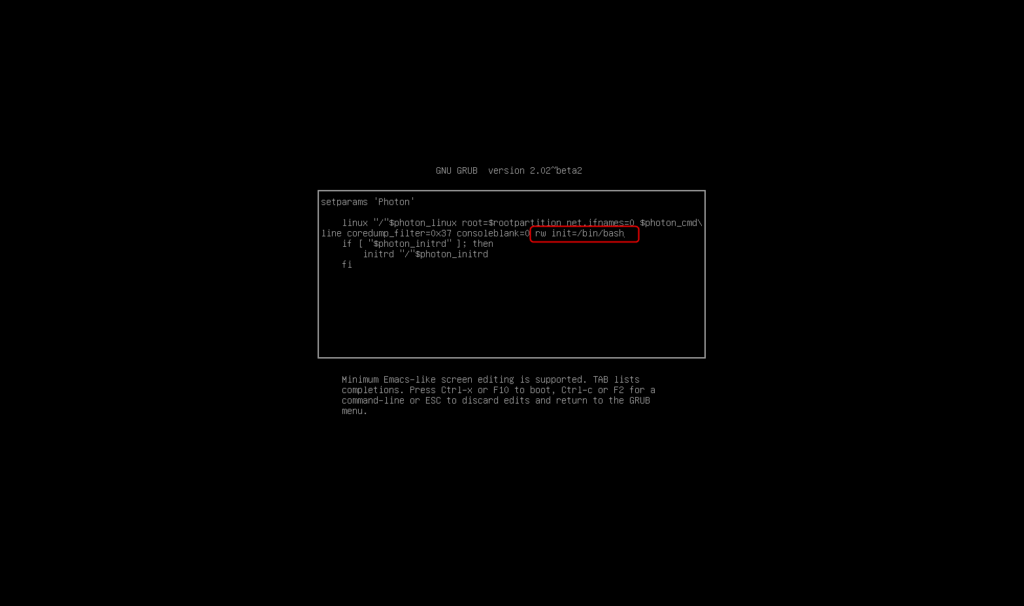
To reset the password of the root account you have to go to the console of the vCenter Now restart the application and press the e key while booting Now you will be presented with the option to customize the Photon OS startup options Now add the following parameter rw init bin bash Add it at the end of the third line Here is a run list how to do it You need to know on which host your vCenter is located You need to check if host is NOTin the Lockdown mode Login to the host
How To Reset Root Password On VCenter Appliance 5 5 Settlersoman A Settler In The SDDC World VMWARE Cloud Virtualization Vmware Vcenter Vsphere 5 5 Reset Root Server Fault VMware VCenter 7 And 6 Appliance Root Password Reset And Secure Password Management Blog Do Resetting Root Password In VMware VCenter Server Appliance VGeek Tales From Real IT System How To Fix Or Change VCenter Root Password Expired 7 0 x How To Change An ESXi Password For VCenter TechTarget How To Reset VCenter Server SSO Administrator vsphere local Password VGeek Tales From Real Reset Root Password VCenter Appliance 6 7 Virtual Building Blocks
Change Root Password Vcenter
 Change Root Password Vcenter
https://i.stack.imgur.com/V3HYk.png
Note If the root account is not accessible through the console like secure shell and the Virtual Appliance Management Interface VAMI vCenter Server Appliance 6 0 Update 1 then that indicates that the root account is inactivated due to password expiration Reactivate Account and Modify Kernel option in GRUB Reboot the vCenter
Templates are pre-designed files or files that can be utilized for various functions. They can conserve effort and time by supplying a ready-made format and design for creating different type of material. Templates can be used for individual or professional jobs, such as resumes, invites, flyers, newsletters, reports, presentations, and more.
Change Root Password Vcenter

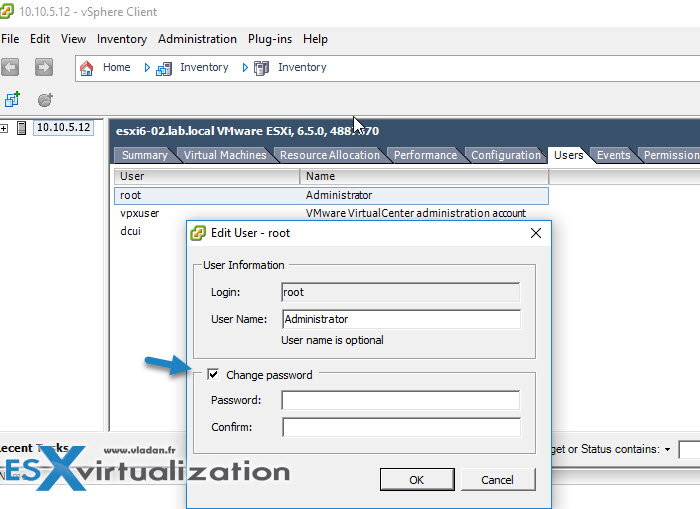
Change Root Password Of ESXi Server Using VSphere ClientMustBeGeek
VMWARE Cloud Virtualization

Vmware Vcenter Vsphere 5 5 Reset Root Server Fault
VMware VCenter 7 And 6 Appliance Root Password Reset And Secure Password Management Blog Do
How To Fix Or Change VCenter Root Password Expired 7 0 x

How To Change An ESXi Password For VCenter TechTarget

This article provides steps to reset a lost forgotten or expired root password for a vCenter Server Appliance or external PSC 6 5 and later Important This article is explicitly for the vCenter Server Appliance and external PSC 6 5 and 6 7 6 5 and later

Shell set enable true Once in shell as sso user run the below command to change to root shell sudo i Alternately you could use the command sudo passwd root Then once in root shell run passwd to change the root password passwd

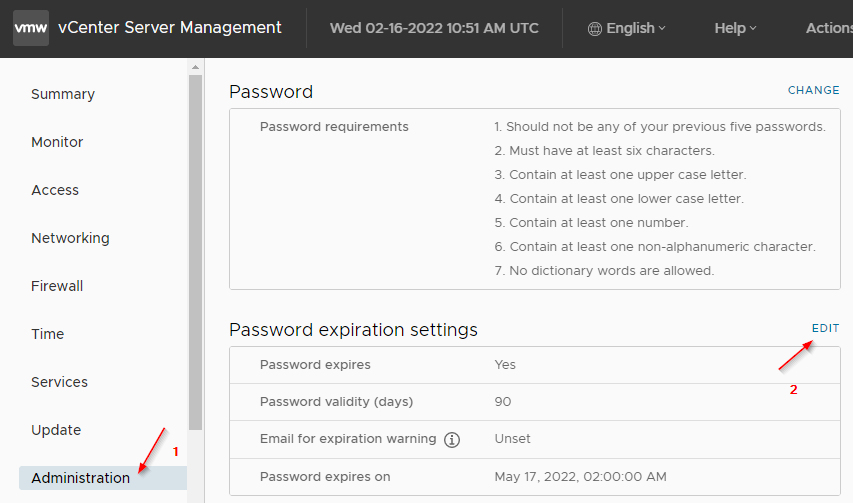
Log in to the vCenter Server Management Interface as root Procedure In the vCenter Server Management Interface click Administration In the Password section click Change Enter the current password and the new password then click Save Configure the password expiration settings for the root user

Updated on 01 07 2020 You can update the password of a local user in vCenter Server for security reasons Procedure Access the appliance shell and log in as a user who has a super administrator role The default user with a super administrator role is root Run the localaccounts user password update username user name password command

Please change the root password before installing an update Appliance OS root password is expired upgrading vCenter Server Appliance 6 5 or 6 7 Connecting to vCenter Serve errors Login attempt using SSH fails with Login incorrect or
[desc-11] [desc-12]
[desc-13]