Change Resolution Using Cmd Change Someone s Mind By Showing The Big Picture Making Html Files Using Cmd Commands YouTube Change Your Mindset Free Stock Photo Public Domain Pictures Windows 11 ChangeScreenResolution Change Your Screen Resolution From The Command Web Apr 14 2011 nbsp 0183 32 9 Answers Sorted by 25 Try this wmic desktopmonitor get screenheight screenwidth From within Cygwin cmd c wmic desktopmonitor get screenheight screenwidth EDIT Update for later versions of Windows wmic path Win32 VideoController get VideoModeDescription CurrentVerticalResolution CurrentHorizontalResolution
Web Jun 28 2018 nbsp 0183 32 This uses ms settings display to open the Display screen and then it presses the tab key once and the up arrow 5 times using sendkeys to adjust the scale accordingly It will press Alt F4 at the end keys to close the screen once it completes Web Aug 22 2015 nbsp 0183 32 1 Copy dc2 exe to system32 folder 2 dc2 exe dccmd exe listmonitors return the current screen resolution along with refresh rate and monitor type 3 dc2 exe width 1600 height 900 refresh 60 more parameters can be added if desired E g dc2 exe width 1600 height 900 refresh 60 cmd c C Program Files text txt Share
ChangeScreenResolution Change Your Screen Resolution From The Command How To Change Pixel Size In Illustrator Gaiping Set Resolution For Exporting Fix To Change Resolution Again Again Resolution How To Change Resolution CreateStudioPRO PDF Towards Li Quantification At High Spatial Resolution Using EDS How To Change Resolution In Windows 10 Tech FAQ How To Change Resolution CreateStudioPRO Fix Can t Change Screen Resolution In Windows 11 10
Change Resolution Using Cmd
 Change Resolution Using Cmd
https://stevemehta.com/wp-content/uploads/2017/06/iStock-513552966.jpg
Web Mar 21 2023 nbsp 0183 32 How to Change Resolution on Windows 10 with CMD Windows 10 does not have an in built command line tool to change display resolution To set display resolution with command prompt you need to download a 3rd party tool called QRes How to Install Windows 10 2004 Update Manually How to Record Audio on Windows 10
Pre-crafted templates use a time-saving service for producing a varied range of files and files. These pre-designed formats and layouts can be made use of for numerous personal and professional tasks, including resumes, invitations, flyers, newsletters, reports, presentations, and more, simplifying the material development procedure.
Change Resolution Using Cmd

How To Change Resolution On Windows 10 2 Methods
How To Change Pixel Size In Illustrator Gaiping

Set Resolution For Exporting Fix To Change Resolution Again Again

Resolution

PDF Towards Li Quantification At High Spatial Resolution Using EDS

How To Change Resolution In Windows 10 Tech FAQ

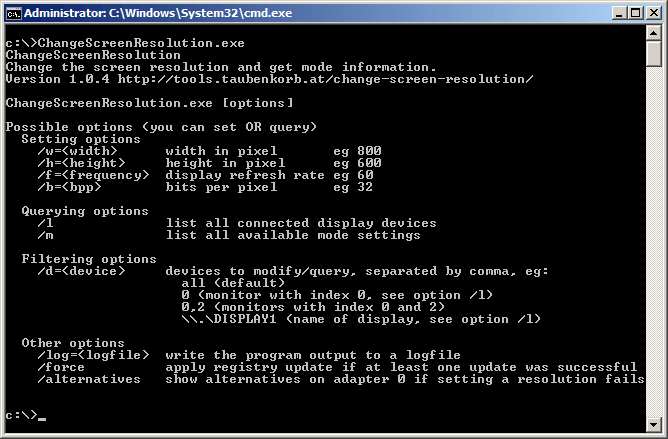
Web Change screen resolution of all monitors to 800x600px with refresh rate of 60Hz and 32bit color depth ChangeScreenResolution exe w 800 h 600 f 60 b 32 Set color depth of display with index 1 to 16bit ChangeScreenResolution exe b 16 d 1
Web Feb 17 2023 nbsp 0183 32 Type CMD and press Enter in add QRes folder address bar to open Command Prompt in the location Type the following command to change the Windows 10 screen resolution and press Enter QRes exe x 1680 y 1050 In the command change the path for the QRes exe file and enter a supported width x and height y pixel resolution

Web Actually nircmd from nirsoft can change the screen resolution setdisplay monitor index name width height color bits refresh rate updatereg allusers Changes your display settings The width and height parameters represents the number of pixels on your screen

Web Apr 30 2015 nbsp 0183 32 ChangeScreenResolution exe w 800 h 600 Change screen resolution of all monitors to 800x600px with refresh rate of 60Hz and 32bit color depth ChangeScreenResolution exe w 800 h 600 f 60 b 32 Set resolution of display with index 1 to 800x600px ChangeScreenResolution exe w 800 h 600 d 1
Web Jan 27 2023 nbsp 0183 32 Change Screen Resolution using Command Prompt The Windows OS does not give any option to change screen resolution using the Command Prompt But there is a utility called QRes that can be used for this purpose It also supports screen resolutions that are incompatible with your monitor
Web Jul 15 2021 nbsp 0183 32 So how can I reproduce the effect of that UI interaction without the UI UI Sequence Minimise everything down to desktop Context Menu for desktop background quot Display Settings quot Scroll down to quot Multiple Displays quot In the drop down change from quot Extend these displays quot to quot Duplicate these display quot Web Sep 25 2022 nbsp 0183 32 2 Check and change Screen Resolution using PowerShell To check and change Screen Resolution via Windows Terminal in Windows 11 do the following Press Windows key X to open Power User Menu
Web May 14 2019 nbsp 0183 32 3 I m trying get the current screen resolution on windows via command line Based on most of the answers I ve found I should use wmic desktopmonitor get screenheight screenweight But this returns the max supported resolution of the display device not the current one which is what I need Example