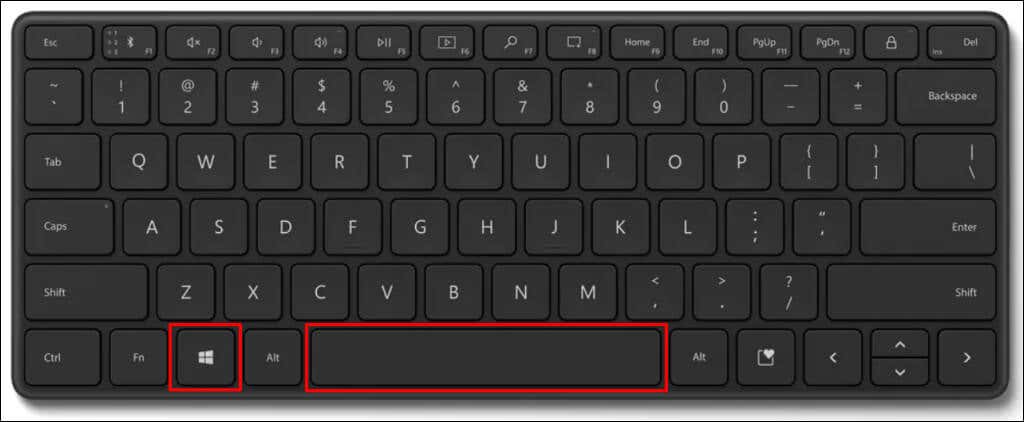
Change Keyboard Layout Windows 10 Command Line How To Change Keyboard Layout For Windows 10 Blogtypity How To Change Keyboard Layout Windows 8 Coolnup How To Open A Port In Windows 10 Command Line How To Change Keyboard Writing Style In Windows 11 2023 How To Change Keyboard Layout Windows 10 Guide TroubleChute Hub Web Jan 6 2022 nbsp 0183 32 1 If you add another Language in the Time and Language settings you can press the Windows Key Space Bar to quickly change your keyboard layout and only
Web Switch the keyboard layout when multiple keyboard layouts are available Ctrl Spacebar Turn the Chinese input method editor IME on or off Shift F10 Display the Web Click Start type intl cpl in the Start Search box and then press ENTER On the Keyboards and Language tab click Change keyboards Click Add Expand the language that you
How To Change Keyboard Layout Windows 10 Guide TroubleChute Hub How To Change Keyboard Layout On Windows 10 Windows Central Cuitandokter Windows 11 How To Change Keyboard Layout Tech How How To Add Remove Change Keyboard Layout In Windows 11 How To Change Keyboard Layout On Windows 10 Windows Central How To Change Your Keyboard Layout In Windows 11 How To Change Keyboard Layout On Windows 10 Windows Central How To Change Keyboard Layout On Windows 10 Techwiser Otosection 13 Cmd Windows 10 Command Line Commands For Freshers Using Windows Command Line Interface CMD
Change Keyboard Layout Windows 10 Command Line
 Change Keyboard Layout Windows 10 Command Line
https://i2.wp.com/www.tenforums.com/attachments/tutorials/173838d1516660260-change-keyboard-layout-windows-10-a-touch_keyboard_full.jpg
Web Apr 25 2021 nbsp 0183 32 1 Click start the Windows icon in the bottom left corner 2 Click the gear icon to open the Settings window Image credit Laptop Mag 3 In the Settings
Templates are pre-designed files or files that can be utilized for numerous purposes. They can save effort and time by providing a ready-made format and layout for creating various type of content. Templates can be used for individual or expert projects, such as resumes, invites, leaflets, newsletters, reports, discussions, and more.
Change Keyboard Layout Windows 10 Command Line
How To Change Keyboard Layout Windows 11 Guide TroubleChute Hub

How To Change Keyboard Layout On Windows 10 Windows Central Cuitandokter
Windows 11 How To Change Keyboard Layout Tech How
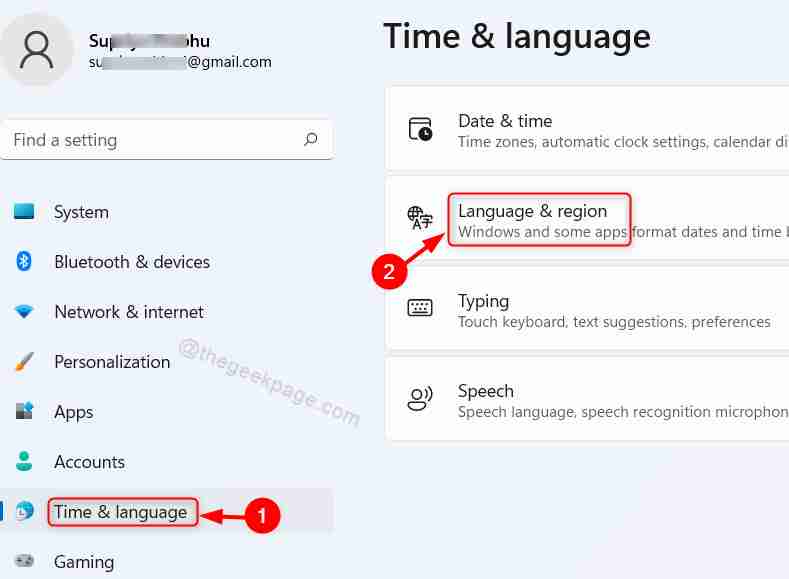
How To Add Remove Change Keyboard Layout In Windows 11
How To Change Your Keyboard Layout In Windows 11
How To Change Keyboard Layout On Windows 10 Windows Central

Web Jun 10 2017 nbsp 0183 32 Go to Control Panel Clock Language and Region Change input methods under Language Advanced settings Change language bar hot keys

Web Jul 27 2009 nbsp 0183 32 It seems to have very good built in keyboard layout switching functionality with the following features Switches layout globally by default This can be changed if
Web Oct 3 2016 nbsp 0183 32 2 Answers Sorted by 13 On Windows 10 press Win Space to cycle through the languages You may need to press multiple times until you see the overlay

Web To switch the keyboard layout you re using in Windows 10 press and hold the Windows key and then repeatedly press the Spacebar to cycle through all your installed

Web Your default keyboard layout or input method is the one that s automatically used with the language you see Windows in for example the QWERTY keyboard for American English If you want to keep your
Web Sep 23 2019 nbsp 0183 32 Alternatively you can use the keyboard shortcut Alt Space P The Properties window opens displaying five tabs that can be used to configure the Web Jan 20 2023 nbsp 0183 32 3 Click Language preferences A new window will open 4 Click Keyboard It s under the header quot Language quot next to an icon of a keyboard 5 Click Input Language
Web Aug 21 2020 nbsp 0183 32 Configuration Changing your keyboard language in Windows 10 switching between languages step by step Sometimes special characters are required