Change Explorer Default View How To Change The Default Download Location In Windows 11 Vrogue How To Change File Explorer Default View In Windows 10 YouTube How To Reset Folder View Settings On Windows 10 File Explorer Windows Central Windows 11 File Explorer Windows 11 News The First Preview Of Windows 11 Is Now Available TechCrunch Web Aug 13 2023 nbsp 0183 32 1 Open File Explorer Options 2 In the General tab select Quick access default or This PC in the Open File Explorer to drop menu for what you want and
Web 09 May 2024 How to Reset Folder View Settings to Default in Windows 10 In Windows you can change the File Explorer window size template not for folders on the Desktop column width Group by Sort by and layout Web Sep 26 2023 nbsp 0183 32 Step 1 Press the Win E key to open the File Explorer Step 2 Change the settings as needed You can change the layout in the upper of File window to choose which folder details to display add extra
The First Preview Of Windows 11 Is Now Available TechCrunch I Want To Change File Explorer Default View Type In Windows 7 In The Pictures Folder Techsupport Sign Out Microsoft Account From Windows 10 Wikigain GPO Windows 10 Explorer View This Pc How To Set File Explorer To Default Open To This PC On Windows 11 Sign Out Microsoft Account From Windows 10 Wikigain Principiante Cambie Las Vistas De Iconos A Extra Grandes En El Explorador De Windows 7 QuotHome Tutes Club Show Or Hide File Extensions In Windows File Explorer My XXX Hot Girl
Change Explorer Default View
 Change Explorer Default View
https://www.lifewire.com/thmb/HTQjVT_RHmfOWq1Sh2CS_MpfAKg=/1500x1000/filters:no_upscale():max_bytes(150000):strip_icc()/LocationMove-7dafa46d6b574dbf9e78be8e945720b8.jpg
Web Aug 6 2021 nbsp 0183 32 On Folder Options click the View tab To reset Windows 10 File Explorer to the default view on the Folder views section of the Views tab click Reset Folders You will receive a confirmation pop up
Pre-crafted templates use a time-saving solution for producing a varied series of files and files. These pre-designed formats and designs can be utilized for different individual and expert projects, including resumes, invites, flyers, newsletters, reports, presentations, and more, streamlining the content creation procedure.
Change Explorer Default View
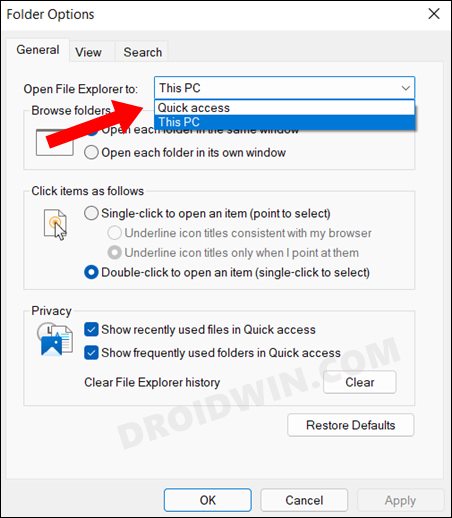
How To Change Default Startup Folder In Windows 11 File Explorer

I Want To Change File Explorer Default View Type In Windows 7 In The Pictures Folder Techsupport

Sign Out Microsoft Account From Windows 10 Wikigain
GPO Windows 10 Explorer View This Pc
Sign Out Microsoft Account From Windows 10 Wikigain

Principiante Cambie Las Vistas De Iconos A Extra Grandes En El Explorador De Windows 7

Web Jun 19 2020 nbsp 0183 32 1 Open any folder and set its view to quot Details quot which is the one you want right 2 ON that same folder click the tab quot View quot on the top then quot Options quot at the far right and select quot Change folder and search

Web May 10 2024 nbsp 0183 32 TLDR There is now a free open source script available for setting Explorer default views for any folder type in any combination This makes the whole process of
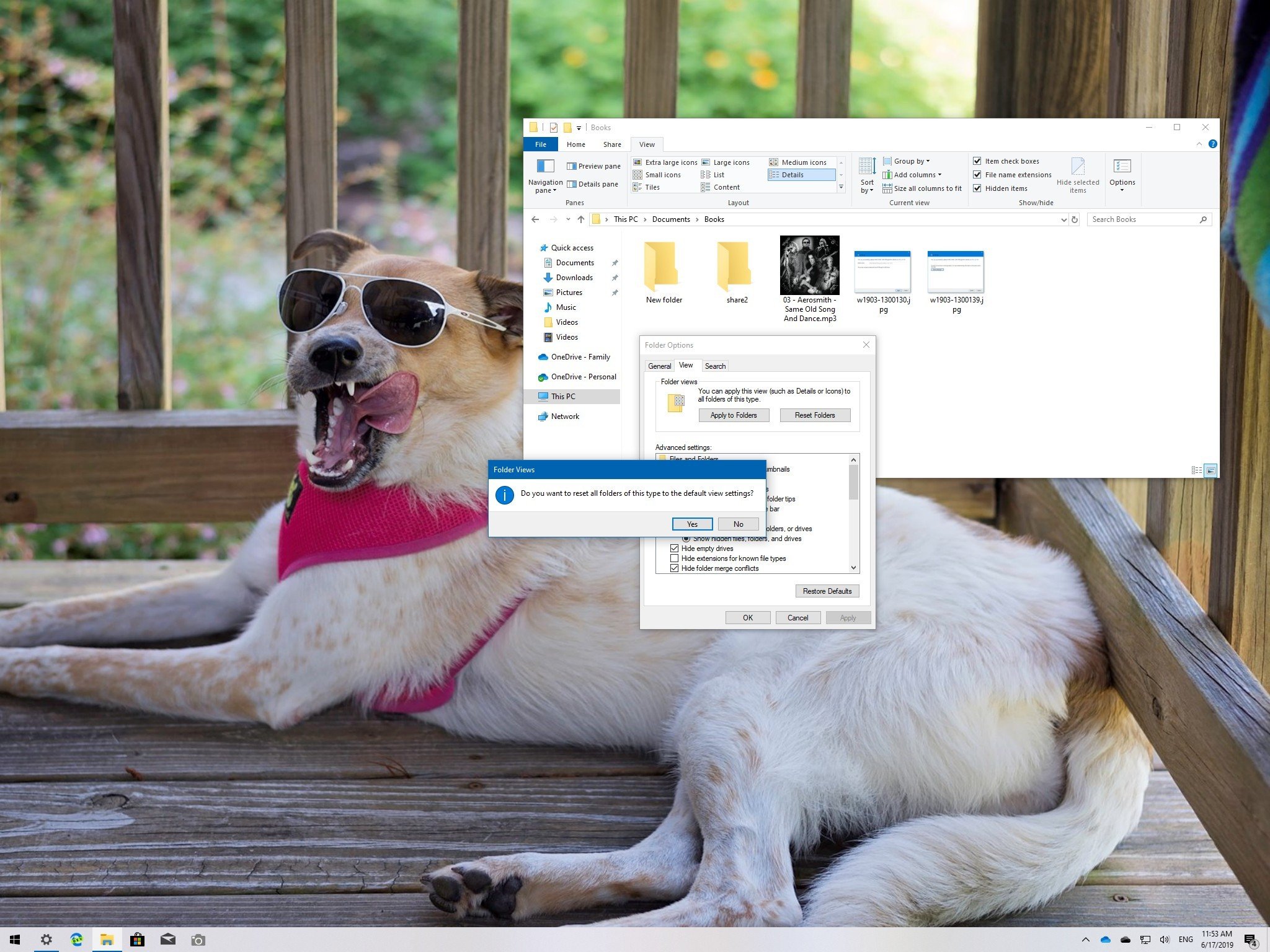
Web 10 Feb 2022 How to Set a Default Folder View for All Folders in Windows 10 While browsing folders in File Explorer you can apply the view settings of the current folder to all folders on your PC that are optimized for the

Web Jan 26 2016 nbsp 0183 32 Replace windows explorer as default file viewer in windows 10 Ask Question Asked 8 years 3 months ago Modified 1 year 1 month ago Viewed 25k times 10 Is there a way to set another program as the

Web May 13 2022 nbsp 0183 32 Steps to Reset File Explorer to Default View Follow these simple steps if your file explorer looks different from the above image and you want to change that to the default view Click on the search icon on
Web 22 02 2019 One of the changes often performed in Windows is to customize the way File Explorer displays files We show you how to make these changes once and make sure Web Nov 7 2020 nbsp 0183 32 1 Answer Sorted by 3 The Common Dialogs provided by Explorer Open Save Save As save their view settings in the same Registry location Explorer folder
Web Mar 1 2013 nbsp 0183 32 Click on Organize menu and click on click Folder and Search Options b On the View tab click Apply to Folders c Click Ok Reference Change folder options