Change Default Camera Windows 11 How To Switch Or Change Default Camera In Windows 10 11 Gulf Insights How Do I Change My Default Camera App How To Change The Default Camera On Windows 10 YouTube How To Change Default Camera Windows 10 Easysitebass How To Change Default Camera On Windows 10 5 Ways Learn How to Change Default Camera in Windows 11 It is simple process to change camera in Windows 11 follow this video 0 00 Intro0 05 How to Change Default
Flip On Windows 11 you can now change the brightness contrast and rotation settings and enable or disable Video HDR or Eye Contact for webcams and network cameras and here s how Starting on Windows 11 the Settings app includes a Cameras page You can change these settings from the camera section in the Settings app Press Win I to launch the Settings app Select Bluetooth devices from the left sidebar and select Cameras from the right pane Select the webcam you want to change the settings for You ll see a live webcam image at the top and right below you ll see Default image
How To Change Default Camera On Windows 10 5 Ways How To Change Default Camera In Windows 11 Updated YouTube How To Change The Default Camera Settings On Your IPhone Cybertechbiz Skyrim Mods Pack Download Easysitefs How To Change The Default Camera App On Windows Phone Lumia YouTube How To Change Default Camera In Windows 10 Easy 2023 YouTube How To Change Default Camera In Windows 10 Quick Easy YouTube How To Switch Or Change Default Camera In Windows 10 11 TechWiser How To Change Default Camera App In Windows 10 Mobile YouTube
Change Default Camera Windows 11
 Change Default Camera Windows 11
https://techwiser.com/wp-content/uploads/2022/09/How-to-Add-and-Change-Default-Camera-in-Windows-9-1024x532.jpg
Open the Windows 11 Settings app by pressing Windows I on your keyboard Choose Bluetooth devices in the sidebar Select the camera on your laptop Under Camera Effects select the effects you
Pre-crafted templates offer a time-saving service for creating a diverse variety of documents and files. These pre-designed formats and layouts can be made use of for various personal and professional jobs, including resumes, invites, leaflets, newsletters, reports, discussions, and more, improving the content creation procedure.
Change Default Camera Windows 11

Windows 10 Change Default Camera Berrypro

How To Change Default Camera In Windows 11 Updated YouTube

How To Change The Default Camera Settings On Your IPhone Cybertechbiz

Skyrim Mods Pack Download Easysitefs

How To Change Default Camera In Windows 10 Easy 2023 YouTube

How To Change Default Camera In Windows 10 Quick Easy YouTube

Press Windows button on your keyboard and search for and open the Control Panel 2 Go to Hardware and Sound Devices and Printers 3 You should see a list of devices connected to your Windows computer Find your external webcam right click on the same and select Set as Default Device from the pop up menu
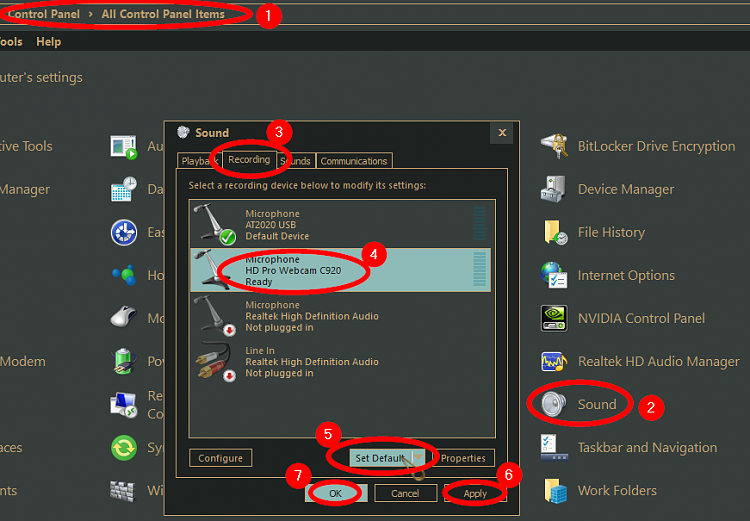
Press Windows key R to invoke the Run dialog In the Run dialog box type and hit Enter to open Control Panel From the top right corner of the window set the View by option to Large icons or

To set your preferred microphone as default for audio or communication navigate to Settings System Sound More sound settings go to the Recording tab and set your preferred device as default To change your default camera disable all other camera devices except the one you want to use

Windows 11 How to manage webcam settings on Windows 11 How to By Mauro Huculak published 12 July 2022 It s now possible to control camera features through the Settings app and here s how

Press Win I to open the Settings page Click on Bluetooth devices On the right side select Camera Select your web camera Here you will find different camera settings that you can change Brightness Adjust the brightness slider to increase decrease brightness levels for your webcam
The new build 22623 885 that is now rolling out to Windows Insiders testers comes with a new button on the operating system s quick settings panel It s called Studio effects and allows you to see your camera feed and tweak several settings like background blur eye contact automatic framing and voice focus Microsoft Step 1 Connect your PC to the external webcam with the help of USB or Bluetooth Step 2 Now press the Windows Key and S to open the search bar Step 3 Type Control Panel and run the application Control Panel Windows Step 4 Find and choose Hardware and Sound Devices and Printers Devices and Printers Windows
How to Change Camera Settings on Windows 11As always Windows 11 came with a whole lot of different ways to access the settings menu for different devices on