Change Date When Cell Is Updated Autofill Date When A Cell Is Updated In Google Sheets 3 Easy Ways How To Convert A Timestamp To Date In Google Sheets How To Add Timestamp When Cell Is Updated In Google Sheets Sheets For Excel Create Date Stamp When An Cell Is Updated Stack Overflow Autofill Date When A Cell Is Updated In Google Sheets 3 Easy Ways Web Sep 30 2018 nbsp 0183 32 Oct 21 2021 08 03 AM zoyra Try this formula quot IF A1 O1 quot quot quot quot NOW quot I placed it in Cell P1 of the document I have it in So when I make any changes in Cells A1 through O1 Cell P1 will change with
Web Nov 8 2023 nbsp 0183 32 Related Articles How to Insert Timestamp in Excel When Cell Changes 2 Ways 1 Use IF AND NOW and Other Functions to Insert Timestamp in Excel Follow the steps below to get a timestamp using Web Nov 4 2023 nbsp 0183 32 1 Using Formula with Excel TODAY Function to Change Date Automatically 2 Use of NOW Function for Automatic Change of Date 3 Applying Complex Formula Combination 4 Change of Date Based
Autofill Date When A Cell Is Updated In Google Sheets 3 Easy Ways How To Automatically Add A Timestamp To A Cell In Google Sheets How To Insert Timestamp In Google Sheets How To Auto Populate Date In Excel When Cell Is Updated ExcelDemy Famous Excel Formula To Insert Date When Cell Is Modified Ideas Fresh Famous Excel Formula To Insert Date When Cell Is Modified Ideas Fresh Timestamp In Google Sheets 3 Easy Ways Layer Blog Famous Excel Formula To Insert Date When Cell Is Modified Ideas Fresh Using Custom Functions In Google Sheets To Add last Modified Timestamps
Change Date When Cell Is Updated
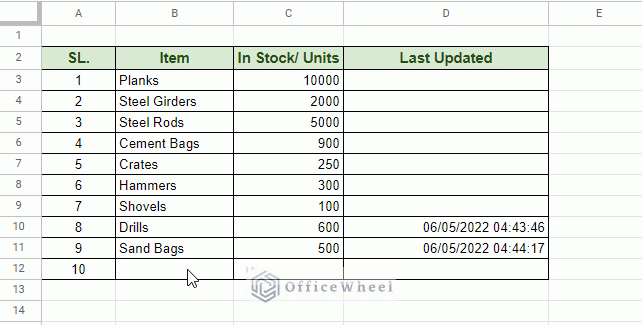 Change Date When Cell Is Updated
https://officewheel.com/wp-content/uploads/2022/06/6-google-sheets-autofill-date-when-cell-is-updated.gif
Web To add a date stamp in a workbook to indicate a quot date last updated quot you can use the TEXT function In the example shown the formula in C5 is quot Last update quot amp TEXT B5 quot ddd
Pre-crafted templates offer a time-saving solution for producing a diverse series of documents and files. These pre-designed formats and layouts can be made use of for different personal and expert tasks, consisting of resumes, invites, leaflets, newsletters, reports, presentations, and more, improving the material production process.
Change Date When Cell Is Updated

Create A Timestamp When A Cell Is Updated In Google Sheets

How To Automatically Add A Timestamp To A Cell In Google Sheets
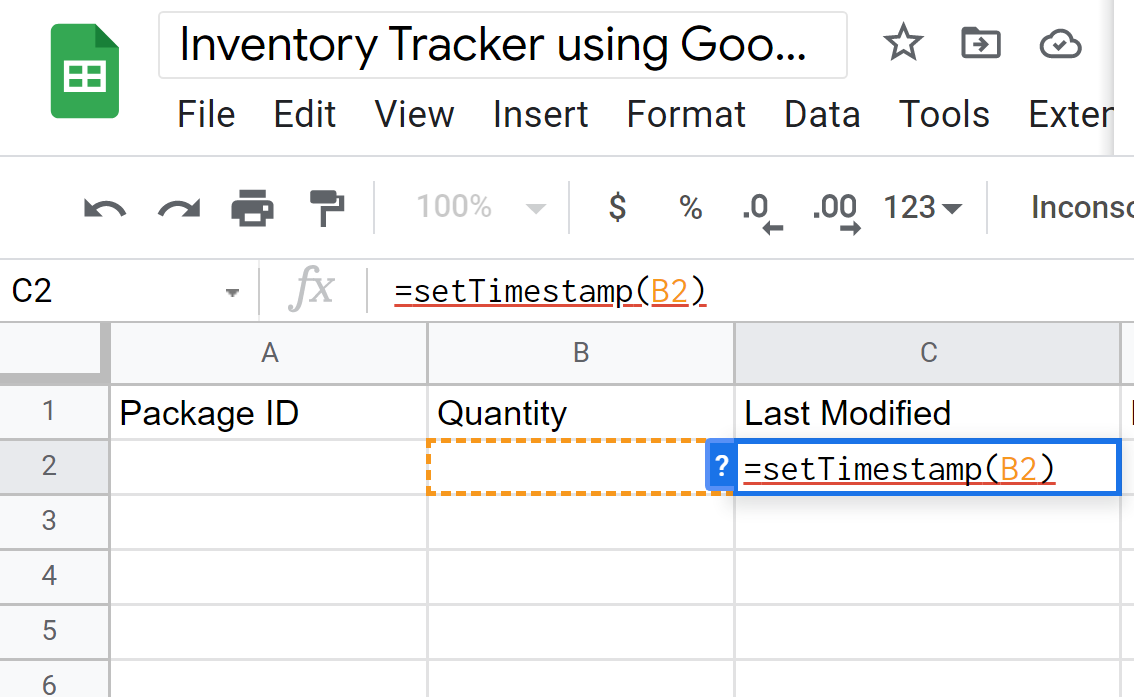
How To Insert Timestamp In Google Sheets

How To Auto Populate Date In Excel When Cell Is Updated ExcelDemy

Famous Excel Formula To Insert Date When Cell Is Modified Ideas Fresh

Timestamp In Google Sheets 3 Easy Ways Layer Blog
Web Mar 26 2010 nbsp 0183 32 Set one reference cell or named range equal to TODAY or NOW which will auto update every time you edit any cell i e recalc as NOW TODAY is a volatile

Web Sep 30 2018 nbsp 0183 32 If you want the date to update whenever the data is changed in column C then place IF ISBLANK C1 quot quot NOW in B1 and copy down If you want the date to be set only when the data in column

Web Nov 4 2023 nbsp 0183 32 1 Using Autofill Feature with Multiple Criteria Days Weekdays Months or Years 2 Applying Fill Series Command to Customize Autofill Option 3 Use the

Web Nov 5 2021 nbsp 0183 32 Update date when a certain cell is changed I want the current date to be updated when I change the Attempt column Date is column G and Attempt is
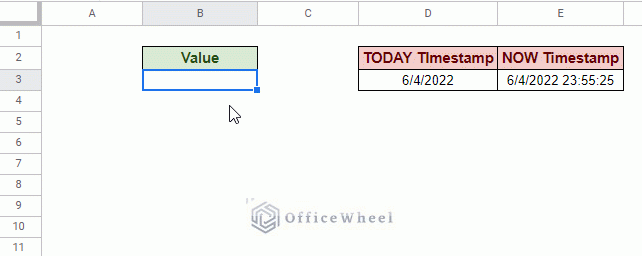
Web Technical details Change the date format Calculate a date based on another date Convert text strings and numbers into dates Increase or decrease a date by a certain number of days See Also Add or subtract
Web Mar 22 2023 nbsp 0183 32 by Svetlana Cheusheva updated on March 22 2023 This tutorial demonstrates various ways of entering dates in Excel See how to insert today s date Web Sep 17 2018 nbsp 0183 32 When you press a key combination such as Ctrl to insert the current date in a cell Excel takes a snapshot of the current date and then inserts the date in the cell
Web Feb 15 2012 nbsp 0183 32 4 Answers Sorted by 10 You could fill the dependend cell D2 by a User Defined Function VBA Macro Function that takes the value of the C2 Cell as input