Change Date Format In Registry Change Date Format In Windows 7 8 1 And Windows 10 To Dd Mm Yyyy Gambaran How To Change Date Format In Excel 365 Online Excel At Work How To Change Date Format In PHP PHPGurukul Change Date Format In Word MosOp How To Convert Date Text Month In Excel 8 Quick Ways Exceldemy With May 30 2022 nbsp 0183 32 70 running title
Windows win10 VISTA windows windows Tip This doesn t change the language of your search results Learn how Google determines the language of search results On your computer open Search settings Click Display language Find and select your language Click Confirm
How To Convert Date Text Month In Excel 8 Quick Ways Exceldemy With How To Change Date Format In PHP RVSolutionStuff 3 Ways Of How To Change Date Format In Excel 14 Date Formulas How To Change Date Format In PHP 3 Ways Of How To Change Date Format In Excel 14 Date Formulas Change Date Format In Excel Google Sheets Automate Excel How Do I Format The Date Format In Excel Change Date Format In Excel How To Find Greatest Date In Excel Haiper
Change Date Format In Registry
 Change Date Format In Registry
https://i.pinimg.com/736x/90/c8/96/90c89661cb6a96c2d9e10e5413f7e58a.jpg
How to change your name For example if you get married you could change from quot Lisa Brown quot at sportsfan gmail to quot Lisa Jones quot at sportsfan gmail Important You can t change your name from the Gmail app
Pre-crafted templates use a time-saving solution for creating a varied variety of files and files. These pre-designed formats and layouts can be made use of for various personal and expert projects, consisting of resumes, invitations, flyers, newsletters, reports, discussions, and more, improving the material production process.
Change Date Format In Registry

How To Change Date Format In PHP MyWebtuts

How To Change Date Format In PHP RVSolutionStuff
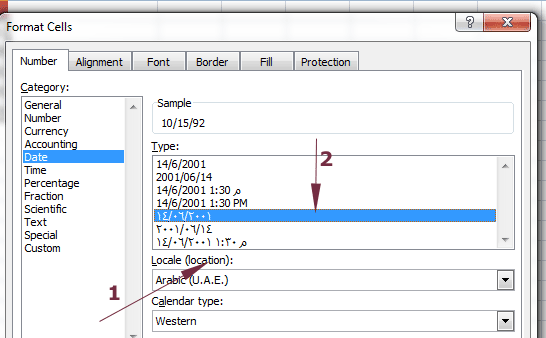
3 Ways Of How To Change Date Format In Excel 14 Date Formulas

How To Change Date Format In PHP
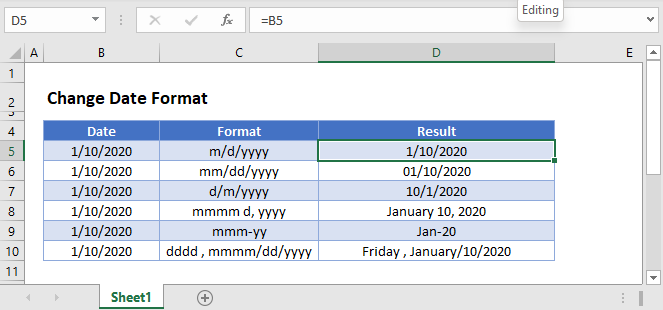
Change Date Format In Excel Google Sheets Automate Excel
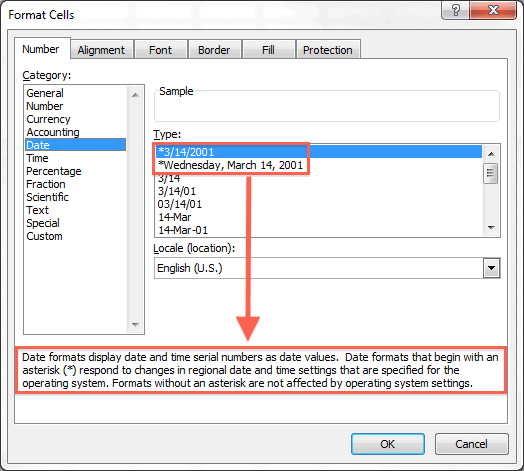
How Do I Format The Date Format In Excel

If you change or reset your password you ll be signed out everywhere except Devices you use to verify that it s you when you sign in Some devices with third party apps to which you ve given account access Learn how to remove an app s access to your account Helpful home devices that you ve given account access

On your computer go to Gmail In the top right click Settings See all settings At the top choose a settings page such as General Labels or Inbox

Change or add a recovery address The recovery address allows you to receive an e mail to reset your password if you need it Your recovery address should be an email address that you use regularly
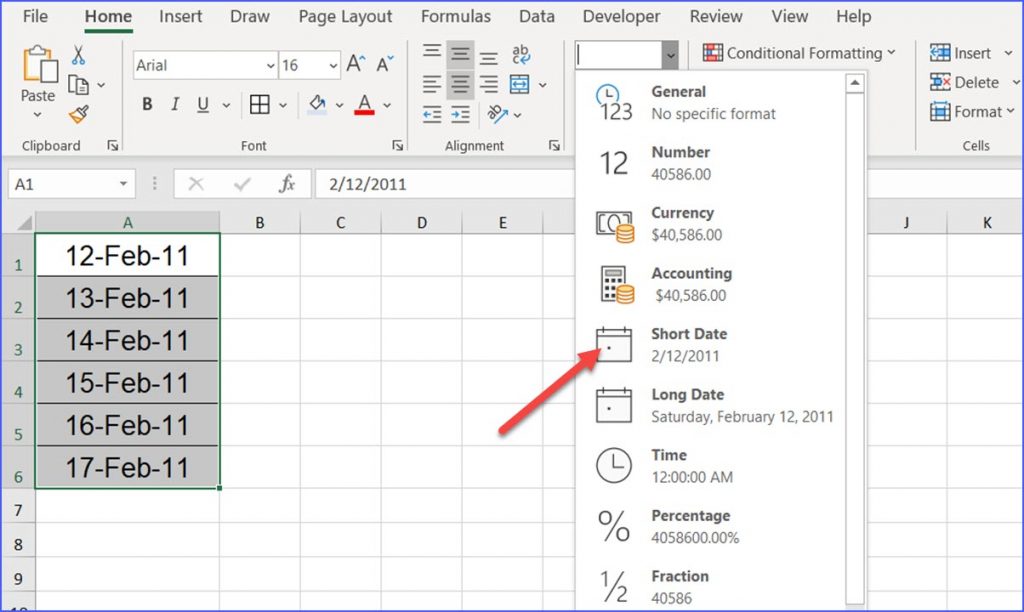
Jan 24 2018 nbsp 0183 32 Endnote

Nov 12 2020 nbsp 0183 32 This help content amp information General Help Center experience Search Clear search
[desc-11] [desc-12]
[desc-13]