Change Canvas Size Procreate Quickly Resize An Image With Procreate For The IPad YouTube Procreate canvas settings Printkeg Blog Procreate App Canvas Size Kumny Rendering Furry Amino How To Edit And Create A Custom Canvas Size In Procreate YouTube Web 1 Hit the plus icon on the top left to bring up the canvas toolbar Upon opening Procreate hit the plus icon on the top left to get started Here you can see some premade canvases Any of these will do but for full control I d suggest you pick your own settings 2 Tap the small plus in the top left corner to create a custom canvas
Web Nov 9 2019 nbsp 0183 32 3 8K views 3 years ago In this tutorial I show you how to create any canvas size you want in the procreate app as well as how to adjust the light interface of the app which is one little detail Web 1 2 3 4 5 Custom Canvas Screen Tap the icon to bring up the New Canvas menu From here tap the icon of a rectangle with a in the top right to bring up the Custom Canvas screen Here you can adjust your canvas in the following ways Name Dimensions Color profile Time lapse settings Canvas properties Change the name of your canvas
How To Edit And Create A Custom Canvas Size In Procreate YouTube How To Adjust Canvas Size In Procreate For Maximum Layer Flexibility CatCoq How To Change Canvas Size In Inkscape UI Tech Mind Ep 3 Procreate Canvas Size Layers Limits Procreate Basic Series By Haze Long YouTube Adobe Illustrator Change Canvas Size Ladeggospel How To Design A Social Media Post Website Banner Or A Flyer On Procreate On IPad World Times Procreate Canvas Size How To Choose The Right Size For Your Digital Art The Best Canvas Size For Procreate Ebb And Flow Creative Co IPad Illustration App Procreate Adds Support For 64 Bit A7 Processor 4K Ultra HD Canvas Size
Change Canvas Size Procreate
 Change Canvas Size Procreate
https://i.ytimg.com/vi/Go6z2hXo2sU/maxresdefault.jpg
Web Apr 23 2021 nbsp 0183 32 In this procreate tutorial we ll be learning about how to create canvas in procreate talk about dimensions dpi dots per inch procreate canvas resize procreate screen sizes and procreate device
Pre-crafted templates provide a time-saving solution for creating a varied variety of documents and files. These pre-designed formats and layouts can be utilized for various individual and professional tasks, consisting of resumes, invites, leaflets, newsletters, reports, discussions, and more, improving the content creation process.
Change Canvas Size Procreate

Adjust Maximum Brush Size In PROCREATE YouTube
How To Adjust Canvas Size In Procreate For Maximum Layer Flexibility CatCoq
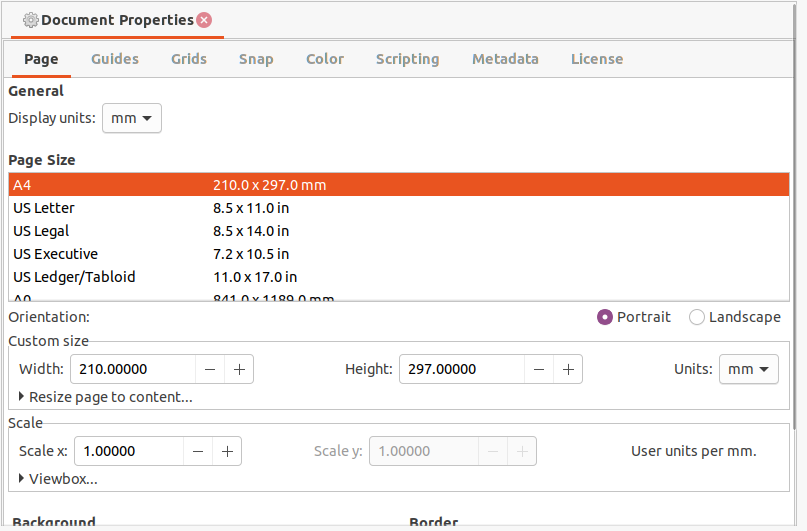
How To Change Canvas Size In Inkscape UI Tech Mind
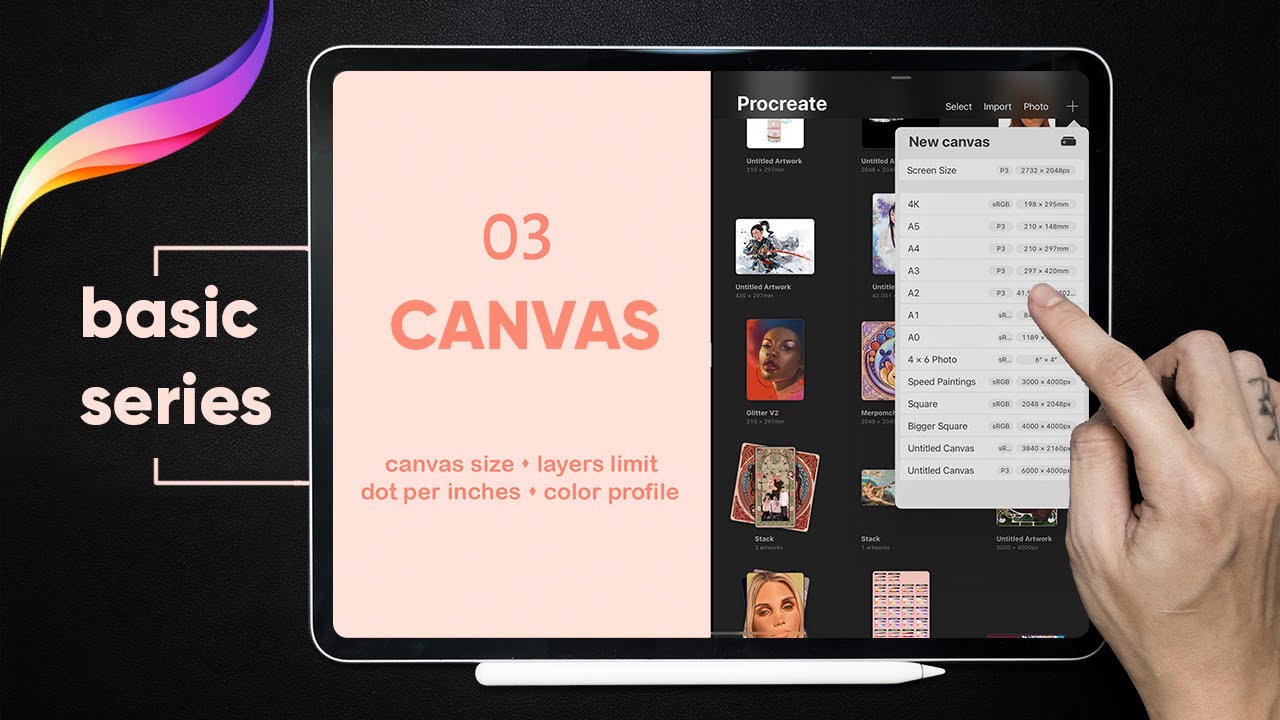
Ep 3 Procreate Canvas Size Layers Limits Procreate Basic Series By Haze Long YouTube
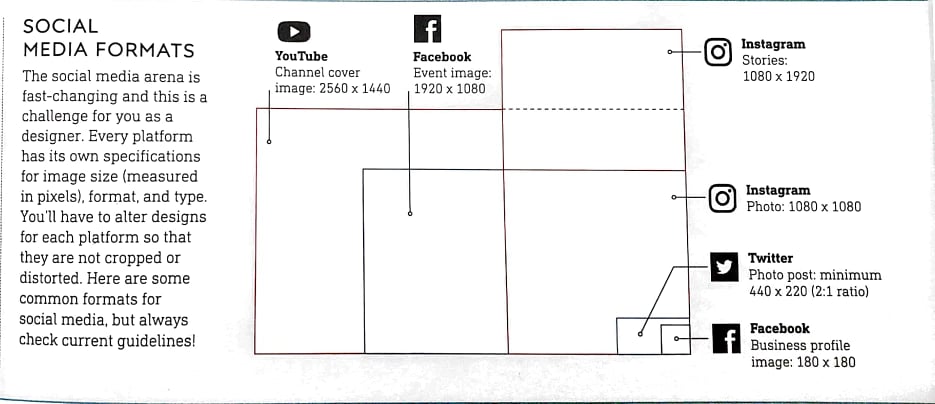
How To Design A Social Media Post Website Banner Or A Flyer On Procreate On IPad World Times
Procreate Canvas Size How To Choose The Right Size For Your Digital Art
Web In This Procreate tuto How to Edit and Create a Custom Canvas Size in Procreate Are you not sure how you can edit and create custom canvas in Procreate
Web If you re a beginner starting out with Procreate this short video talks about setting up your art canvas size Learn how canvas size and canvas resolution a

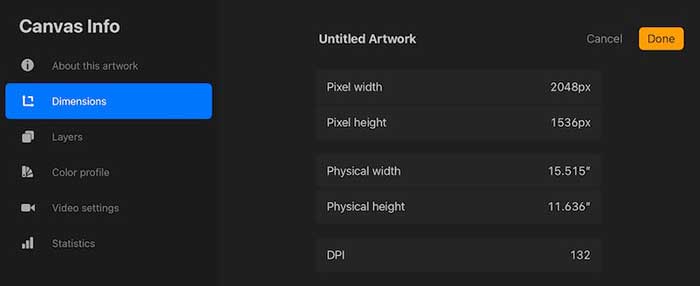
Web Jul 16 2021 nbsp 0183 32 One of the first things you would want to edit is the name of your new canvas size Simply tap on the Untitled Canvas text and enter a name Next enter your custom canvas Width and Height At the bottom of the screen you can type your size on the keypad and select a preferred measuring unit
Web Jun 21 2022 nbsp 0183 32 How to Adjust Canvas Size in Procreate for Maximum Layer Flexibility CatCoq Creating high resolution pieces can be a little tricky in Procreate since the larger your canvas size is the fewer layers you get I ve come up with a few tricks in my Procreate workflow to help with this

Web Jun 19 2023 nbsp 0183 32 Procreate Default Canvas Sizes Procreate offers a variety of default canvas sizes to suit different needs from screen sizes to print sizes Here s a breakdown of the most common default canvas sizes and how to create a custom size if needed Screen Size Creating artwork for display on digital screens Procreate offers default
Web Jun 5 2020 nbsp 0183 32 Select your custom canvas dimensions For a specific size just look up the exact dimensions needed for your project in google ex instagram stories dimensions are 1080 x 1920 pixels PRO TIP You can change the type of measurement to fit your needs when I make a piece of wall art I change it from pixels to inches Web Mar 26 2018 nbsp 0183 32 how do I change my canvas size in procreate I am stuck with a setting that I didn t want for my canvas but I want to change it and don t know how to is their anybody that knows would like the help This thread is archived New comments cannot be posted and votes cannot be cast 1 5 5 comments sorted by Best Top New Controversial
Web Jul 20 2021 nbsp 0183 32 To resize an image with Procreate tap the wrench icon to open the Actions menu Then tap on Canvas and select Crop and resize From there open the Settings menu enable the Resample canvas option and enter a numerical value for the width and or height of your image